

A clear service page structure helps visitors understand what a business offers without forcing them to work through a long, disconnected list of pages.
For businesses with several services, the challenge is deciding which services deserve standalone pages, when broader parent pages are useful, how specialized child pages should fit underneath them, and how supporting content should connect to the commercial pages that matter.
Service page structure SEO is therefore not about creating the largest possible number of service pages. It is about building a logical hierarchy around real services and customer needs, then connecting those pages through useful navigation and internal links.
Quick Answer: A useful service page structure groups closely related services into logical sections of the website. Broader parent service pages can introduce major service categories, while child pages can explain distinct services that need more detail. Important service pages should also be reachable through clear navigation and relevant internal links from related services and supporting content. The exact hierarchy should reflect the business’s actual offering rather than forcing every website into the same structure.
What Is Service Page Structure?
Service page structure is the way a website organizes and connects the pages that explain what a business offers.
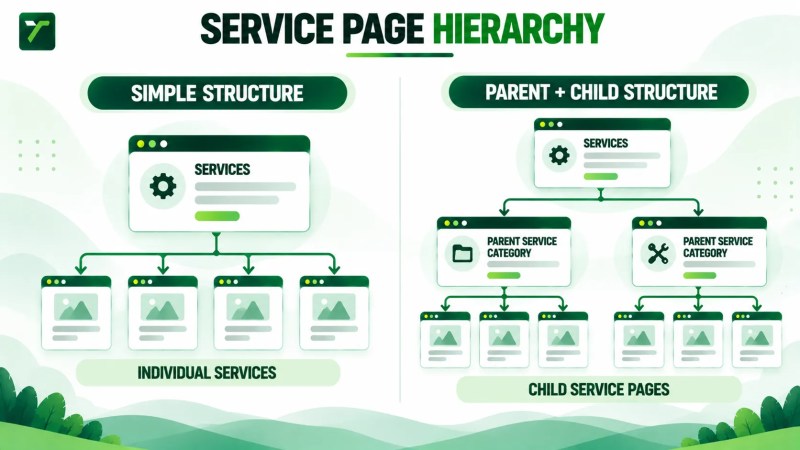
On a small website, the structure may be simple. A general Services page might link directly to several individual service pages. As the business adds more services, specializations, customer types, or related offerings, the hierarchy can become more complex.
A service-business website might conceptually develop a structure such as:
- Services
- Service Category A
- Specialized Service A1
- Specialized Service A2
- Service Category B
- Specialized Service B1
- Specialized Service B2
- Service Category A
The labels and number of levels will vary by business. The important question is whether the hierarchy accurately represents how the services relate to one another and helps visitors reach the information they need.
Traffisite’s SEO website architecture services focus on these relationships between pages, navigation, hierarchy, URLs, and internal links across a website.
Service Structure Is More Than URL Structure
A neat URL pattern can help keep a website organized, but URLs alone should not be treated as the complete definition of the site’s practical hierarchy.
Navigation, breadcrumbs, contextual internal links, parent pages, and other page relationships can all help visitors understand how pages fit together and move through the site.
For a broader explanation of those relationships, Traffisite’s guide to website hierarchy for SEO covers how pages can be arranged into understandable levels.
How Parent and Child Service Pages Work
A parent service page represents a broader service category. A child service page sits beneath that category conceptually and covers a more specific offering.
Imagine a company that provides several forms of commercial cleaning. A broader commercial cleaning page could introduce the category, while separate pages could explain materially different services such as office cleaning, floor care, or post-construction cleaning.
The parent page should still be useful in its own right. It can explain the broader service category, help visitors understand the available options, and direct them toward more specialized pages when appropriate.
The child pages can then focus on the needs, process, considerations, and next steps specific to each distinct service.
Not Every Service Website Needs Multiple Levels
A parent-and-child model is useful only when the service offering justifies it.
If a company has four clearly different services, a simple Services page linking directly to four individual pages may be enough. Adding another hierarchy level solely to make the website look more structured can create unnecessary navigation steps.
More complex businesses may need broader categories because placing dozens of unrelated or semi-related services at the same level can make the offering harder to understand.
The appropriate depth depends on the number of services, how closely they relate, and how customers typically think about the offering.
Traffisite’s guide to SEO site structure provides additional context for deciding how major sections and deeper pages can fit into the overall website.
Which Services Need Separate Pages?
One of the most common structural decisions is whether a service deserves its own page or should remain part of a broader service page.
A separate page may be useful when the service represents a distinct customer need and there is enough meaningful information to explain it independently.
Consider questions such as:
- Is this a real standalone service the business actively provides?
- Would a customer specifically look for or ask about this service?
- Does the service require information that would overwhelm a broader page?
- Is its process, use case, audience, or scope meaningfully different?
- Can the page provide useful information rather than repeating another service page with minor wording changes?
- Does a dedicated page fit naturally into the existing service hierarchy?
If the answer to most of those questions is no, creating another page may not improve the site.
A Page Should Have a Clear Purpose
Creating separate pages for every small service variation can fragment information across the website. At the other extreme, placing every offering on one large general page can make important services difficult to explain in sufficient detail.
The useful middle ground is to give standalone pages to services that deserve distinct treatment while grouping minor variations where a combined page better serves the reader.
This distinction also helps prevent service pages from becoming interchangeable templates with only the service name changed.
Once a standalone service page has a clear role, on-page optimization for service pages can help align its headings, service descriptions, and internal links with the information customers need.
Traffisite’s comparison of service pages vs. blog posts provides additional context for separating commercial service content from informational content.
How to Organize a Service Page Hierarchy
Start with the business itself rather than with keywords or URLs.
List the services the company genuinely provides, then group services that belong to the same broader category. The resulting groups can reveal whether the website needs a simple flat service structure or a deeper parent-and-child hierarchy.
A practical planning process can look like this:
- List the actual services. Start with the current offering rather than every possible keyword variation.
- Group closely related services. Identify services that naturally belong under the same broader category.
- Identify meaningful parent categories. Use parent pages where a broader category helps visitors understand and navigate the offering.
- Identify distinct child services. Give specialized services their own pages when they need independent explanation.
- Check hierarchy depth. Make sure important services do not become unnecessarily difficult to reach.
- Plan navigation and internal links. Decide how visitors will move between the service hub, parent categories, child services, and related content.
This creates a service hierarchy based on relationships rather than a collection of isolated pages.
Keep the Hierarchy Understandable
A deeper hierarchy is not automatically better than a shallow one. The objective is to use enough structure to make relationships clear without adding unnecessary layers.
For example, this may be appropriate:
Services → Commercial Cleaning → Office Cleaning
But adding several intermediate pages between the main Services section and Office Cleaning would need a genuine navigational or content reason.
Traffisite’s guide to crawl depth SEO explains the broader issue of how many links users and crawlers may need to follow to reach pages within a website.
Use URLs to Support Organization, Not Define It
URL structure can reinforce an organized website, but service hierarchy should not be designed solely around producing a particular URL pattern.
Google’s ecommerce site-structure guidance says it generally does not use URL structure to determine a site’s structure. Instead, it analyzes the linkages between pages to understand their relationships and relative importance. Although that documentation is written for ecommerce websites, the distinction is useful when considering URLs and internal page relationships. Google’s site-structure documentation explains the guidance in its ecommerce context.
For service websites, a practical approach is to treat URLs as one part of the architecture alongside navigation and internal links. The hierarchy should remain understandable through the relationships between pages rather than depending on folder depth alone.
Traffisite’s guide to URL structure for SEO explains URL planning in more detail.
Connect Related Service Pages
A hierarchy becomes more useful when the pages within it are connected deliberately.
A parent service page should normally help visitors reach the relevant child services it introduces. Child service pages can link back to the broader category where that relationship helps the visitor, and closely related services can be connected when someone considering one service may reasonably need the other.
Context matters more than creating the maximum number of links.
For example, an office cleaning page might naturally reference floor care if the two services are commonly relevant to the same project. That relationship is more useful than adding a generic list of every service the company offers to every page.
Google says it uses links to find new pages to crawl and recommends linking contextually to relevant resources that can help readers. Its guidance also says that every page a site cares about should have a link from at least one other page on the site. See Google’s link best practices for the technical and anchor-text guidance.
Traffisite’s guide to internal linking for SEO covers how contextual links can connect related pages without turning every page into a directory.
Use Descriptive Internal Links
Internal anchor text should help the reader understand where the link leads. Descriptive service names or natural phrases are usually more informative than generic wording such as “click here” or “learn more.”
Google recommends anchor text that is descriptive, reasonably concise, and relevant to both the current page and the page being linked to. This gives readers context while helping Google understand the destination. The same Google link guidance also advises writing anchor text naturally rather than forcing keywords into links.
Support Service Pages With Relevant Content
Service pages do not have to operate as an isolated section of the website. Relevant informational content can support the service structure by answering questions people have before they are ready to enquire.
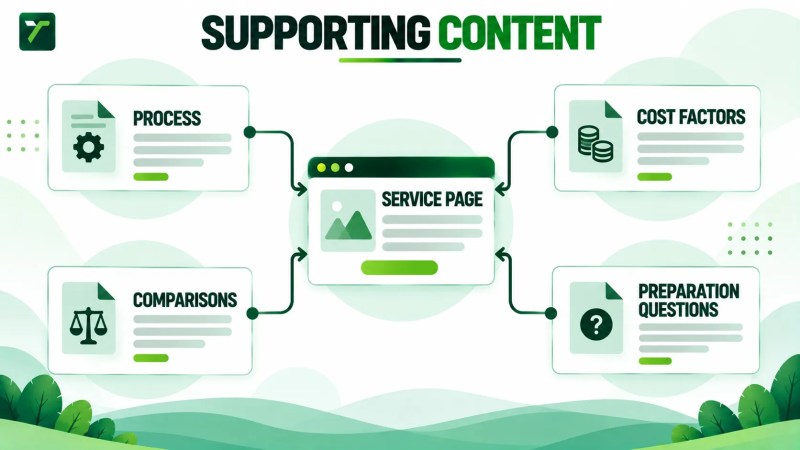
For example, a service page might explain what the business provides, while supporting articles address:
- how the service works
- common problems the service addresses
- preparation or maintenance questions
- service comparisons
- cost factors
- timing or process questions
Where appropriate, those articles can point readers toward the relevant service page. The service page can also reference useful supporting resources when a visitor needs more detailed information.
This creates a relationship between informational content and commercial pages rather than leaving the blog and service sections disconnected.
Traffisite’s guide to topic clusters for SEO explains how related pages can be organized around broader topics, while the internal linking guide provides a broader framework for connecting related content across a site.
Do Not Turn Blog Posts Into Duplicate Service Pages
Supporting articles should answer informational questions that deserve their own treatment. They should not simply restate the service page using a slightly different title.
Keeping the intent of each page clear makes the content structure easier to manage. The service page handles the commercial offering, while supporting articles can address narrower educational questions and connect interested readers back to the appropriate service.
How to Audit Your Service Page Structure
An audit can reveal whether the current service section reflects the business clearly or has grown into a collection of disconnected pages.
Review the structure from both the visitor’s perspective and the site’s architecture.
- Inventory every service page. Record the main Services page, broader category pages, individual service pages, and closely related informational content.
- Identify the role of each page. Determine whether each URL is a hub, parent category, child service, supporting article, or another type of page.
- Check for overlapping services. Look for pages that cover substantially the same offering without a clear reason to remain separate.
- Find missing relationships. Identify child services that are not connected clearly to their parent category or important services that are difficult to reach.
- Review navigation. Make sure visitors can understand the major service categories and reach important pages without navigating unnecessary layers.
- Review contextual links. Check whether related services and supporting articles link to one another where doing so genuinely helps the reader.
- Review anchor text. Replace vague or misleading internal-link labels where more descriptive wording would improve navigation.
- Check orphaned pages. Identify important service pages with no meaningful internal links pointing to them.
- Review URLs separately. Make sure URL decisions support the structure without treating folder depth as the only definition of hierarchy.
- Document the intended structure. Create a simple map showing the relationship between the Services hub, parent categories, child services, and supporting content.
Google recommends that pages on a site be reachable by a link from another findable page and that the referring link provide relevant text or, for linked images, relevant alt text. Google’s developer SEO guide provides the underlying crawlability guidance.
Traffisite’s guide to orphan pages SEO explains disconnected pages in more detail.
Review Breadcrumbs Where They Help Navigation
Breadcrumbs can provide another way for visitors to understand where a page sits within a broader hierarchy and navigate toward higher-level pages.
Google describes a breadcrumb trail as indicating a page’s position in the site hierarchy and notes that it may help users understand and explore a site. See Google’s breadcrumb documentation for its current structured-data guidance.
Traffisite’s guide to breadcrumbs for SEO covers their role in website structure in more detail.
Service Page Structure FAQ
What is the best structure for service pages?
There is no single service page structure that fits every business. A small service offering may work well with one Services page linked directly to several individual services. A larger offering may benefit from broader parent categories with specialized child service pages underneath them. The structure should reflect real relationships between the services and make navigation straightforward.
Should every service have its own page?
Not automatically. A separate page is easier to justify when the service represents a distinct customer need and there is enough useful information to explain it independently. Small variations may be clearer when grouped on a broader page.
What is a parent service page?
A parent service page represents a broader service category and helps visitors understand the services within that category. It may link to more specialized child pages where individual services need additional explanation.
What is a child service page?
A child service page covers a more specific service that belongs conceptually within a broader category. It should still provide standalone value rather than existing only to create another level in the hierarchy.
Should service page URLs use parent folders?
A logical URL structure can support organization, but folder structure alone should not be treated as the complete definition of website hierarchy. Navigation and internal links also communicate relationships between pages. The appropriate URL pattern depends on the website’s existing structure and implementation.
How should blog posts link to service pages?
When an article naturally relates to a service, it can link contextually to the relevant service page so readers have a clear next step. The link should be useful in context rather than added solely to increase the number of internal links.
Build Service Pages Around Real Relationships
A useful service page structure starts with the business’s actual offering and the way customers understand those services.
Broader parent pages can organize meaningful categories. Child pages can give distinct services enough room to be explained properly. Navigation and internal links can then connect those pages with related services and supporting content.
The goal is not to make every website as deep or complex as possible. It is to create a hierarchy that remains understandable as the service offering and content library grow.
For the broader framework behind page hierarchy, navigation, internal linking, and crawl paths, Traffisite’s website structure for SEO guide explains how those elements work together across a site.