

Website hierarchy is the way pages are organized into levels and relationships across a site. Instead of treating every URL as an isolated page, a hierarchy groups related content beneath broader sections so visitors can understand where they are, what belongs together, and where to go next.
For SEO, a useful hierarchy can create clearer paths between important pages. Service pages can sit beneath a broader services section, supporting resources can connect to relevant topics, and internal links can reinforce relationships between broader and more specific content.
Quick Answer: Website hierarchy SEO involves organizing pages into logical levels based on their purpose and relationships. A clear structure typically moves from broad sections to more specific pages, supported by navigation and contextual internal links. The goal is not to make every site follow the same number of levels, but to create a structure that helps users navigate the website and helps search engines discover and understand how important pages relate to one another.
What Is Website Hierarchy?
Website hierarchy describes how pages are organized relative to one another. Broad sections generally sit higher in the structure, while more specific pages are grouped beneath or connected to the sections they belong to.
A simple service-business website might conceptually look like this:
- Homepage
- Services
- Service A
- Service B
- Service C
- Locations
- Location A
- Location B
- Guides or Resources
- Topic A
- Topic B
- About
- Contact
- Services
This is a conceptual hierarchy rather than a mandatory template. The right organization depends on the website’s services, audiences, content, markets, and business model.
Traffisite’s website structure for SEO guide provides a broader framework for organizing an entire site.
Hierarchy is about relationships, not just URL folders
A URL path can communicate useful organization, but folders alone do not define how Google understands a site’s structure. Internal links, navigation, and breadcrumbs where appropriate can also help users and search engines understand relationships between pages.
For example, placing several service URLs beneath a /services/ path does not automatically create a useful service section if visitors cannot easily reach those pages or understand how they relate.
Why Website Hierarchy Matters for SEO
A useful hierarchy can support website usability while creating clearer paths to important pages for visitors and search engines.
It gives users clearer navigation paths
Visitors should be able to move from broad information toward more specific information without repeatedly returning to the homepage or relying on site search.
For example, someone reviewing a company’s services may begin with a broad services page, continue to a specific service, and then move to relevant supporting information. A clear hierarchy helps make those relationships easier to follow.
It creates clearer relationships between pages
A hierarchical structure groups related pages around broader sections and topics. This can make it easier to distinguish major pages from supporting pages and identify where new content belongs.
For SEO planning, this is particularly useful when a website contains many services, locations, guides, blog posts, or other related resources.
It can support page discovery
Search engines can discover URLs by following crawlable links. A site structure that provides crawlable internal links to important pages can therefore help search engines discover those URLs.
This is one reason website hierarchy and internal linking should be planned together rather than treated as separate tasks.
Traffisite’s article on SEO site structure explores how broader structural decisions affect the organization of a website.
How Website Hierarchy Levels Work
A website hierarchy often begins with broad pages and becomes more specific as users move deeper into the site.
One practical conceptual model is:
- Homepage. The broad entry point to the website.
- Major sections. Areas such as services, industries, locations, guides, resources, products, or other primary categories relevant to the business.
- Specific pages. Individual service, location, category, or topic pages that belong within those broader areas.
- Supporting content. Articles, guides, FAQs, examples, or other resources that expand on specific needs and topics.
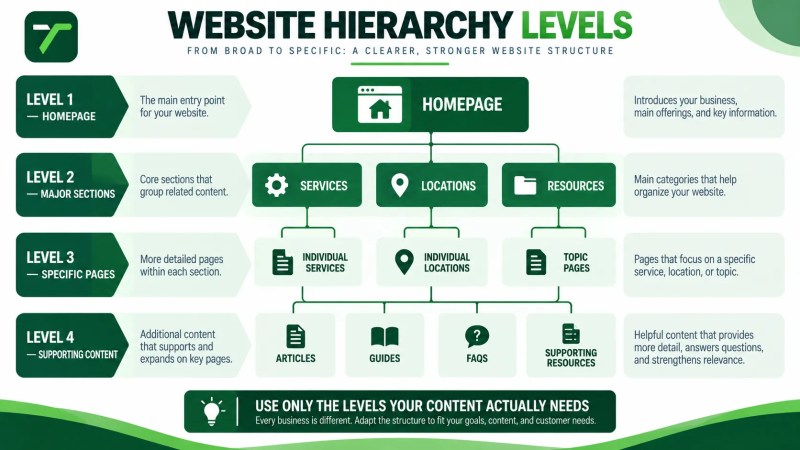
Not every website needs all four levels, and deeper is not automatically better. The objective is to create enough structure to organize the site’s real content without adding unnecessary categories or intermediate pages.
Parent and child pages
A parent page represents a broader section or subject, while child pages cover more specific parts of that section.
For example:
- Parent: Services
- Child: Technical SEO
- Child: On-Page SEO
- Child: SEO Content Strategy
The relationship should make sense to a visitor even without considering SEO. If a page does not logically belong beneath a proposed parent, forcing it into that section simply to create a tidy structure can make the website harder to understand.
Supporting content does not always need to be a child page
Related content can support a topic through contextual internal links without needing to sit directly beneath the same parent in the URL structure.
For example, a blog article can support a service page by answering a related question and linking naturally to the service when that destination helps the reader. The relationship can therefore be expressed through linking and context as well as formal hierarchy.
How to Plan a Website Hierarchy
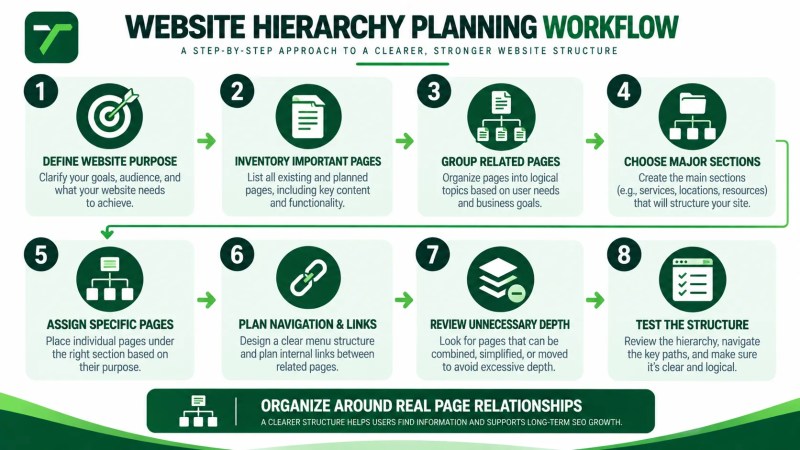
Planning should begin with the website’s real purpose and content rather than with a predetermined number of levels.
- Define the website’s primary purpose. Clarify what the business offers and what visitors need to accomplish.
- Inventory important pages. List current and planned services, locations, industries, resources, company pages, and other meaningful content.
- Group related pages. Identify pages that naturally belong within the same section or topic.
- Choose major sections. Create broader categories only when they help organize genuine groups of content.
- Assign specific pages. Determine which pages logically belong beneath or relate to each major section.
- Plan navigation and internal links. Make sure important pages have useful paths from relevant areas of the website.
- Review unnecessary depth. Look for intermediate levels that make navigation more complicated without adding clarity.
- Test the structure. Check whether someone unfamiliar with the website could understand where important information belongs and how to reach it.
For businesses restructuring an existing site, Traffisite’s Fix Website Structure solution explains the broader problem that structural improvements are intended to address.
Start with page purpose before deciding placement
Before assigning a page to a section, define what that page is supposed to accomplish.
If two pages serve essentially the same purpose, the problem may not be where they sit in the hierarchy. The website may instead need clearer differentiation, consolidation, or another content decision.
Likewise, creating a parent page solely because several URLs share similar keywords does not necessarily improve the site. A parent section should help organize content for a real visitor need. A content strategy for page roles can clarify when a topic needs a dedicated page and when it belongs within existing content.
Connect the Hierarchy With Internal Links
Hierarchy describes the organization of the site, while internal links create practical paths through that organization.
Useful internal-link relationships can include:
- Homepage to major sections
- Major section to specific pages
- Specific pages back to useful broader sections
- Related service pages where the relationship helps the visitor
- Supporting articles to relevant service or topic pages
- Guides to deeper supporting resources
These links do not need to reproduce the hierarchy mechanically. A useful contextual link may connect pages across sections when the relationship genuinely helps the reader.
Traffisite’s internal linking guide explains how to plan these connections, while the article on internal linking for SEO explores the topic from a more focused SEO perspective.
Use descriptive anchor text
Anchor text should give users and search engines useful context about the linked page. Descriptive wording is generally more informative than generic phrases such as “click here” when a natural descriptive phrase is available.
Anchor text does not need to repeat the same exact keyword every time. It should fit the surrounding sentence and accurately describe the destination.
Common Website Hierarchy Problems
A website can contain useful individual pages while still being difficult to navigate because the relationships between those pages are unclear.
Too many pages competing for the same purpose
When several pages address essentially the same service, topic, or search need without meaningful differentiation, it becomes harder to decide which page should act as the primary destination.
A hierarchy review should identify these overlaps before adding more pages.
Important pages with weak internal paths
A page may exist in a sitemap or content-management system but still have few useful internal links from relevant areas of the website.
Important pages should have deliberate paths from pages where visitors would reasonably expect to find them.
Unnecessary levels
Adding categories, subcategories, and intermediate pages can make a website appear organized on paper while making real navigation more complicated.
Use another hierarchy level only when it meaningfully groups content or helps visitors choose where to go next.
Everything sits directly beneath the homepage
The opposite problem can also occur. If a growing website treats every service, location, resource, and article as an unrelated top-level destination, meaningful content relationships can become difficult to communicate.
Logical sections can help organize those pages without requiring an excessively deep structure.
Navigation and page relationships do not match
If the navigation suggests one structure while contextual links and page content suggest another, visitors may receive conflicting signals about how the website is organized.
Navigation does not need to expose every page, but its major categories should generally reflect the site’s most important sections.
How to Review an Existing Website Hierarchy
An existing website should be reviewed as a connected structure rather than one URL at a time.
A practical review can include:
- List important pages. Identify the pages intended to serve meaningful search or customer needs.
- Map the current hierarchy. Document major sections and the pages associated with them.
- Review navigation. Check whether important sections and destinations are reasonably accessible.
- Review internal links. Identify important pages with weak or unclear internal paths.
- Find overlapping page purposes. Look for URLs serving substantially similar needs.
- Identify structural gaps. Determine whether useful pages lack a logical broader section or relationship.
- Review depth. Identify unnecessary intermediate levels or important pages that are difficult to reach.
- Plan changes carefully. If URLs need to change, review affected redirects, internal links, navigation, sitemaps, canonical annotations where applicable, and other elements that reference those URLs.
Traffisite’s article on website architecture and SEO provides additional context for evaluating the broader system around site hierarchy.
For larger or more complicated sites, SEO website architecture work can involve reviewing hierarchy alongside navigation, internal linking, URL organization, and other structural considerations.
Frequently Asked Questions
What is website hierarchy in SEO?
Website hierarchy in SEO is the logical organization of pages into broader and more specific relationships. It helps structure services, locations, topics, resources, and other content so visitors can navigate the site and search engines can discover important pages through crawlable links.
How many levels should a website hierarchy have?
There is no universal number. A small website may need only a few broad sections and specific pages, while a larger site may require additional levels. Each level should have a useful organizational purpose rather than being added to meet an arbitrary structural rule.
Should every page be linked from the homepage?
No. The homepage can provide paths to major sections and important destinations without linking directly to every URL. More specific pages can be reached through relevant section pages, navigation elements, and contextual internal links.
Does URL structure have to match website hierarchy?
URL organization can make a site easier to understand, but URL folders alone do not define the site’s hierarchy. Google also analyzes links between pages, while navigation and internal links help communicate how content is connected.
Are parent pages necessary for SEO?
Not every group of related pages requires a dedicated parent page. A parent page is most useful when it has a genuine purpose, helps visitors understand or navigate a section, and provides a meaningful broader destination.
Can website hierarchy be changed after a site is published?
Yes, but structural changes should be planned carefully. If the work changes URLs, affected redirects, internal links, sitemaps, and canonical annotations where applicable should be reviewed, along with any navigation that points to the changed URLs.
Build Hierarchy Around Real Page Relationships
A useful website hierarchy should make the site’s organization easier to understand rather than simply making the structure look tidy. Start with the website’s purpose, identify its important pages, group content according to genuine relationships, and create clear paths from broad sections to more specific information.
Then use navigation and contextual internal links to reinforce those relationships. As the website grows, periodically review whether new pages still fit the structure, whether important destinations remain accessible, and whether unnecessary complexity has developed.