

Breadcrumb navigation gives visitors an additional way to understand where a page sits within a website and move toward broader sections. On a well-structured site, breadcrumbs can reinforce relationships that already exist between parent sections and more specific pages.
For service-business websites, this can become increasingly useful as services, locations, guides, resources, and supporting content expand. Breadcrumbs do not create a logical website architecture by themselves, but they can make an existing hierarchy easier to see and navigate.
Quick Answer: Breadcrumbs are a secondary navigation system that can show a page’s position within a broader website structure. For SEO and website architecture, useful breadcrumbs should reflect meaningful page relationships, provide crawlable links where appropriate, and complement rather than replace the site’s main navigation and contextual internal links.
What Are Breadcrumbs?
Breadcrumbs are a form of secondary navigation that can show the current page’s position within a website hierarchy and provide paths toward broader sections.
A simple breadcrumb path might look conceptually like this:
Home → Services → Technical SEO
Another website might have a content hierarchy such as:
Home → Guides → Technical SEO → Crawling and Indexing
The exact path depends on how the website is organized. For hierarchy-based breadcrumbs, the trail should represent meaningful relationships between the current page and the broader sections shown in the path.
Breadcrumbs are not a replacement for the main navigation. Instead, they can provide another navigation path that helps visitors understand where they are within the site’s structure.
Traffisite’s website structure for SEO guide explains the broader relationship between hierarchy, navigation, URLs, and internal linking.
Breadcrumbs should represent the site, not an arbitrary path
A hierarchy-based breadcrumb trail is most useful when its levels correspond to meaningful sections of the website.
For example, if several individual service pages genuinely belong within a broader Services section, showing that relationship in the breadcrumb can make sense. The same principle can apply to guides, resources, categories, or other structured sections.
A breadcrumb should not introduce a hierarchy that conflicts with how the rest of the website is organized simply because an extra keyword or category could be added to the trail.
How Breadcrumbs Relate to SEO
Breadcrumbs can contribute to a website’s broader internal navigation and linking system by creating links between a specific page and broader sections in its structure.
When those breadcrumb links are crawlable, they can provide additional paths that search engines can follow between related pages. Descriptive breadcrumb labels can also provide context about the destination of each link.
Breadcrumbs should therefore be considered as one part of website architecture rather than as an isolated SEO tactic. A breadcrumb trail cannot compensate for unclear site organization, weak internal linking, inaccessible pages, or content that does not satisfy the reader’s needs.
Traffisite’s internal linking guide covers the broader role of links in connecting related pages throughout a website.
Breadcrumbs can create additional internal links
Consider a service page with a breadcrumb that links back to its broader Services section. That link creates another route from the specific page to the parent section.
This can complement other internal links already present in menus, hubs, and page content. It does not mean every breadcrumb link has unique SEO value or that adding breadcrumbs automatically improves rankings.
The useful question is whether the trail accurately represents the structure and provides a meaningful navigation path.
Traffisite’s article on internal linking for SEO provides additional context on internal links, page discovery, and site organization.
How Breadcrumbs Reinforce Website Hierarchy
Hierarchy-based breadcrumbs work best when the website already has a clear structure.
Imagine a service-business site organized like this:
- Home
- Services
- Service A
- Service B
- Service C
- Guides
- Guide A
- Guide B
- Locations
- Location A
- Location B
- Services
A breadcrumb on Service B might represent the relationship as:
Home → Services → Service B
A breadcrumb on Guide B might instead show:
Home → Guides → Guide B

In these examples, the breadcrumb makes the broader-to-specific relationship visible. It reflects an underlying organizational decision rather than creating that organization by itself.
Traffisite’s guide to website hierarchy SEO explains how broader sections and more specific pages can be organized into understandable levels.
A breadcrumb trail does not need to mirror the URL literally
The visible breadcrumb structure and the URL structure are related architecture decisions, but they are not the same thing.
A URL identifies a page through its web address, while breadcrumbs provide visible navigational relationships for visitors. Both can reflect aspects of site organization without needing to match segment for segment.
The priority is to keep each system logical and understandable rather than forcing breadcrumb labels to reproduce every URL directory or slug.
Traffisite’s guide to URL structure SEO covers how readable URLs fit into broader website architecture.
Build a Logical Breadcrumb Structure
Start with the actual hierarchy of the website rather than designing breadcrumb trails page by page.
For each important section, identify:
- The broader section the page genuinely belongs to
- Whether there are meaningful intermediate levels
- Which levels are useful destinations for visitors
- How similar page types should be handled consistently
- Whether the proposed trail matches the site’s broader organization
For a simple site, the breadcrumb may need only a few levels. A larger site with deeper categories may require more. There is no reason to add unnecessary levels simply to make the breadcrumb look more detailed.
Avoid inventing parent sections solely for breadcrumbs
If a page does not genuinely belong beneath a particular section, adding that section to the breadcrumb can make the site’s architecture less clear.
For example, a company might be tempted to insert additional keyword-focused categories between Services and an individual service page. If those categories do not serve a real navigational or organizational purpose elsewhere on the site, the breadcrumb can begin to represent an artificial hierarchy.
Fix the underlying information architecture first when necessary. Traffisite’s Fix Website Structure solution addresses broader problems with hierarchy and site organization.
Use Useful Breadcrumb Links and Labels
Breadcrumb labels should be concise enough to scan while still describing the destination clearly.
A trail such as:
Home → Services → Technical SEO
is easier to interpret when each label corresponds naturally to the page or section it represents.
Avoid rewriting labels awkwardly simply to place additional keywords into the breadcrumb. The trail is a navigation element first, so the wording should help the visitor understand the path.
Decide how to handle the current page
The current page may appear as the final breadcrumb item, depending on the site’s implementation and settings.
Whichever pattern the site uses, apply it consistently across similar templates and make sure visitors can understand the trail.
Keep breadcrumb links crawlable when they are intended as links
If breadcrumb items are intended to link to parent or broader pages, their technical implementation matters.
Google’s guidance on crawlable links recommends using anchor elements with an href attribute for links that Google can generally crawl. Breadcrumb navigation intended to create link paths should therefore use an implementation that allows those destinations to be followed.
Traffisite’s article on website navigation SEO explains crawlable navigation and the relationship between recurring navigation elements and broader site structure.
Implement Breadcrumbs Carefully
Breadcrumb implementation has both visible and technical considerations.
The visible trail should accurately represent the website’s intended structure. Depending on the site’s implementation, structured data may also be used to describe breadcrumb information to search engines.
Google documents BreadcrumbList structured data for representing breadcrumb trails. When breadcrumb structured data is used, its implementation should be reviewed against Google’s current documentation and should accurately represent the breadcrumb information on the page.
Google recommends breadcrumb trails that represent a typical user path to the page rather than simply mirroring the page’s URL structure.
Because search features and structured-data requirements can change, implementation details should be checked against current official documentation rather than relying on an old plugin tutorial or outdated example.
Do not treat structured data as the breadcrumb itself
Structured data and visible breadcrumb navigation serve different roles.
The visible breadcrumb is a navigation element for people using the website. Breadcrumb structured data provides structured information about the breadcrumb trail using supported properties such as BreadcrumbList and ListItem.
Adding structured data alone should not be treated as a substitute for useful visible navigation when the website would benefit from breadcrumbs.
Check existing WordPress breadcrumb behavior
Current WordPress versions include a Breadcrumbs block that can be added to individual content or to templates and template parts. Existing sites may also already output breadcrumbs through another implementation, so check the site’s current behavior before adding a second breadcrumb system.
To avoid duplicate trails or inconsistent breadcrumb logic, first check whether the site already outputs breadcrumbs and how those breadcrumbs are generated.
For WordPress sites undergoing broader optimization, Traffisite’s WordPress SEO service covers technical and on-page considerations within the platform.
How to Review Breadcrumb Navigation
A breadcrumb review should begin with the site’s structure rather than with visual styling.
Use this practical workflow:
- Map the hierarchy. Identify the major sections and the pages that genuinely belong beneath them.
- Review breadcrumb paths. Compare the displayed trails with the site’s intended hierarchy.
- Check parent destinations. Confirm that linked breadcrumb levels lead to appropriate broader pages.
- Review labels. Make sure each breadcrumb label clearly describes its destination.
- Check consistency. Compare similar page types to see whether breadcrumb logic is applied consistently.
- Check crawlability. Verify that breadcrumb items intended as links use crawlable implementations.
- Review the current-page treatment. Confirm that the current-page item is handled consistently across similar templates.
- Check mobile presentation. Make sure long trails remain usable on smaller screens.
- Review structured data where used. Confirm that the markup represents the breadcrumb information accurately and follows current applicable guidance.
- Recheck after structural changes. Review breadcrumbs when pages are moved, consolidated, renamed, or reorganized.
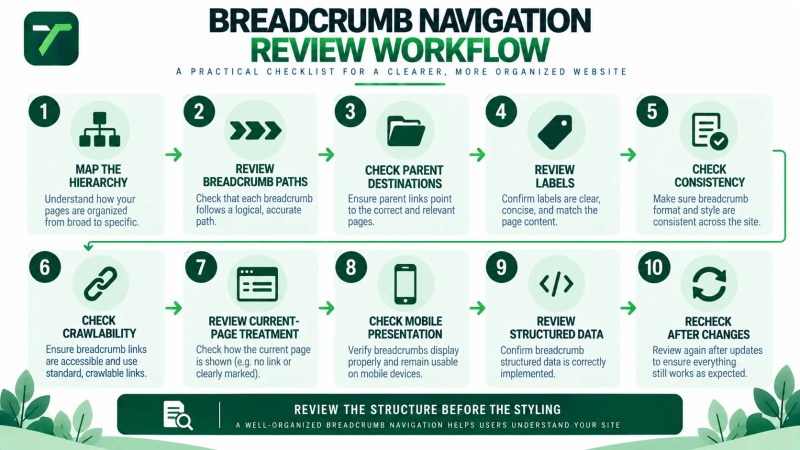
The goal is not to add breadcrumbs to every site simply because they can be implemented. The goal is to determine whether they provide useful navigation and accurately reinforce the site’s real structure.
Frequently Asked Questions
What are breadcrumbs in SEO?
Breadcrumbs are a secondary navigation system that can show a page’s position within a website hierarchy. Crawlable breadcrumb links can also become part of the site’s internal linking and page-discovery paths.
Are breadcrumbs good for SEO?
Breadcrumbs can support website architecture by making page relationships visible and creating additional internal navigation paths. They should not be treated as a guaranteed ranking improvement or as a replacement for clear site structure, useful content, and broader internal linking.
What is an example of breadcrumb navigation?
A simple service-business example could be Home → Services → Technical SEO. A content site might use a trail such as Home → Guides → Technical SEO → Crawling and Indexing. The appropriate path depends on the website’s actual structure.
Should breadcrumbs match the URL structure?
No. Google recommends using breadcrumbs that represent a typical user path to a page rather than simply mirroring the URL structure. Breadcrumbs and URLs can both reflect aspects of website organization, but they do not need to match segment for segment.
Should the current page appear in breadcrumbs?
The current page may appear as the final breadcrumb item, depending on the implementation and settings. Google does not require the page itself to be included as a ListItem in breadcrumb structured data.
Do breadcrumbs need structured data?
Visible breadcrumb navigation and breadcrumb structured data are different elements. Structured data can provide structured information about the breadcrumb trail, while the visible trail serves as navigation for visitors.
Can breadcrumbs replace internal linking?
No. Breadcrumbs primarily connect hierarchical levels, while contextual internal links can connect pages according to the reader’s topic and next useful destination. They can work together as parts of a broader internal-linking system.
Does every website need breadcrumbs?
No. Whether breadcrumbs are useful depends on the site’s size, structure, navigation needs, and design. A small site with a shallow structure may gain less navigational value from breadcrumbs than a larger site with multiple sections and deeper page relationships.
Use Breadcrumbs to Reinforce a Structure That Already Makes Sense
Breadcrumb navigation is most useful when it reflects a website architecture that is already logical. Start by defining meaningful sections and page relationships, then use breadcrumbs to make those relationships easier for visitors to understand and navigate.
Keep labels clear, link broader sections appropriately, use crawlable implementations for breadcrumb links, and review structured data against current guidance when it is used. As the site changes, revisit breadcrumb paths so the navigation continues to represent the structure visitors actually need.