

If your website’s pages feel scattered — some buried five clicks deep, others competing with each other for the same keyword — that’s usually a site structure problem, not a content problem. Search engines and visitors both rely on structure to understand what your site is about and which pages matter most.
This article breaks down what website structure actually means for SEO, why it affects how search engines discover and understand pages, and how to organize hierarchy, navigation, internal links, crawl depth, and URLs into something that works for both users and search engines.
Quick Answer: A strong website structure for SEO organizes pages into a clear hierarchy — homepage, then core category or service pages, then supporting content beneath them — so both users and search engines can reach your most important pages easily. This means logical navigation, internal links that connect related pages, reasonable crawl depth for priority pages, and URLs that reflect where each page sits in that hierarchy.
What Website Structure Means in SEO
SEO site structure refers to how your pages are organized in relation to each other — the hierarchy, the navigation paths, and the internal links that connect them. It’s separate from design or visual layout. A site can look polished and still have a structure that makes it difficult to understand which pages are most important and how different topics relate to each other.
In practical terms, site structure helps answer three questions for both users and search engines: What is this page about, how does it relate to the rest of the site, and where does it sit within the site’s broader hierarchy? When those relationships are clear and consistent, the site becomes easier to navigate, crawl, and understand.
Why Site Structure Affects Rankings and Crawl Efficiency
Search engines discover pages in part by following links from pages they already know about. Pages you want Google to find should be linked from at least one other page on your site using crawlable links, giving both visitors and Google a way to reach them.
Internal linking also helps communicate relationships between pages. Contextual internal links with descriptive anchor text help visitors navigate between related content and give Google information about the pages being linked to. Isolated pages — especially pages with no internal links pointing to them — lack those useful connections.
For service businesses specifically, this matters because your highest-value pages — core service pages, key location pages, or your main offer — should be structurally supported, not just written well. Making those pages accessible through crawlable navigation and relevant internal links gives visitors and Google clear ways to reach them from other parts of the site.
The Core Elements of a Strong SEO Site Structure
Good site structure comes down to five interconnected elements. Getting one right while ignoring the others usually just moves the problem rather than solving it.
Hierarchy: How Pages Relate to Each Other
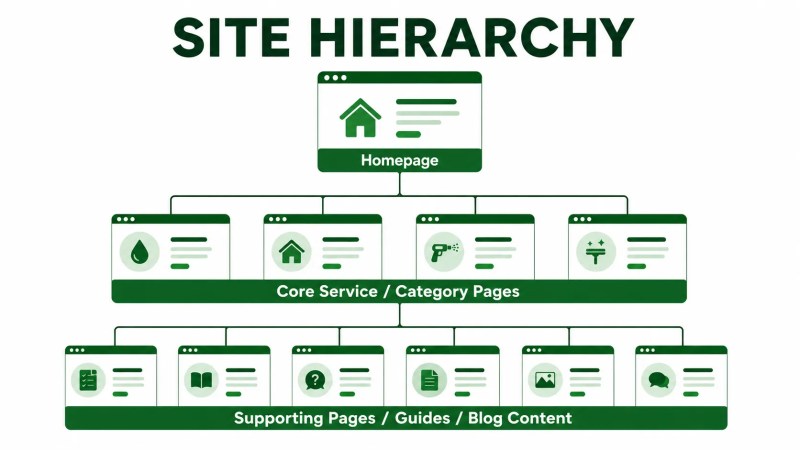
Hierarchy is the backbone of site structure. Most service-business sites can be organized with a homepage at the top, core category or service pages beneath it, and more specific supporting pages beneath those. One way to apply this is a pillar-and-cluster model: a broad page covers a topic at a high level, and more specific pages go deeper into subtopics while linking back to the broader page.
Our guide to topical authority and topic clusters covers this model in more depth if you want to see how it applies to building authority around a subject over time. It’s also worth understanding the difference between a deliberate cluster approach and publishing content without a structural plan, which we break down in topical clusters vs. random blogging.
Navigation That Reflects the Hierarchy
Your main navigation should reflect your site’s priorities rather than simply list every available page. For a service business, that generally means making important services, locations, or other primary paths easy for visitors to find while keeping secondary resources appropriately organized in submenus, contextual links, or other navigation areas.
Internal Links Between Related Pages
Internal links do the work that navigation menus can’t do alone: connecting related pages to each other in context. A blog post about a specific problem can link to the service page that solves it. A service page can link to related services or supporting guides. These contextual links help communicate topical relationships and help users find the next logical page to read.
If you’re not sure whether your current internal linking is helping, our internal linking guide walks through how to evaluate it, and our team can also help if you need hands-on support improving internal linking across an existing site.
Crawl Depth
Crawl depth describes how many clicks it takes to reach a page from a starting point such as the homepage. For priority pages — such as core services, important locations, and key conversion pages — keeping the path relatively short is a practical way to make those pages easier for visitors and crawlers to reach without navigating through several unnecessary layers of the site.
Crawl-depth problems can also appear alongside broader technical issues. If you suspect search engines are struggling to reach or index parts of your site, it’s worth reading our technical SEO guide or getting help to fix crawling and indexing issues directly.
URL Structure
URLs can reinforce the way a site is organized when they follow a clear and consistent pattern. A page about pressure washing services in a specific city, for example, may fit naturally within a services or locations structure rather than using an unrelated URL pattern. The goal isn’t to rely on URLs as a substitute for navigation or internal linking, but to make the site’s organization more consistent and easier to manage as it grows.
How to Prioritize Your Most Important Pages
Not every page deserves equal structural weight. Before reorganizing anything, identify which pages actually drive your business — typically your core service pages, your highest-value locations or industries, and any pages tied directly to leads or bookings. Those pages should get:
- Prominent placement in navigation where appropriate
- Internal links from multiple relevant pages across the site
- A short, logical path from the homepage
- Their own appropriate place in the hierarchy rather than being nested under an unrelated page
Everything else — supporting blog content, resources, and secondary pages — can sit further down the hierarchy, as long as it still connects logically to the pages it supports. If you’re planning this from scratch or restructuring an existing site, this is exactly the kind of work covered under SEO website architecture.
A Simple Framework for Structuring Your Site
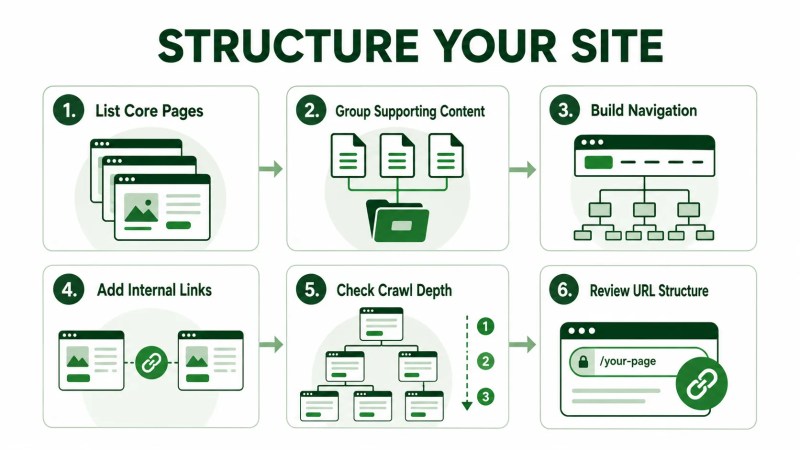
If you’re mapping out structure for the first time, or auditing an existing site, this order tends to work well:
- List your core pages first. Homepage, main services, and any high-value locations or industries.
- Group supporting content under the page it supports. Blog posts, guides, and resources should each have a clear primary topic or page they connect back to.
- Build navigation around the core pages. Keep the main menu focused on what matters most; use submenus or other appropriate navigation areas for secondary pages.
- Add internal links between related pages. Look for natural connections — a blog post and the service it relates to, or a service and a related industry page.
- Check crawl depth for priority pages. Make sure important pages can be reached through a short, logical path.
- Keep URL patterns consistent with the site’s organization. Review slugs and URL patterns for clarity and consistency rather than changing established URLs without a reason.
Common Site Structure Mistakes
- Flat structure with no clear hierarchy. Treating every page as though it has the same role can make relationships between topics and sections less clear.
- Orphan pages. Pages with no internal links pointing to them, often created and then forgotten.
- Navigation that doesn’t match priorities. Secondary pages occupy prominent navigation positions while important service or conversion pages are difficult to reach.
- Inconsistent URL patterns. Similar pages use completely different URL formats, making the site harder to manage and understand.
- Unnecessary crawl depth. Important pages require several navigation steps even though there is no useful structural reason for them to be buried.
If several of these sound familiar, reorganizing the existing structure may be more useful than continuing to add content on top of it. Our team can help you fix a website structure that’s grown without a clear plan.
Frequently Asked Questions
What does “site structure” mean in SEO?
It refers to how a website’s pages are organized and connected — including hierarchy, navigation, and internal links — and how easily users and search engines can move between related pages.
What is the best site structure for SEO?
There’s no single template that fits every site, but a clear hierarchy is a practical starting point: homepage, core category or service pages, then supporting content beneath or around each topic — all connected through logical navigation and contextual internal links.
How many clicks should it take to reach an important page?
There isn’t one universal number that applies to every website. As a practical guideline, important pages should be easy to reach through a short, logical path rather than being buried behind several unnecessary navigation steps.
Does URL structure affect SEO rankings directly?
URL structure should be considered as part of overall site organization rather than relied on as a standalone SEO tactic. Clear, logical URLs can help users and Google understand the site’s organization and can make a growing website easier to manage.
Getting Your Site Structure Right
Website structure isn’t necessarily a one-time setup. As a site grows and new pages are added, hierarchy, navigation, and internal linking may need to be revisited so new content continues to fit into a clear overall structure.
When a site needs repeated reviews rather than a one-time restructuring, monthly SEO support may be a practical way to plan and maintain those improvements over time.
If you’re not sure where your site currently stands, an SEO audit can help identify which pages are well connected and where structural issues may be limiting discoverability or creating unnecessary complexity.