

Publishing many articles about related search terms does not automatically create a useful content system. Without a clear structure, pages may overlap in purpose, remain disconnected from important services, or become difficult for visitors to discover.
Topic clusters provide a practical way to organize related pages around a central subject. A well-planned cluster connects a broad pillar page with more focused supporting pages, using purposeful internal links to make the relationships understandable.
Quick Answer: An SEO topic cluster is a group of related pages organized around a central subject. A broad pillar or hub page introduces the subject, while supporting pages answer narrower questions or cover specific subtopics. Internal links connect the pages according to their relevance and help visitors move between broad explanations and detailed guidance.
What Is a Topic Cluster?
A topic cluster is a collection of pages that address different parts of one broader subject. The pages are planned as a connected system rather than as isolated articles selected only because individual keywords appear attractive.
A typical cluster contains:
- a central pillar or hub page covering the broader subject
- supporting pages focused on distinct questions, problems, processes, or subtopics
- contextual internal links connecting pages where the relationship helps the reader
- clear differences in purpose so that multiple pages do not unnecessarily target the same need
The cluster model is sometimes described as hub-and-spoke SEO. The hub is the central subject page, while the spokes are more focused pages connected to it. This is a useful planning model, but the finished website does not need to resemble a perfectly symmetrical diagram. Some supporting pages may logically connect to several related pages, services, or adjacent clusters.
A topic cluster is also not simply a blog category. In WordPress, categories are a hierarchical taxonomy used to organize posts. In this article, a topic cluster refers to a planned relationship between pages based on their subjects, purposes, and internal links. Categories and archive pages may support a cluster, but assigning the same category does not create a useful content relationship by itself.
How Topic Clusters Fit Into Website Architecture
Topic clusters form one part of a website’s wider architecture. Website architecture describes how services, industries, locations, guides, articles, and other resources are arranged and connected across the site.
A cluster can reinforce that structure by giving related informational pages a clear central destination. It can also provide useful routes from educational content to relevant service or solution pages when the reader is ready for a practical next step.
Traffisite’s guide to website structure for SEO explains how hierarchy, navigation, hubs, URLs, and internal links work together across the full website.
Topic clusters should follow the website’s real subjects and business relationships. They should not create a second, contradictory structure in which articles are grouped one way while services and navigation present an entirely different model.

When a growing website contains disconnected subjects, overlapping hubs, or unclear page roles, an SEO website architecture service can help assess how those pages should be organized and connected.
Pillar Pages and Supporting Pages
Pillar pages and supporting pages serve different but complementary purposes. Their roles should be defined by what each page helps the reader accomplish, not merely by length.
What is a pillar page?
A pillar page is a central resource for a broad subject. It should help readers understand the topic, recognize its major components, and find more detailed pages when they need deeper guidance.
A useful pillar page often:
- defines the broader subject
- explains its major components
- introduces important decisions or processes
- links to supporting resources at relevant points
- provides a clear route to an applicable service, solution, or next action
A pillar page does not need to include every detail from every supporting article. If it attempts to answer every possible question fully, the page can become difficult to use and leave little distinct purpose for its supporting content.
What is a supporting page?
A supporting page covers a narrower need within the broader subject. It may explain one task, compare two approaches, answer a specific question, address a particular problem, or provide guidance for one audience or situation.
Each supporting page should have an independent reason to exist. Changing a few keywords while repeating the same advice across several pages creates unnecessary overlap rather than a useful cluster.
Can a supporting page belong to more than one cluster?
Some pages naturally relate to more than one subject. For example, a guide about internal links may support discussions of website architecture, content strategy, crawl paths, and topic clusters.
The page can link to multiple relevant destinations without being duplicated or forced into only one conceptual relationship. However, it should still have a clear primary purpose and a recognizable place within the website.

How to Plan an SEO Topic Cluster
Effective topic-cluster planning begins with the business, its audience, and its existing content. It should not begin by turning every keyword variation into a new page.
Choose a durable central subject
Select a subject broad enough to support several distinct needs but specific enough to remain coherent. For a service business, useful central subjects may align with an important service family, recurring customer problem, industry specialization, or substantial area of expertise.
The central subject should matter beyond one temporary campaign. It should represent something the business expects to explain, provide, or support over time.
Identify the audience’s distinct needs
List the decisions, questions, problems, and tasks that belong within the subject. Then separate them according to the purpose a visitor would expect each page to fulfill.
Potential supporting-page formats include:
- step-by-step guides
- cost and planning explanations
- comparisons
- problem-and-solution articles
- checklists
- service-specific explanations
- industry or audience applications
- implementation and maintenance guidance
Do not assume every format is needed. Select pages only when they address a genuine and sufficiently distinct reader need.
Review the existing content before creating pages
Inventory the pages that already cover the subject. Record each page’s primary purpose, intended audience, main question, existing links, and current place within the website.
This review may reveal that the website already has most of a cluster but lacks a useful hub. It may also reveal pages serving nearly identical needs, supporting content with no clear route back to a central resource, or valuable articles that are difficult to reach.
Define the role of every proposed page
Write a short purpose statement for the pillar page and each supporting page. The statement should explain:
- who the page is for
- which question or task it addresses
- how it differs from the other pages
- which broader page it supports
- which logical next steps it should offer
If two proposed pages have nearly identical purpose statements, combine them or redefine their scope before drafting them.
Prioritize instead of publishing everything at once
A cluster can begin with a useful pillar page and a limited number of important supporting resources. Additional pages can be added when research, customer questions, business priorities, or content performance reveal a genuine gap.
Traffisite’s guide to topical authority and topic clusters provides a broader framework for planning connected subject coverage without treating publication volume as the primary objective.
Connect the Cluster With Internal Links
Internal links make the relationship between cluster pages visible and usable. Google explains that it uses links to find new pages to crawl and recommends descriptive anchor text that helps people and Google understand linked destinations.
The pillar page can link to supporting pages when their narrower explanations become relevant. Supporting pages can link back to the pillar when readers may benefit from the broader context. They may also link to other supporting pages when the connection represents a natural next step.
Use descriptive anchor text that helps readers anticipate the destination. Generic phrases such as “click here” provide less context than an anchor that names the subject or task being discussed.
The goal is not to make every page link to every other page. That approach can produce repetitive sections and weak connections. Links should reflect the reader’s likely path through the information.
For a more detailed approach, see Traffisite’s internal linking guide. It explains how contextual links, hubs, navigation, and related-page connections can complement the website’s hierarchy.
Clusters should also connect responsibly to commercial pages. An educational article can link to a relevant service when that service represents a reasonable next step, but every article does not need the same sales link or identical anchor text.
Topic Cluster Example for a Service Business
Consider a roofing company that wants to organize content around roof repair. The topic should not be divided into pages solely because several similar keyword phrases exist. Instead, the cluster can reflect distinct customer needs.
A central roof-repair pillar page might explain the repair process, common warning signs, inspection considerations, broad repair options, and when professional evaluation may be appropriate.
Supporting pages could address:
- how to recognize signs of a roof leak
- what to do after storm damage
- repair considerations for different roofing materials
- questions to ask before approving repair work
- the difference between roof repair and replacement
- how roof inspections fit into project planning
The pillar page can introduce each subject and link to the appropriate detailed guide. A page about roof leaks can link back to the broader repair resource, connect to material-specific guidance where relevant, and provide a path to the actual roof-repair service.
This arrangement can create a useful path from a specific concern to broader education and then to an appropriate service. It is more coherent than publishing many similar articles without defined roles or meaningful links.
The same planning principle can be applied to other service businesses. The subjects will differ, but each cluster should connect genuine customer needs with the pages and services that address them.
Common Topic-Cluster Mistakes
Treating every keyword as a separate page
Closely related phrases may represent the same intent. Creating a page for every variation can produce repetitive articles and unclear page roles. Group keywords according to the underlying need before deciding how many pages to create.
Making the pillar page too broad
A pillar should provide a useful overview, but it still needs boundaries. If it attempts to cover several unrelated services, audiences, or problems, supporting-page relationships become difficult to understand.
Publishing supporting pages without a useful hub
A collection of detailed articles may remain difficult to navigate if there is no central page that introduces the subject and directs readers toward the appropriate resources.
Creating a hub that contains only a list of links
A central page should provide enough explanation to help visitors understand the subject and choose their next step. A bare directory may not give readers sufficient context.
Using identical internal-link blocks on every page
Repeating the same collection of links regardless of context can make the cluster feel mechanical. Place links where their destinations genuinely expand or continue the discussion.
Leaving important supporting pages isolated
A useful article can still be difficult for visitors and crawlers to find when no relevant hub, guide, service, or contextual page links to it. Google advises that every important page should have a link from at least one other page on the site. Traffisite’s explanation of orphan pages and SEO covers how pages can become disconnected from a website’s internal pathways.
Confusing publication volume with subject coverage
A large number of articles does not necessarily create a stronger cluster. A smaller collection of differentiated, maintained, and well-connected pages may serve the audience more effectively than many repetitive posts.
The comparison between topical clusters and random blogging explains why purposeful relationships matter more than publishing unrelated articles without a wider content plan.
Maintain and Improve Topic Clusters
Topic clusters require maintenance because services, customer questions, search language, and existing content can change. Without periodic review, supporting pages may become outdated, duplicate newer resources, or lose their connection to the central page.
A practical cluster review should check:
- whether the pillar page still represents the subject accurately
- whether each supporting page has a distinct purpose
- whether important pages are reachable through relevant links
- whether obsolete or overlapping pages should be updated, consolidated, or redirected
- whether new business offerings create legitimate content gaps
- whether internal anchor text remains descriptive
- whether the cluster still provides a logical route to appropriate services or actions
Performance data can help identify questions, weak pages, and changing demand, but metrics should be interpreted alongside content quality and business relevance. A page should not be created, removed, or merged based on one number without reviewing its actual purpose.
When the website needs a more systematic content plan, Traffisite’s SEO content strategy service can help connect topic selection, page purpose, publishing priorities, and internal links.
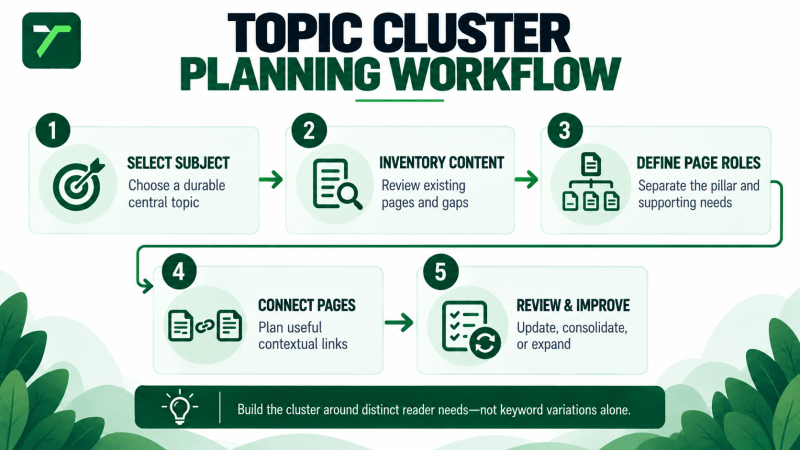
Topic Cluster Planning Workflow
- Select a durable subject. Choose a topic connected to the business, its audience, and its long-term information needs.
- Inventory existing pages. Identify what has already been published and how each page currently functions.
- Group reader needs. Organize questions and tasks according to their underlying purpose rather than individual keyword variations.
- Define the pillar page. Establish the central page’s boundaries, audience, and role.
- Define supporting pages. Give every proposed page a distinct question, task, or decision to address.
- Remove unnecessary overlap. Combine or redefine pages that would serve nearly identical purposes.
- Map internal links. Plan useful routes between the pillar, supporting content, services, and adjacent resources.
- Prioritize production. Begin with the pages that fill the most important audience and business gaps.
- Publish and connect the pages. Add contextual links as each resource becomes available.
- Review the cluster over time. Update, expand, consolidate, or retire content when evidence and business needs support the change.
The workflow should remain proportional to the website. A smaller service business may need a focused pillar and a handful of supporting pages. A larger organization may require several adjacent clusters, stricter editorial rules, and more detailed content inventories.
Frequently Asked Questions
What is a topic cluster in SEO?
A topic cluster is a connected group of pages covering one broader subject. It generally includes a central pillar or hub page, supporting pages addressing narrower needs, and internal links that help visitors move between them.
What is hub-and-spoke SEO?
Hub-and-spoke SEO is another way to describe a central topic page connected to narrower supporting resources. The model helps visualize the relationship, although real websites may include additional links between related supporting pages, services, and adjacent subjects.
What is the difference between a pillar page and a supporting page?
A pillar page introduces and organizes a broad subject. A supporting page covers a more specific question, task, comparison, problem, or application within that subject.
How many supporting pages should a topic cluster have?
There is no universal number. Use as many pages as necessary to cover distinct and useful audience needs without creating repetitive or overlapping content. A cluster can begin with a small number of strong pages and expand when a genuine gap is identified.
Do all supporting pages need to link to the pillar page?
A supporting page should provide a path to the pillar when the broader resource is useful to the reader. Internal links should follow real relationships rather than a rigid requirement applied without context.
Is a topic cluster the same as a blog category?
No. A category is a classification label or collection mechanism. A topic cluster is a planned relationship between pages with defined purposes and useful internal links. A category may support a cluster, but it does not create one automatically.
Can a service page be a pillar page?
It can function as a central destination when it provides a useful overview and connects naturally to relevant supporting information. However, the page should still satisfy its commercial purpose, and supporting articles should not be created merely to send links to it.
Build Topic Clusters Around Real Reader Needs
A useful topic cluster does more than group similar keywords. It gives a broad subject a clear central resource, assigns distinct purposes to supporting pages, and creates understandable paths between related information.
Begin with the website’s existing pages and the questions customers genuinely need answered. Define the role of every page before drafting it, remove unnecessary overlap, and connect the finished resources through contextual internal links.
The objective is not to produce the largest possible cluster. It is to build a maintainable content system that helps visitors understand the subject and reach an appropriate next step.