

A URL is more than the address used to open a page. A clear URL can provide useful context about what the page contains, while a consistent URL system can make a website easier to organize and manage.
URL structure SEO is the practice of creating clear, logical, and manageable URLs while considering how those URLs fit within the broader organization of the website. The objective is not to force every page into a complicated folder system. It is to use URLs that are understandable, consistent, and appropriate for the content they represent.
Quick Answer: A useful SEO-friendly URL structure keeps addresses readable, descriptive, consistent, and as simple as the website reasonably allows. Use words that describe the page, organize URLs logically when folders genuinely represent sections of the site, avoid unnecessary complexity, and plan URL changes carefully. URL structure can support website organization, but navigation and internal links also play important roles in communicating relationships between pages.
What Is URL Structure?
URL structure describes how page addresses are written and organized across a website.
Consider a hypothetical service page:
example.com/services/technical-seo/
The domain identifies the website, /services/ indicates a broader section, and /technical-seo/ identifies the specific page.
That does not mean every website needs the same folder pattern. A useful URL structure reflects the site’s actual content and remains understandable without adding unnecessary levels.
Traffisite’s website structure for SEO guide provides a broader framework for organizing pages across an entire website.
URL structure and site structure are related but different
URL organization can reflect parts of a website’s structure, but the two concepts are not identical. A site’s architecture also includes navigation, internal links, page relationships, and the paths users and search engines can follow between content.
This distinction matters because changing a URL folder does not automatically improve the relationships between pages. The surrounding site structure still needs to make sense.
Traffisite’s article on website hierarchy SEO explains how broader and more specific pages can be organized into understandable relationships.
What Makes a URL SEO-Friendly?
An SEO-friendly URL structure should first make practical sense. It should identify the page clearly enough to be understandable while avoiding unnecessary complexity.
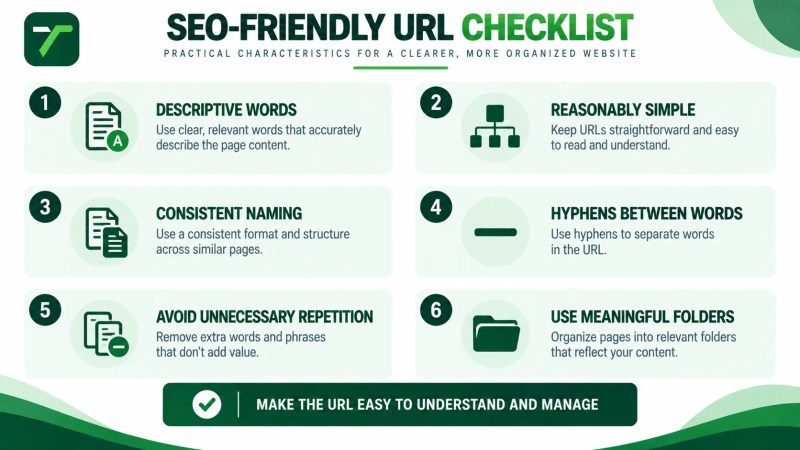
Use descriptive words
When possible, use words that describe the page’s content rather than identifiers that provide little context to a person reading the URL.
For example, a URL such as:
example.com/services/technical-seo/
provides more descriptive context than a hypothetical address such as:
example.com/page?id=8472
This does not mean every dynamic URL is inherently problematic. The practical goal is to make URLs understandable and manageable where the website and platform allow it.
Keep URLs reasonably simple
A URL does not need to repeat every category, keyword, or page attribute associated with the content.
For example:
example.com/services/technical-seo/
is easier to work with than a needlessly expanded structure such as:
example.com/seo/services/search-engine-optimization/technical-seo-services/technical-seo/
The second example adds several layers without necessarily making the page easier to understand.
Use a consistent naming approach
Consistency makes URL planning easier as a website grows. Similar types of pages should generally follow a predictable approach where that organization reflects the site’s real sections.
For example, service pages might use:
- /services/technical-seo/
- /services/on-page-seo/
- /services/seo-content-strategy/
Location pages might use a different logical section:
- /locations/location-a/
- /locations/location-b/
These are conceptual examples rather than required URL patterns.
Use hyphens where words need separation
For new URLs containing multiple words, use hyphens to separate those words clearly.
For example:
/website-architecture/
rather than:
/websitearchitecture/
or:
/website_architecture/
How URLs Relate to Website Architecture
URL organization can reflect a logical website structure when folders correspond to genuine sections of the site.
A service-business website might conceptually use:
- /services/ for service-related pages
- /locations/ for genuine location pages
- /guides/ for substantial educational guides
- /blog/ for blog articles
This type of organization can make the site’s content easier to categorize and manage. However, the URL path alone does not establish the complete hierarchy.
Internal links and navigation still need to create useful paths between related pages. Traffisite’s internal linking guide explains how those connections can reinforce broader website organization.
Folders should represent useful organization
A folder is most useful when it represents a meaningful section rather than being added simply to make a URL look more structured.
For example, if a website has a genuine services section containing several individual service pages, /services/ can communicate a logical grouping.
Adding several unnecessary folder levels simply because a page belongs to multiple conceptual categories can make URLs harder to manage without necessarily improving the website’s architecture.
Traffisite’s article on website architecture and SEO provides additional context on how structural elements work together across a site.
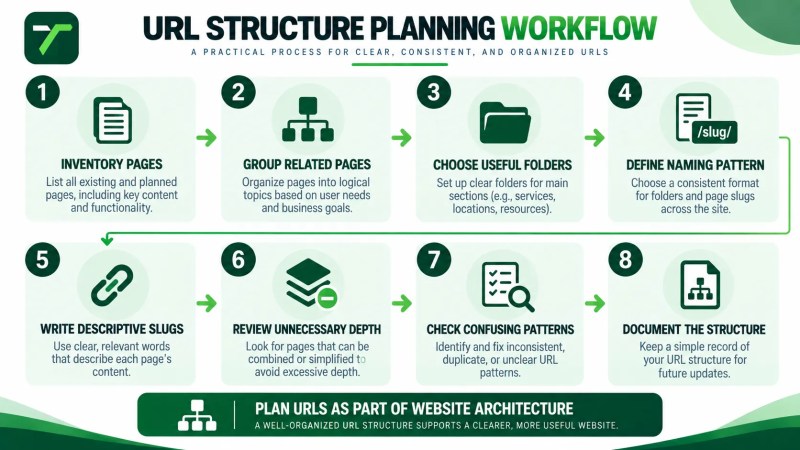
How to Plan a Logical URL Structure
URL planning is easiest when it happens alongside website architecture rather than after every page has already been created.
- Inventory the pages you need. Identify the site’s major services, locations, resources, company pages, and other meaningful content.
- Group related pages. Determine which pages naturally belong within broader sections.
- Choose useful folders. Use folders where they communicate genuine organizational relationships.
- Define a naming pattern. Decide how slugs will be written so similar pages follow a consistent approach.
- Keep individual slugs descriptive. Use wording that accurately identifies the page without unnecessary repetition.
- Review unnecessary depth. Remove structural levels that do not provide useful organization.
- Check for duplicate or confusing patterns. Make sure different URLs do not appear to represent the same page purpose unintentionally.
- Document the structure. Record the planned URLs so future pages can follow the same system where appropriate.
For websites with structural problems, Traffisite’s Fix Website Structure solution is a relevant next step when URL organization is part of a broader architecture issue.
Plan around page purpose, not keyword repetition
A slug should describe the page, but it does not need to contain every related keyword variation.
For example, if one page clearly covers technical SEO services, creating a long slug that repeats several versions of “SEO,” “service,” and “optimization” usually adds complexity rather than clarity.
The page’s content, headings, internal links, and broader context can communicate more detail than the URL alone needs to carry.
Common URL Structure Problems
Many URL problems begin when a website grows without a consistent structural plan.
URLs that reveal little about the page
Generic IDs, unexplained abbreviations, or vague slugs can make URLs difficult for people to interpret.
Some platforms and applications legitimately rely on parameters or identifiers, so the objective is not to eliminate them universally. The question is whether important public-facing pages can use clearer addresses without disrupting necessary functionality.
Unnecessary folder depth
Deep URLs are not automatically bad simply because they contain several folders. The problem is unnecessary depth that adds no meaningful organization.
Each level should have a reason to exist.
Repeated words
URLs can become difficult to read when the same concept appears repeatedly across folders and slugs.
For example:
/seo-services/technical-seo-services/technical-seo-service/
contains more repetition than is needed to identify the page.
Inconsistent naming patterns
One service page might use a short descriptive slug while another uses dates, internal codes, unexplained abbreviations, or a completely different naming convention.
Consistency does not mean every URL must have identical formatting beyond what the website requires. It means similar page types should follow a deliberate system rather than accumulating arbitrary patterns.
Creating multiple URLs for the same content
Technical configurations can sometimes make the same or substantially similar content accessible through more than one URL. When that occurs unintentionally, the site’s technical setup may need to provide clearer canonicalization signals indicating the preferred URL, although search engines may ultimately select a different canonical.
This is a technical issue rather than merely a naming issue and should be reviewed as part of the site’s broader technical SEO setup. When duplicate URL versions, canonicals, or redirects require coordinated investigation, technical SEO support for URL issues can help address the underlying configuration.
Traffisite’s technical SEO guide provides broader context for crawling, indexing, canonicalization, and other technical considerations.
Be Careful When Changing Existing URLs
A cleaner-looking URL is not automatically a reason to change an established address.
Changing a live URL creates additional implementation work because existing references to the old address may need to be updated, and users or search engines may continue trying to access it.
When a URL change is genuinely necessary, plan the migration and review the affected elements. Depending on the change, this can include:
- Redirecting the old URL to the appropriate new destination
- Updating internal links
- Updating navigation where affected
- Updating canonical references where applicable
- Updating sitemap entries
- Checking other internal references to the old URL
For this reason, URL structure is worth planning carefully when building new sections or restructuring a website.
If URL problems are contributing to broader discovery or indexing issues, Traffisite’s Fix Crawling and Indexing Issues solution provides a more relevant path for investigating the technical problem.
How to Review Your URL Structure
A URL review should consider the website as a system rather than judging individual addresses in isolation.
Use this practical review:
- List important URLs. Identify the pages that serve meaningful customer or search needs.
- Group URLs by page type. Separate services, locations, resources, blog content, company pages, and other major categories.
- Review readability. Check whether important slugs communicate what their pages contain.
- Review consistency. Look for similar page types following unrelated naming patterns without a clear reason.
- Review folder purpose. Confirm that folders represent meaningful sections rather than unnecessary complexity.
- Look for repetition. Identify URLs with repeated words or redundant structural levels.
- Check for duplicate URL versions. Investigate whether the same content is accessible through multiple addresses where that is not intentional.
- Separate cosmetic issues from structural problems. Do not change established URLs simply because another version looks slightly cleaner.
- Plan necessary migrations. When URLs genuinely need to change, document redirects and affected internal references before implementation.
For a broader architecture review, Traffisite’s SEO website architecture service covers URL organization alongside hierarchy, navigation, internal linking, and other structural considerations.
Frequently Asked Questions
What is URL structure in SEO?
URL structure in SEO refers to how page addresses are written and organized across a website. Useful URLs are generally understandable, descriptive, consistent, and organized in a way that reflects the site’s real content without unnecessary complexity.
What is an SEO-friendly URL structure?
An SEO-friendly URL structure uses readable and descriptive addresses, consistent naming patterns, and logical organization where folders are useful. It avoids unnecessary complexity while accurately representing the page.
Should URLs include keywords?
A URL can use descriptive words that naturally identify the page’s topic. The goal should be clarity rather than trying to place every keyword variation into the slug.
Should URLs be short?
URLs should be as simple as practical, but there is no need to remove useful words or meaningful folders solely to make an address shorter. Clarity and maintainability are more useful goals than pursuing an arbitrary length.
Should I use hyphens or underscores in URLs?
For new URLs containing multiple words, use hyphens as word separators. Existing URLs should not automatically be changed solely to replace underscores without considering the consequences of changing a live address.
Do URL folders determine website hierarchy?
No. Folders can provide useful URL organization, but URL paths do not define the entire website hierarchy. Navigation, internal links, and other page relationships also contribute to the site’s broader architecture.
Should I change old URLs to make them more SEO-friendly?
Not automatically. Changing an established URL creates migration work and can affect existing links and references. A change should solve a meaningful problem, and necessary redirects and internal updates should be planned before implementation.
Build URLs Around Clear Website Organization
A useful URL structure starts with clarity. Give important pages understandable slugs, use folders when they represent genuine sections, follow consistent naming patterns, and avoid adding complexity that does not help organize the website.
Most importantly, treat URLs as one part of website architecture rather than the entire architecture. Navigation, internal links, hierarchy, and page purpose still need to work together. Plan those relationships early, and be deliberate before changing URLs that are already live.