

Internal links connect one page of your website to another page on the same website. They may look simple, but they help create pathways that visitors and search engines can use to move through your content.
For service businesses, internal linking in SEO is especially useful when a website contains service pages, location pages, educational guides, blog posts, and other related content. Linking those pages thoughtfully helps turn separate pieces of content into a connected website structure.
Quick Answer: Internal linking in SEO means linking one page of your website to another relevant page on the same site. Internal links help users discover related content, give search engines paths to discover pages, and use descriptive anchor text to provide context about linked content. Effective internal links are contextual, use descriptive anchor text, and point readers toward genuinely useful next steps.
What Is Internal Linking in SEO?
An internal link is a hyperlink from one page on your website to another page on the same website. For example, a blog post explaining a common customer problem might link to the service page that addresses that problem, while the service page could link to a more detailed guide for readers who need additional information.
The purpose of internal linking is not simply to add more links to a page. Useful internal links create meaningful connections between related content. They give readers somewhere relevant to go next and help make the overall structure of a website easier to navigate.
Internal linking is therefore closely connected to website structure for SEO. Your navigation creates the broad structure of the site, while contextual links inside your content create additional pathways between related pages.
Why Internal Links Matter for SEO
Internal links serve several purposes at the same time. They help people navigate your website, give search engines links they can follow to discover pages, and provide context about the content being linked to.
This becomes increasingly important as a website grows. A small service-business website may begin with a homepage and a handful of service pages. Over time, it can expand into supporting articles, location pages, comparison pages, resources, and detailed guides. Without thoughtful connections between those pages, useful content can become more difficult for visitors to find.
A broader on-page SEO strategy should therefore consider internal links alongside elements such as page content, headings, titles, and other on-page signals rather than treating linking as a separate task.
Internal links help users navigate
A useful internal link anticipates what a reader might reasonably want to know next. Someone reading about a specific SEO problem may need a deeper explanation, a related strategy, or a page describing how that problem can be addressed.
That makes internal linking partly a usability decision. The question is not just, “Where can we add a link?” It is, “What page would genuinely help this reader from here?”
Internal links help search engines discover pages
Search engines can follow links to discover pages. Connecting relevant pages with crawlable links gives Google additional links it can use to find other pages on the site.
This is one reason internal linking should work together with the site’s broader technical and structural setup. If important pages are difficult to reach through normal site navigation and contextual links, reviewing the site’s crawling and indexing structure may be a useful next step.
Internal links provide context about linked pages
Descriptive anchor text can help users and search engines understand what the linked page is about before following the link. The surrounding discussion should also make the link useful and relevant to the reader.
That does not mean every keyword mention should become a link. Internal linking works best when the connection between the source and destination pages is meaningful.
How Internal Links Connect Related Pages
Internal linking becomes more useful when you stop thinking about pages as isolated URLs and start thinking about them as parts of related topics.
Imagine a service business with a main service page supported by several articles answering common customer questions. The main page introduces the service, while the supporting articles explore narrower questions. Contextual links can connect those pieces so readers can move between the broader topic and its supporting information.
This type of relationship is central to topical authority and topic clusters. Internal links can connect a main topic with relevant supporting pages instead of leaving each article isolated.
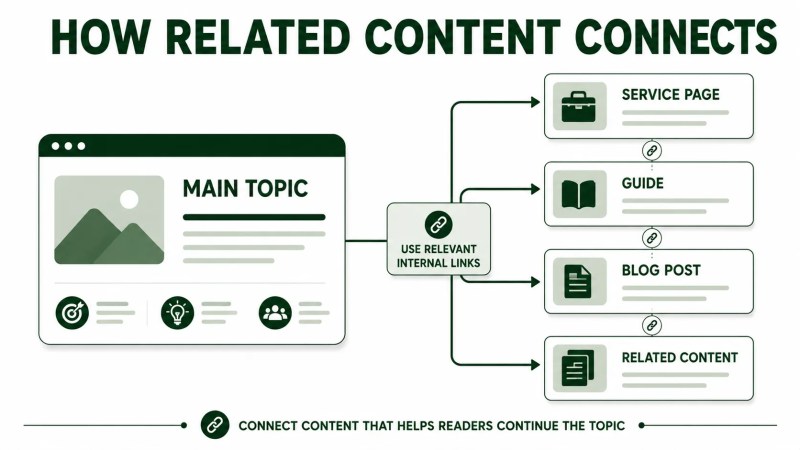
The same principle can apply beyond a simple service-page-to-blog relationship. Depending on the website, useful connections might include:
- A service page linking to a detailed guide that explains the process
- A blog post linking to another article that answers the reader’s next question
- A comparison page linking to deeper information about the options being compared
- A location page linking to a relevant service available in that market
- A supporting article linking back to its broader topic or service page
The goal is not to create every possible connection. It is to create the connections that make the site’s topics easier to navigate and understand.
How to Create Contextual Internal Links Naturally
Contextual internal links appear within the main content of a page rather than only in menus, sidebars, or footers. Because they sit inside a relevant discussion, they can direct readers to additional information at the moment that information becomes useful.
A practical way to find these opportunities is to review each section and ask what a reader might reasonably need next.
- Identify the topic of the paragraph. Be clear about what question or idea the section is addressing.
- Look for a genuinely related page. The destination should expand, clarify, compare, or provide a logical next step from the current discussion.
- Choose descriptive anchor text. The linked words should help the reader understand what they will find.
- Check the surrounding sentence. The sentence should still sound natural rather than appearing to exist solely for the link.
- Check the destination. Make sure the linked page actually satisfies the expectation created by the anchor text.
If a site already contains many pages but those relationships are weak or inconsistent, a focused effort to improve internal linking can help identify where stronger contextual connections are needed.
Writing Useful Anchor Text
Anchor text is the clickable text used for a link. Good anchor text is descriptive enough to set expectations without making the sentence sound unnatural.
For example, a phrase such as “our guide to website structure for SEO” gives the reader more information than a generic phrase such as “click here.” The goal is clarity, not repeatedly forcing an exact keyword into every link.
Useful anchor text usually:
- Describes the destination clearly
- Fits naturally into the sentence
- Relates to the surrounding discussion
- Avoids vague wording when a more descriptive phrase is available
- Does not need to be identical every time a page is linked
Internal linking is one part of a wider on-page SEO framework, so anchor text should support the reader and the surrounding content rather than being treated as an isolated optimization trick.
Common Internal Linking Mistakes
Adding links simply to hit a number
There is no reason to force a fixed number of internal links into every page. A short, focused article may naturally need fewer links than a detailed guide covering several related topics.
Relevance is more useful than quantity. If a destination does not genuinely help the reader at that point in the article, the link probably does not belong there.
Using vague anchor text
Generic anchors such as “click here” or “read more” provide little information about the destination. When possible, make the linked phrase describe the page or concept the reader is about to visit.
Linking unrelated pages
A link should not be added simply because another page needs more internal links. The source paragraph and destination page should have a logical relationship.
Overlooking older content
Internal linking should not happen only when a new page is published. Older relevant pages can provide useful opportunities to point readers toward newer content.
When publishing a new article, review existing pages that discuss the same or a closely related topic. Where a natural opportunity exists, this can create links in both directions instead of relying only on the new article to connect itself to the rest of the website.
Creating pages that are difficult to reach
Important content should not depend on a single obscure link for discovery. If valuable pages are consistently difficult to reach from relevant areas of the site, the issue may extend beyond individual links into the broader website structure.
A Practical Internal Linking Process
You do not need to rebuild your entire website to start improving internal links. A repeatable page-by-page process is usually easier to maintain.
- Choose the page you are reviewing. Identify its main topic and purpose.
- Identify closely related pages. Look across services, guides, blogs, solutions, locations, comparisons, and other useful content.
- Add relevant outgoing links. Connect the page to destinations that genuinely help the reader continue the topic.
- Look for incoming-link opportunities. Review older related pages that could naturally point to the page you are working on.
- Review anchor text and context. Make sure each link accurately describes its destination and reads naturally.
- Revisit links as the site grows. New pages can create useful linking opportunities that did not exist when older content was originally published.
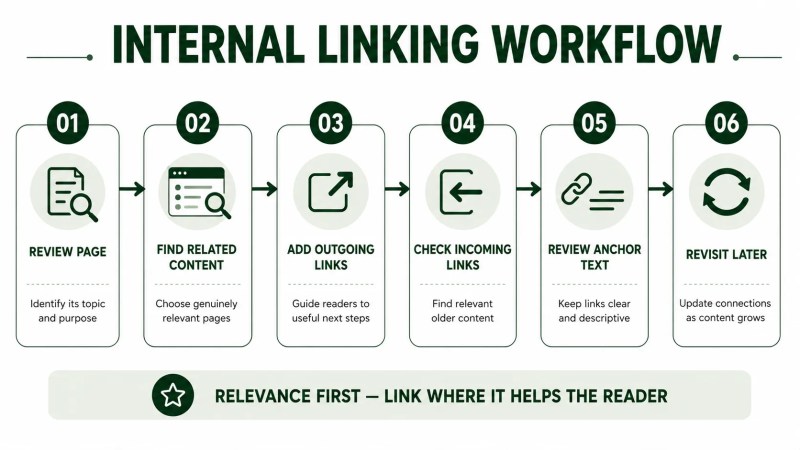
This process is particularly useful when building clusters of related content. Instead of publishing articles independently, you can plan how each new page fits into the site’s existing structure and where readers should be able to move next.
For businesses that need internal linking handled alongside content, technical improvements, and ongoing optimization, monthly SEO services can provide a broader framework for maintaining those connections as the website grows.
FAQ
What is the meaning of internal linking in SEO?
Internal linking in SEO means creating links between pages on the same website. These links help users move between related content and give search engines paths they can follow to discover other pages.
Why are internal links important for SEO?
Internal links support website navigation, connect related content, and give search engines links they can follow to discover pages. Their usefulness depends on the relevance of the destination, placement of the link, anchor text, and the relationship between the pages.
What is the purpose of internal linking in on-page SEO?
Within on-page SEO, internal links connect the current page to other useful content on the website. They can guide readers toward deeper information while providing descriptive context about linked pages.
How many internal links should a page have?
There is no single number that makes sense for every page. Add internal links when the destination is relevant and useful to the reader rather than working toward an arbitrary link count.
Should every blog post link to a service page?
No. The best destination depends on the reader’s needs and the topic being discussed. Sometimes a service page is the logical next step; in other cases, another blog, guide, solution, comparison, resource, or other relevant page may be more useful.
Should old content link to new content?
When an older page has a relevant contextual opportunity, adding a link to newer content can make that resource easier for visitors and Google to discover. The link should still make sense naturally within the older page.
Build Internal Links Around Useful Relationships
Effective internal linking is less about adding as many links as possible and more about building useful pathways through your website. Each link should have a reason to exist: helping a reader continue a topic, connecting related pages, or making useful content easier to discover.
As your website grows, those relationships become part of the site’s overall structure. A consistent internal linking process helps keep services, guides, articles, and other pages connected instead of allowing useful content to become isolated.
If internal linking is one of several structural SEO issues on your website, start by reviewing how your pages fit together and which connections genuinely help users navigate the site. Traffisite’s approach to SEO website architecture addresses those broader relationships between structure, content, and internal navigation.
For WordPress sites, implementing those relationships may also require reviewing page-builder content, templates, generated archives, and plugin behavior. Traffisite’s WordPress internal-linking setup can help connect relevant pages within the CMS without adding links where they do not belong.