

For many service businesses, the phone is the main conversion point. A homeowner searches for a plumber, an HVAC company or a cleaning service, finds a result, and calls without ever filling in a form. If your reporting only counts form submissions, SEO can look like it is producing far fewer enquiries than it really is.
Call tracking closes that gap, but it has limits, and a careless setup can create new problems, especially inconsistent phone numbers across your website and listings. This article explains the main tracking methods, what each one can and cannot tell you, and how to measure phone enquiries from organic search without breaking your business contact details.
Quick Answer: To track SEO phone calls, combine three data sources: call tracking on your website (usually dynamic number insertion, which swaps the displayed number by traffic source), click-to-call event tracking in your analytics, and the call-button clicks reported in your Google Business Profile. Keep your main business number listed consistently, treat tracking numbers as a controlled addition, and review call quality instead of counting calls alone. No method attributes every call perfectly.
Why SEO phone calls are hard to track
A form submission leaves a trail. A phone call does not, unless you build one. When someone dials the number printed on your website, your phone system sees only an incoming call. It has no idea whether the caller arrived from organic search, a paid ad, a directory or a friend’s recommendation.
The path to a call is also rarely direct. A prospect may find you in Google Maps, read a few pages on your site, leave, and call from a saved contact days later. That is why call tracking is better understood as a way to gather useful evidence than as a perfect record of every call.
If you are already building a wider measurement setup, the SEO measurement and reporting guide shows how call data fits alongside rankings, traffic and conversions.
Call tracking methods and what each one tells you
Most service businesses use a combination of methods. Each answers a slightly different question.
Dynamic number insertion on your website
Dynamic number insertion (DNI) uses a script that displays a different phone number to visitors depending on where they came from. A visitor arriving from organic search sees a number assigned to that source, and calls to it are recorded as organic search calls. This is the most direct way to connect a call to a website visit and, in many tools, to the page the visitor landed on.
Its strengths are source-level reporting and call recordings. Its limits are cost, setup effort, and the fact that it only covers calls made after seeing a number on your website.
Click-to-call event tracking
If your site has tappable phone links, you can record each tap as an event in your analytics tool and mark it as a key event, the term Google Analytics 4 now uses for what used to be called a conversion. This is lower cost than a call tracking platform and works well on mobile. It shows intent to call, not a completed or answered call, so some taps will never become conversations.
Google Business Profile call data
Your Google Business Profile can show how many people clicked the call button on your listing. Google’s own definition of the metric is the number of call-button clicks in the Business Profile performance report, so it counts clicks rather than completed calls. The report also includes activity from both organic search results and Google Ads, which means it is not a pure organic figure.
This captures part of the local search journey that website tracking misses. It reports totals and trends over time rather than attributing each call to a keyword or website page, so treat it as a separate source instead of adding it blindly to website calls. If your profile is not fully set up, start with the Google Business Profile optimization guide.

Static tracking numbers for specific pages or channels
You can assign a fixed tracking number to a single channel, such as one landing page or one directory listing. This is simple and does not need a script, but it becomes hard to manage if you add many numbers, and it increases the risk of inconsistent contact details.
Asking callers and logging the answer
A short intake question such as “How did you hear about us?” costs nothing and often reveals things software cannot, like a referral that began with a Google search. The answers are subjective, so use them to cross-check tracked data rather than replace it.
Keeping contact details consistent while tracking calls
The biggest risk in call tracking is replacing your real business number everywhere with tracking numbers. Your business name, address and phone number should match across your website, Google Business Profile and other listings, and changing numbers carelessly can create conflicting information for both customers and search engines. Our guide to NAP consistency explains why this matters and how to audit it.
A safer approach looks like this:
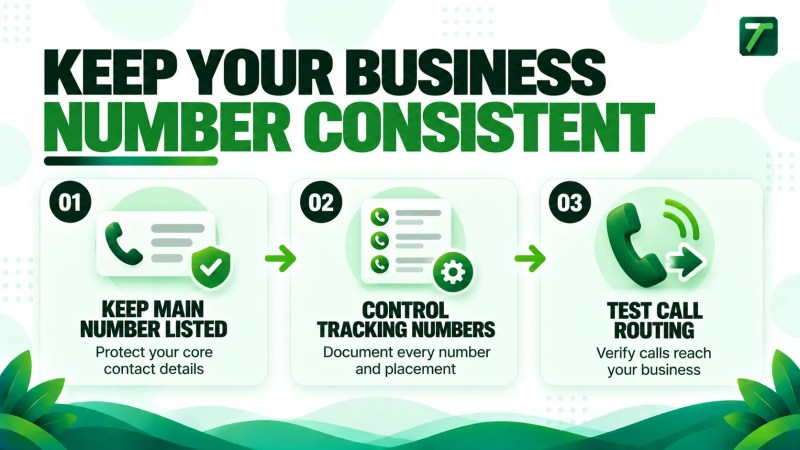
- Keep your main local business number published consistently on your website and in your core listings, and treat every tracking number as a controlled addition.
- On your Google Business Profile, Google lets you add up to two more phone numbers alongside the primary one. Choose deliberately which number is primary: it is the one customers are most likely to see and dial, so a tracking number only records profile calls if it takes that place. Many call tracking providers suggest making the tracking number primary and listing your main number as an additional number. Keeping your main number primary protects consistency but means those profile calls bypass the tracking number. Whichever you choose, keep your main number listed and test the result.
- Where possible, configure dynamic number insertion with your main number as the default, so visitors who do not match a tracked source still see it.
- Keep a simple register of every number, where it appears and why, so nothing is changed or removed by accident.
- Make sure tracking numbers forward to the same phone line and are answered with the same business name.
If you are cleaning up listings at the same time, the article on local SEO citations covers where business details are typically published.
If your profile, listings and website details need aligning before you add any tracking numbers, our local SEO service is the most relevant place to start.
Attribution limitations to expect
Even a well-configured setup will have gaps. Plan for these so your reports stay honest:
- Calls from saved or remembered numbers. A caller who saved your number from an earlier visit will not trigger a source-specific number.
- Calls from the Google Business Profile. These appear as call-button clicks in a profile metric, not as completed calls, and usually cannot be tied to a keyword or landing page. People who copy your number and dial it manually are not counted.
- Offline influence. Someone may search your business name after a referral or a van sighting, and the call will be attributed to organic search even though SEO did not create the demand.
- Multiple touchpoints. A prospect may visit from organic search, then return via an ad or direct visit before calling. Different tools will credit different sources.
- Consent and privacy requirements. Call recording rules vary by location, and the FCC’s guidance on recording telephone conversations notes that some state laws restrict it. Tracking scripts may also raise their own privacy or cookie-consent questions, so check the rules that apply to you.
The goal is a consistent, explainable method over time, not a claim that every call has been attributed perfectly.
How to set up SEO call tracking
- Define what counts as an SEO call. Decide the minimum call length for a qualified enquiry and whether you will count Google Business Profile call-button clicks separately.
- Record your current numbers. List every phone number currently published on your website, profile and listings.
- Choose your methods. For most service businesses, that means dynamic number insertion or click-to-call event tracking on the site, plus Google Business Profile call-button clicks.
- Install tracking on key pages. Prioritize service pages, location pages and the contact page, where most calls begin.
- Test every number. Call from a mobile and a desktop session, check that the right source is recorded, and confirm calls are forwarded and answered correctly.
- Send call data into your analytics or reporting. Mark qualified calls as key events (or conversions, depending on your tool) so you can compare them with form submissions.
- Review after a few weeks. Look for unusual patterns, such as calls with no source or very short call durations.
If you are looking for a broader conversion setup, local SEO conversion tracking covers how calls, forms and directions requests can be measured together.
Measuring call quality, not just volume
A rising call count looks good in a report, but it only matters if the calls turn into work. Many callers are existing customers, suppliers, job applicants or people outside your service area. Without a quality check, SEO can look more or less successful than it really is.
Useful quality signals include call duration, whether the call was answered or missed, whether it was a new enquiry, whether it was in your service area, and whether it led to a quote or booking. Our article on SEO lead quality for service businesses goes deeper on how to define and score a good lead.
Missed calls deserve special attention. If organic search brings calls that go unanswered, the problem is operational rather than an SEO one, but it still wastes the traffic you earned.
Reporting SEO calls each month
Keep call reporting simple enough that you will actually use it. A useful monthly view includes:
- Calls recorded by your tracking tools, split by source, with Google Business Profile call-button clicks shown separately because they include Google Ads activity as well as organic results
- Qualified calls, based on your agreed definition
- Top landing pages or service pages that produced calls
- Missed-call rate
- Bookings or quotes that came from those calls, where your team can track them
These figures work best alongside the wider performance metrics described in local SEO reporting. When you want to connect call data to revenue, see how to measure SEO ROI for service businesses.
Frequently asked questions
Does call tracking hurt local SEO?
It can create problems if tracking numbers replace your main number across your website and listings and leave inconsistent contact details. Keeping your main number listed, choosing deliberately which number is primary on your profile, and documenting every number reduces the risk.
Can I track phone calls from organic search for free?
Partly. Click-to-call event tracking in your analytics and the call-button clicks in your Google Business Profile do not require a paid call tracking platform. Source-level call attribution and call recordings usually do.
What is the difference between call tracking and call event tracking?
Call tracking records actual calls made to a tracking number. Call event tracking records taps on a phone link, which shows intent but not whether a conversation took place.
Should I use a separate tracking number for SEO?
Not as a replacement for your main number. If you use one, it should be controlled and documented, and your main number should stay listed alongside it, for example as an additional number on your Business Profile.
How long does it take to see useful call tracking data?
Most businesses need several weeks of data to spot patterns, and longer if call volume is low. Avoid drawing conclusions from a handful of calls.
Final thoughts
SEO call tracking will not give you a perfect attribution record, but it can turn phone enquiries from an invisible result into something you can measure, compare and improve. Start with a short list of methods, protect your core business details, and judge success by qualified calls rather than call counts alone.
Once you can see which calls search is producing, our approach to generating more local leads is a logical next step.