

Google Business Profile optimization is the process of reviewing and improving the information customers can find about your business on Google Search and Maps. For a service business, that means making sure your profile accurately explains who you are, what you offer, where you serve customers, when you’re available, and how people can contact you.
Optimization should not be treated as a collection of shortcuts for manipulating local rankings. Google recommends keeping business information complete and accurate, while its local results are mainly based on relevance, distance, and popularity. Google also explains prominence in terms of how well-known a business is. Your Business Profile should therefore work alongside your broader local SEO strategy rather than operating as a standalone marketing asset.
Quick Answer: Google Business Profile optimization means keeping your profile accurate, complete, useful, and representative of your real business. Review your business information, categories, address or service area, services, description, photos, reviews, and other applicable profile details, then update them whenever your business changes.
What Is Google Business Profile Optimization?
Google Business Profile optimization is the process of improving and maintaining the information available on your Business Profile so that it accurately represents your business and gives potential customers useful information.
A Business Profile can display information such as your location or service area, business hours, website, phone number, photos, reviews, and other details.
The goal is not to fill fields with keywords or select every option available. Google specifically instructs businesses to represent themselves accurately and consistently with how they are recognized in the real world.
Business Profile optimization is one component of local SEO. Your profile, website, service information, and other local signals should give customers a consistent understanding of your business. That consistency also extends to the business information appearing elsewhere online, which is why local SEO citations and business listings are another part of a broader local search strategy.
Google Business Profile Optimization Checklist
Use this checklist as a starting point when reviewing your profile:
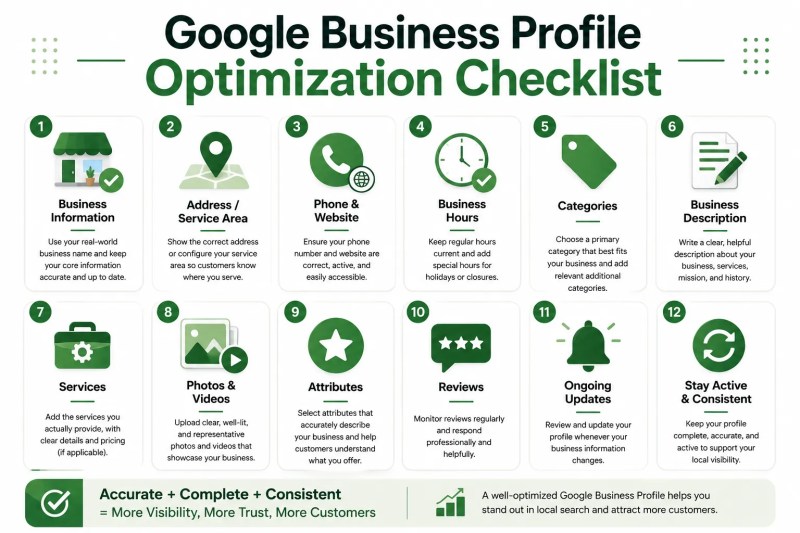
- Confirm your real-world business name.
- Review your address or service area.
- Check your phone number and website.
- Update regular and special business hours.
- Select an appropriate primary category.
- Use additional categories only when they accurately describe the business.
- Write a useful business description.
- Add relevant services where the feature is available.
- Review applicable business attributes.
- Add representative photos and videos.
- Monitor and respond appropriately to customer reviews.
- Update the profile whenever important business information changes.
1. Get Your Core Business Information Right
Start with the information customers rely on to understand and contact your business. Accuracy should come before attempts to make individual fields sound more optimized.
Use Your Real-World Business Name
Your profile name should reflect the business name you actually use. Google says businesses should represent their names consistently with their real-world branding.
Do not add service terms, locations, taglines, or other keywords simply because you want to appear for those searches. If those words are not genuinely part of the business name, they should not be added as optimization terms.
Check Your Address or Service Area
This is especially important for service businesses that travel to customers.
If you do not serve customers at your business address, Google’s guidance says the address should not be displayed to customers and the appropriate service area should be configured. A hybrid business that serves customers at its address and also visits or delivers to customers can show its address and designate a service area.
This makes accurate profile setup particularly important for local service businesses such as contractors and other companies that work at customer locations.
Check Your Phone Number and Website
Confirm that the phone number connects customers to the appropriate business location and that the website represents the business accurately.
Check these details after a website migration, domain change, phone-system change, relocation, or other major business update.
Keep Business Hours Current
Your regular hours should reflect when customers can actually visit or contact the business as applicable. Remember to review special hours when holidays, temporary closures, or unusual operating schedules affect availability.
2. Choose the Right Business Categories
Categories help describe what your business is. Google recommends choosing as few categories as necessary to describe the overall core business and selecting categories that are specific but representative.
A useful way to evaluate a category is to ask whether it completes the statement, “This business is a…” rather than simply describing something the business offers.
Use Additional Categories Carefully
An additional category can make sense when it genuinely represents another important aspect of the business. It should not be added solely because it resembles a target keyword.
More categories do not automatically mean better optimization. Accuracy and relevance are the priorities.
3. Write a Useful Business Description
Your business description should help customers understand what the company does. Google’s guidelines recommend focusing on relevant and useful information about the business, including its products or services, mission, and history where appropriate.
A straightforward description can cover:
- What type of business you operate.
- Your main services or products.
- Who you serve where relevant.
- Useful context about the company.
Avoid turning the description into a repeated list of search terms. It should make sense to a prospective customer reading it from beginning to end.
4. Add the Services You Actually Provide
Businesses in certain categories, including service businesses, may be able to showcase their offerings directly on their Business Profile. Google can provide suggested services based on the business type, and businesses can also create custom services where appropriate.
Depending on the available options, service details can include information such as descriptions and prices.
Use the feature to help customers understand what they can actually hire you for. Avoid creating multiple near-identical services solely to cover keyword variations.
When your offerings change, review the service list so discontinued services do not remain visible and new core offerings are represented accurately.
5. Use Helpful Photos and Videos
Photos and videos can help customers understand what your business offers. Google’s guidance recommends photos that are in focus, well lit, and representative of reality rather than significantly altered.
For service businesses, useful photo opportunities can include:
- Representative work being performed.
- Completed work where appropriate.
- Team members when useful to customers.
- Equipment or work environments that help explain the service.
- Exterior or interior views when customers visit a physical location.
Choose media because it helps someone evaluate the business, not because you are trying to reach an arbitrary upload count.
6. Review Relevant Business Attributes
Google Business Profiles can include additional attributes that provide customers with useful details about a business. Review the attributes currently available on your profile and select only those that accurately apply.
Because profile features can change, check your current Business Profile rather than relying indefinitely on an old optimization checklist.
7. Manage Customer Reviews
Customer reviews are another part of the Business Profile experience. Google encourages businesses to respond to reviews. Its guidance says positive reviews and helpful replies can help a business stand out, while helpful and positive replies can show that the business is responsive to customers.
Respond professionally when appropriate and treat reviews as customer communication rather than an opportunity to repeat promotional keywords.
Avoid relying on claims such as needing a particular number of reviews to achieve a specific ranking. Local visibility depends on multiple factors, and Google does not provide a guaranteed review threshold for a particular position. For more context on how local visibility works beyond individual profile fields, see the guide to Google Maps SEO.
8. Keep Your Google Business Profile Updated
Optimization does not end after the initial setup. Information that is accurate today can become outdated after operational changes.
A practical maintenance routine is to periodically review:
- Business hours.
- Address or service area.
- Phone number and website.
- Categories.
- Services.
- Business attributes.
- Photos and videos.
- Recent customer reviews.
There is no need to wait for a scheduled review when something important changes. If you relocate, change your hours, update your contact details, alter your service area, or substantially change your services, review the profile at the same time.
Common Google Business Profile Optimization Mistakes
Adding Keywords to the Business Name
Do not turn the business-name field into a keyword list. Use the name by which the business is consistently represented and recognized in the real world.
Using Categories Like Keywords
Choose categories that describe what the business is. Do not add categories solely because they represent services or search phrases you want to target.
Showing an Address Customers Cannot Visit
A service-area business that does not serve customers at its business address should not display that address as though it were a customer-facing location.
Leaving Old Information Live
Outdated hours, phone numbers, service areas, or service information can make the profile less useful to prospective customers. Include Business Profile updates in the same operational process used to update other customer-facing information.
Treating Your Business Profile as a Replacement for Your Website
Your Business Profile can provide important information quickly, but your website gives you much more room to explain individual services, locations, processes, FAQs, expertise, and other details.
A site-wide SEO audit can help check whether website content, technical foundations, and local search elements work together consistently.
The two should support one another. For a broader framework, the SEO for service businesses guide explains how different parts of a service company’s search presence can work together.
Google Business Profile Optimization in 2026: What Should You Prioritize?
For businesses optimizing a Google Business Profile in 2026, the safest approach is to follow Google’s current documentation rather than assume that a new year requires a new ranking tactic. Google’s current guidance supports accurate business representation, complete information, appropriate categories, review management, and useful photos and videos.
For service businesses, a practical priority list is:
- Accuracy: Make sure the profile represents the real business.
- Completeness: Provide relevant information customers need to understand and contact you.
- Categories: Use specific categories that accurately represent the core business.
- Service-area setup: Represent where and how you serve customers correctly.
- Services: Keep available service information aligned with what you actually provide.
- Media: Add clear, representative photos and videos where useful.
- Reviews: Monitor customer feedback and respond professionally where appropriate.
- Maintenance: Update the profile when your business changes.
Google can change Business Profile features and interfaces over time. Before following instructions that depend on a specific menu or setting, check the options currently available on your profile and Google’s current documentation.
Frequently Asked Questions
What is Google Business Profile optimization?
It is the process of reviewing, improving, and maintaining the information and content available on your Business Profile so that it accurately represents your business and gives potential customers useful information.
Should I add keywords to my Google Business Profile name?
Only words that are genuinely part of your real-world business name belong in the name field. Google’s guidelines state that the profile name should reflect how the business is consistently represented and recognized in the real world.
Should I select every relevant business category?
No. Google recommends using as few categories as necessary to describe the overall core business. Choose categories that accurately represent what your business is rather than treating categories as target keywords.
What should a service-area business do with its address?
If the business does not serve customers at its address, Google’s guidance says the address should not be displayed to customers and the business should configure its service area. Hybrid businesses that serve customers at their location and also travel or deliver to customers can use both an address and service area when applicable.
How often should I optimize my Google Business Profile?
There is no single review schedule that every business must follow. A practical approach is to check the profile periodically and review it immediately whenever important information such as hours, contact details, services, or location information changes.
Make Business Profile Optimization Part of Your Local SEO Process
Google Business Profile optimization works best as part of a broader local search process rather than as an isolated task. Your profile, website, service information, location information, and customer-facing details should tell a consistent story about what your business does and how customers can work with you.
Start with accuracy, improve the information that genuinely helps potential customers, and keep the profile current as your business changes. Combined with a well-structured website and broader local search strategy, these improvements can support your efforts to generate more local leads without relying on assumed ranking shortcuts.