

A service business might receive more calls, quote requests, and appointments after improving its local SEO. But if those enquiries are not tracked properly, it can be difficult to tell which activities helped generate them.
Google Search Console may show more clicks, Google Business Profile may report additional interactions, and Google Analytics may record form submissions. These are useful measurements, but they do not all represent the same thing. A phone-button click is not necessarily a completed call, and a completed enquiry is not necessarily a qualified lead.
Local SEO conversion tracking helps connect local search visibility with meaningful customer actions. This guide explains how to measure calls, forms, bookings, and leads, understand the limits of each tracking method, and build a reporting process that a service-business owner can actually use.
Quick Answer: To track local SEO conversions, define what counts as a lead, configure Google Analytics 4 events for successful website enquiries and bookings, review Google Business Profile interactions, and use appropriate call tracking when actual phone conversations need to be measured. Use Google Search Console to understand search traffic, distinguish direct profile actions from website activity, and connect enquiries to CRM or booking records to assess lead quality. Report each metric separately to avoid double-counting.
What Is Local SEO Conversion Tracking?
Local SEO conversion tracking is the process of measuring valuable customer actions associated with local organic search and a business’s presence on Google Search and Maps.
For a plumbing company, an important action might be a call requesting emergency service. For a cleaning business, it could be a completed quote form. A professional services firm may care most about confirmed consultations with suitable prospective clients.
Unlike traffic reporting, conversion tracking asks what happened after someone discovered the business and whether that interaction moved the customer closer to booking or purchasing a service.
This is an important distinction within a broader SEO measurement and reporting framework. Search visibility helps explain how customers find a business, while lead and customer records help establish the commercial value of those interactions.
Separate Interactions From Actual Leads
A visitor can interact with a business without becoming a lead. For example:
- A website-link click indicates that someone selected the link, but does not confirm that the destination page loaded or that they made an enquiry.
- A phone-link click shows an attempt to start a call, not necessarily a connected conversation.
- A form submission can generate an enquiry even when the person is outside the service area.
- An appointment request may still need confirmation before it becomes a booked appointment.
- A qualified enquiry may not become a paying customer.
Use precise labels for each stage. This allows owners and marketers to distinguish interest, enquiries, qualified opportunities, and actual customers.
Which Local SEO Conversions Should You Track?
The right conversions depend on how the business receives work. Begin with the actions that represent genuine customer demand, then identify the supporting interactions that help explain how customers reached those actions.
Primary Conversions
Primary conversions are usually the actions most closely connected to a potential sale or appointment:
- Completed quote or enquiry forms: A valid request successfully received by the business.
- Qualified inbound calls: Calls that meet the business’s agreed definition of a legitimate sales or service enquiry.
- Confirmed bookings: Appointments recorded successfully by the booking system or team.
- Consultation requests: Completed requests for an initial conversation about a service.
Supporting Interactions
Supporting interactions may include Google Business Profile call-button clicks, website clicks, click-to-call actions, booking-button clicks, and directions requests.
These help explain customer behaviour, but should not automatically be combined into a total labelled “leads.”
For example, a business may record ten call-button clicks while receiving fewer connected calls. Counting every click as a qualified lead would overstate the result.
Which Tools Measure Local Search Conversions?
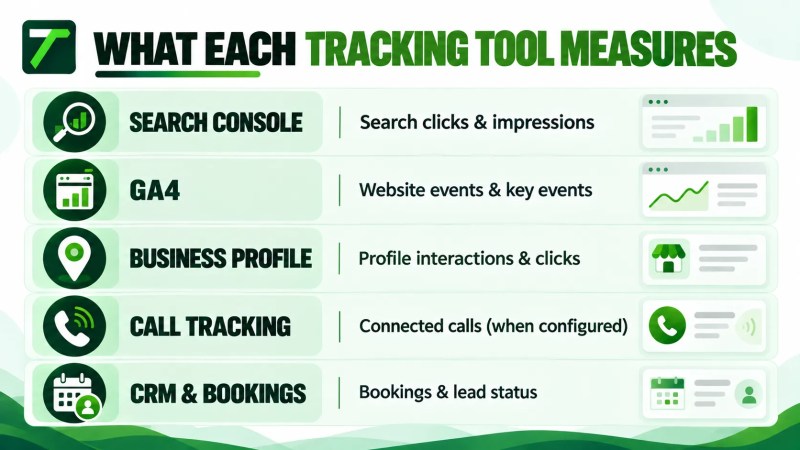
No single analytics platform automatically records every local-search interaction, completed call, booked appointment, and sale. Different tools answer different questions.
Google Search Console
Google Search Console’s Search results Performance report provides information about Google Search clicks, impressions, click-through rate, and average position. It also allows analysis by dimensions such as query and page.
Use it to understand which website pages receive clicks from Google Search and how search visibility changes. Search Console does not by itself establish whether a visitor completed a contact form, made a phone call, or became a customer.
Google Analytics 4
Google Analytics 4 (GA4) can record website visits and configured interactions. For lead generation, important actions may include successful form submissions, appointment requests, and relevant phone-link clicks.
Google calls particularly important measured actions key events. An event must be collected and appropriately configured before it can be used to assess the corresponding business action.
Website tracking needs testing because not every form, booking system, or phone conversation can be measured through the same default events.
Google Business Profile Performance
Google Business Profile Performance measures interactions with an eligible, verified Business Profile on Google Search and Maps.
According to Google’s Business Profile performance documentation, relevant metrics can include:
- Calls: Clicks on the call button within the Business Profile.
- Website clicks: Clicks on the profile’s website link.
- Directions: Requests for directions to the business.
- Bookings: Completed bookings where supported through a booking provider.
Not all metrics appear for every business. Google also notes that Business Profile performance data can contain interactions associated with both organic results and Google Ads, so these totals should not automatically be labelled organic-only conversions.
Google Business Profile performance is especially useful alongside a broader Google Business Profile optimization process, but its interaction counts are not a substitute for actual enquiry records.
Call Tracking, Booking Systems, and CRM Records
A dedicated call-tracking system can help identify connected calls and, depending on its configuration, information about call sources, duration, and outcomes. Booking systems confirm whether appointments were actually created. A customer relationship management system, or CRM, can record whether enquiries are qualified and eventually become customers.
These systems need a clear measurement plan and appropriate integration. Do not assume they automatically share complete attribution information with GA4 or Google Business Profile.
How to Track Website Form Submissions
Forms are often one of the most straightforward local SEO lead-tracking opportunities because the business controls the website and can test whether a request was received successfully.
However, clicking a form’s Submit button is not always the same as completing an enquiry. Validation errors, connection problems, and unsuccessful submissions can make button-click counts misleading.
Define a Successful Submission
Choose a specific success condition. Depending on the form, that could be:
- Loading a dedicated thank-you page after a confirmed submission.
- Receiving a successful submission response from the form system.
- Triggering a confirmed success message after the form is accepted.
- Recording a new enquiry in the CRM or form-management system.
The best trigger is the one that most reliably represents a real submitted enquiry.
Configure the GA4 Event
Google Analytics documents enhanced measurement for form interactions, including form_start and form_submit, where supported. A recorded form submission event is not, by itself, proof that the business received a valid enquiry. Test the actual form implementation and confirm successful submissions against form or CRM records.
Google also recommends the generate_lead event for initial lead acquisition. Its recommended events documentation identifies this event for actions such as form-generated leads.
A practical setup process is:
- Identify the form that creates a meaningful customer enquiry.
- Choose a verified submission-success condition.
- Configure the relevant GA4 event through the site’s existing measurement implementation or Google Tag Manager.
- Mark the meaningful event as a key event where appropriate.
- Submit a test enquiry and check whether the event was recorded.
- Check the actual form inbox or CRM to ensure the corresponding enquiry was received.
- Test again after material changes to the form or website.
A thank-you-page trigger may be suitable for some forms, while others need a successful form-response event. Avoid counting both as separate leads when they represent the same enquiry.
How to Track Calls From Local Search
Phone calls are especially important for businesses where customers want to speak to someone before booking, including many home-service providers.
Call tracking becomes more useful when you distinguish an attempted call from a connected conversation and a qualified service enquiry.
Calls From Google Business Profile
Google Business Profile’s Calls metric counts interactions with the call button on the profile. It does not, by itself, confirm that the call connected or resulted in a booking.
Use the metric as an indicator of call intent. Compare it with the business’s phone-system or call-tracking records when actual connected calls and outcomes matter.
Phone Calls From the Website
With appropriate website event tracking, a business can measure clicks on telephone links using the tel: protocol. Such an event shows that a visitor selected a phone contact action, but it does not prove that the call connected or was completed.
For businesses that need connected-call measurement, a properly configured third-party call-tracking system may be appropriate. Source attribution, call recording, caller information, and integration features vary by provider.
Google Ads also offers phone call conversion tracking for eligible advertising scenarios. Google’s phone call conversion tracking documentation describes calls associated with ads and eligible ad-driven website visits.
Important: Google Ads call conversion tracking should not be presented as a complete tracking solution for all unpaid local search calls. Paid and organic measurement need to remain distinguishable.
Define What Makes a Call Qualified
Call duration alone is an imperfect indicator of value. A long support call may not be a new sales enquiry, while a relatively short conversation may produce a legitimate booking.
For service businesses, useful qualification checks may include whether the caller:
- Requested a service the business actually provides.
- Was located within the operating service area.
- Was a new prospective customer rather than an existing support case.
- Provided enough information for the business to respond or quote.
- Booked an appointment or advanced to the next sales stage.
If calls are recorded or personal information is processed, follow applicable privacy, consent, retention, and access requirements.
How to Track Bookings and Appointments
Booking tracking should distinguish a visitor opening a scheduler from an appointment actually being created.
For example, someone might click “Book Appointment,” review the available times, and leave before completing the process. Treating the initial click as a confirmed booking would overstate appointment activity.
Measure the Completed Booking
Where supported, connect the booking system’s confirmation event or successfully created appointment record to the analytics setup.
Depending on the platform, this may involve a confirmation page, an integration, an appropriate event, or reconciliation with the booking system’s records.
Test for situations where:
- The booking flow opens on another website or domain.
- The visitor begins but does not complete scheduling.
- A reservation is created and later cancelled.
- An appointment is rescheduled rather than newly booked.
- The same appointment appears in more than one reporting system.
If a booking provider does not expose a reliable completion signal, report tracked booking clicks separately from confirmed appointments.
Confirm the Outcome
Review the booking calendar or CRM before reporting confirmed appointments. Businesses may also track attended appointments, completed jobs, and eventual sales as later stages of the customer journey.
How to Attribute Leads to Local Search
One of the main challenges in tracking local search conversions is knowing which source deserves credit for an enquiry.
A customer may discover a business through Google Maps, visit its website, return later, and eventually call. Another customer may call directly from the Business Profile without opening the website at all.
These journeys require careful reporting because website analytics and Business Profile performance do not necessarily capture the same interactions or identify the same individuals.
Use Consistent UTM Tracking Where Appropriate
UTM parameters help Google Analytics identify traffic-source information from tagged links. Google’s campaign URL guidance documents parameters such as utm_source, utm_medium, and utm_campaign.
For example, a business may use a consistently tagged website destination on its Business Profile to help distinguish visits that arrive through that link from other website visits. The parameter values must follow the business’s established reporting conventions.
UTM tagging does not track a call made directly from the Business Profile, and it does not identify every person who later returns by another route.
Keep organic and paid traffic classifications accurate. Do not label paid advertising clicks as organic simply because the business also appears in Google Maps.
Connect Search Console, GA4, and Business Profile Data Carefully
Each tool contributes a different view:
- Search Console: Google Search visibility and website clicks by query or page.
- GA4: Website sessions and configured events, subject to its measurement and attribution settings.
- Business Profile Performance: Reported profile interactions such as call-button clicks and website-link clicks.
- CRM or booking data: Recorded enquiries, qualified opportunities, appointments, and customers.
These numbers should not automatically be added together. A person may appear in more than one system, and the platforms may use different definitions and reporting periods.
The goal is a coherent explanation of the customer journey, not an artificial single total formed by combining incompatible metrics.
How to Measure Qualified Leads and Customers
Traffic and enquiry volume can increase without producing more suitable work. This is why local SEO conversion tracking should extend beyond the first interaction whenever reliable business records are available.
For example, a roofing contractor might receive several enquiries from people outside its working territory. Those enquiries may be genuine form submissions, but they do not all represent viable opportunities.
Create Simple Lead Stages
A practical lead-status framework can include:
- Enquiry received: A form, connected call, or booking request was received.
- Qualified lead: The enquiry meets agreed service, location, and customer criteria.
- Appointment or quote: The business schedules a consultation or prepares a quotation.
- Customer won: The prospect purchases or books the service as defined by the business.
Google’s recommended Analytics events include generate_lead, qualify_lead, and close_convert_lead for different stages of lead generation. These do not create qualified-lead or customer records automatically; the business needs an appropriate implementation and source data.

Keep Lead Records Consistent
Record the enquiry date, source when reasonably known, service requested, service area, qualification status, and eventual outcome.
Use one consistent definition for a qualified lead. Exclude spam, duplicates, and unrelated enquiries from qualified-lead totals while retaining appropriate records for audit and reporting.
For a wider explanation of turning search demand into business opportunities, see Traffisite’s article on SEO lead generation for service businesses.
Build a Useful Local SEO Conversion Report
A useful local SEO report connects search visibility to business outcomes without hiding the differences between data sources.
Start with the same reporting period across systems wherever possible, then group measurements by stage.
Report Visibility and Website Activity
- Google Search clicks and impressions
- Organic search sessions to relevant service and location pages
- Business Profile website clicks and other applicable interactions
Report Enquiries and Outcomes
- Successfully submitted website enquiries
- Phone-link clicks, separately from connected calls
- Connected calls and qualified calls where reliable data exists
- Booking requests, separately from confirmed bookings
- Qualified leads and customers recorded in the CRM
Calculate Rates Using Consistent Definitions
Google defines session key event rate as the percentage of sessions containing a key event. For a consistently defined group of website sessions, you can use a similar calculation for successfully tracked enquiry actions:
Session enquiry conversion rate = (eligible sessions with at least one recorded enquiry ÷ total eligible sessions) × 100
For example, suppose a service page receives 200 eligible sessions during a reporting period, and 10 of those sessions generate at least one successfully tracked enquiry. The session-based enquiry conversion rate would be 5%.
This is a hypothetical calculation, not a Traffisite client result or an industry benchmark. It measures the share of sessions with at least one defined enquiry action, not the number of individual leads. The numerator and denominator must use the same eligible session group and reporting period. Each qualifying session is counted once even if it generates multiple enquiry events.
Direct calls from a Business Profile do not belong in that website-session calculation unless a reliable and consistent method actually connects them to the measured session population.
For broader local performance indicators, Traffisite’s guide to local SEO KPIs provides useful context for separating search visibility, engagement, and business outcomes.
Explain Results and Limitations
A monthly report should answer three practical questions: what changed, what evidence supports the change, and what action should happen next?
For example, if organic traffic increases but confirmed enquiries stay flat, review the pages attracting visitors and whether the contact process works properly.
If form submissions increase while qualified leads decline, investigate search relevance, customer location, service descriptions, and the form’s qualification process.
Do not treat every month-to-month change as proof that a particular SEO action caused the result. Seasonality, other marketing channels, operational capacity, tracking errors, and changes in customer demand may also affect the numbers.
Common Conversion Tracking Mistakes
Before relying on a conversion dashboard, check for these common issues:
- Counting every call click as a completed call: A button click is not evidence of a connected conversation.
- Counting form starts as submitted leads: Beginning a form does not mean the visitor completed it.
- Tracking only the Submit button: Failed submissions may still trigger a click event.
- Counting bookings before confirmation: Opening a scheduler is not the same as creating an appointment.
- Adding Business Profile and GA4 totals together: The same customer journey may be represented in multiple systems.
- Mixing paid and organic conversions: Maintain clear acquisition and source classifications.
- Ignoring duplicate or spam enquiries: Raw submissions can exaggerate useful demand.
- Assuming every lead is qualified: Confirm whether the enquiry matches the business’s services and operating area.
- Changing event definitions without documenting them: Inconsistent definitions make historical comparisons unreliable.
- Skipping tests after site updates: Form changes, booking integrations, and website modifications can affect tracking.
Accurate measurement supports better decisions about the website and its contact experience. If qualified visitors reach a service page but struggle to enquire, consider the practical improvements in Traffisite’s guide to improving service page conversions.
Local SEO Conversion Tracking Checklist
Use this checklist when setting up tracking or reviewing an existing measurement system.
- Define what counts as an enquiry, qualified lead, booking, and customer.
- Confirm Google Analytics is collecting data on the relevant website pages.
- Configure and test successful form-submission events.
- Mark appropriate business-critical events as GA4 key events.
- Separate phone-link clicks from confirmed connected calls.
- Review available Business Profile interaction metrics.
- Check booking confirmation tracking against actual booking records.
- Use a consistent UTM naming approach on appropriate tracked links.
- Keep paid and organic search reporting separate.
- Record lead qualification and outcomes in an appropriate business system.
- Exclude or identify duplicate and spam enquiries when reporting qualified leads.
- Check that different tools are not being combined into an unsupported lead total.
- Test tracking after important form, website, or booking changes.
- Follow applicable privacy, consent, and data-handling requirements.
- Report limitations when an enquiry’s source cannot be determined reliably.
Start with the highest-value conversion actions rather than attempting to instrument every possible click. Expand the tracking setup only when the additional information will help the business make a useful decision.
FAQ
What is local SEO conversion tracking?
Local SEO conversion tracking measures actions associated with local organic search and Business Profile discovery, such as enquiries, qualified calls, appointments, and customers. It connects search visibility with meaningful business outcomes.
Can Google Analytics 4 track leads from local SEO?
GA4 can measure configured website events, including successful form submissions and certain booking or contact interactions. It does not automatically confirm every connected call, offline booking, qualified lead, or sale without an appropriate tracking implementation.
Does Google Business Profile show how many calls I received?
Its Calls performance metric counts clicks on the Business Profile call button. It does not, by itself, confirm the number of connected conversations or qualified phone leads.
Can I track phone calls from Google Maps?
You can review Business Profile call-button interactions. Measuring actual connected calls and their outcomes may require appropriate phone-system records or third-party call tracking. The attribution detail depends on the tracking setup.
How do I track local SEO form submissions?
Configure an analytics event that represents a successfully received enquiry, test the event using a real submission, and reconcile it with form or CRM records. Do not assume that clicking the Submit button always means the form was accepted.
What is the difference between a conversion and a qualified lead?
A tracked conversion is a defined measurable action. A qualified lead is an enquiry that meets the business’s agreed criteria, such as service need and location. A form submission can be a conversion without becoming a qualified lead.
Should I combine Search Console, GA4, and Business Profile conversions?
Use the tools together for context, but do not simply add their different metrics. They measure different actions, and the same customer journey can appear in more than one system.
How often should I review local SEO conversion performance?
A monthly review is a practical starting point for many service businesses, with more frequent checks for critical tracking errors or active campaigns. The appropriate schedule depends on enquiry volume and how quickly the business needs to respond to changes.
Measure Local SEO by the Enquiries That Matter
Local SEO conversion tracking is most useful when it shows more than visibility and click counts. Calls, forms, bookings, qualified leads, and customers each represent different stages of the journey, and each needs an appropriate measurement method.
Begin by defining the actions that matter to the business. Confirm that website events reflect successful enquiries, review Business Profile interactions without overstating them, and connect reliable call and booking records to the lead qualification process.
Over time, this gives the business a clearer picture of which pages and local search activities deserve attention. If you need help connecting your local visibility work with practical measurement and improvement priorities, explore Traffisite’s local SEO services or request a free SEO growth plan.