

When your business hours, phone number, website, location, or other important details change, your Google Business Profile should be updated so customers can find current information about your business.
The editing process itself is relatively straightforward. The more important task is knowing what information to review, making only accurate changes, and checking the profile afterward to confirm that the update appears as intended.
Quick Answer: To edit your Google Business Profile, sign in to the Google Account associated with the profile, find your business through Google Search or Google Maps, and open the available profile editing options. Select the information you need to change, review the update carefully, and save it. Google may review certain changes, and some updates can result in a request to verify the business again.
How to Edit Your Google Business Profile
Start by signing in to the Google Account associated with the Business Profile. You can find the profile through Google Search by searching for your business name and city or “my business,” or through Google Maps.
A practical editing process is:
- Sign in to the Google Account associated with the Business Profile.
- Locate the Business Profile through Google Search or Google Maps.
- Select the available option to edit the profile.
- Select the information you need to update.
- Enter the correct business information and review it carefully.
- Save the change.
- Check the public profile afterward to confirm how the information appears.
If you are creating a listing rather than changing an existing one, see our guide to adding a Google Business Profile.
If the profile is already established and you want to improve it beyond basic information updates, our Google Business Profile optimization guide covers the broader optimization process.
What Business Profile Information Should You Review?
You do not need to change every field whenever you access your profile. Focus on information that has actually changed, is incomplete, or no longer represents how the business operates.

Business Name
Your Business Profile name should reflect your business’s real-world name as it is consistently represented to customers. Avoid adding unnecessary promotional wording, location details, or other information that is not part of the actual business name.
If the business name changes, review other customer-facing places where the old name may still appear.
Address and Service Information
If your business moves or changes how it serves customers, review its location and service information carefully. The information shown should reflect how the business currently operates.
Location information also connects to a wider local search strategy. Our local SEO guide explains how business profiles, websites, and other local search elements work together.
Phone Number
Make sure the listed phone number is current and able to receive customer inquiries. An outdated or unmonitored number can create problems for customers regardless of how visible the profile is.
Website
Review the website destination after a domain change, site migration, major restructuring, or other website update. Customers should be sent to the correct active website rather than an outdated or broken destination.
For more context about how these two assets work together, see our guide to the Google Business Profile and your business website.
Business Hours
Review your hours whenever your operating schedule changes. Customers may rely on this information when deciding when to contact or visit the business, so outdated hours can create unnecessary confusion.
Business Categories
Business categories help describe what your business does, and Google recommends choosing a primary category that best represents the business. If your core business changes, review whether your selected categories still accurately describe it.
For a more detailed explanation of this field, see our guide to Google Business Profile categories.
Business Description and Other Details
Review descriptive information when the business changes its services, positioning, operating model, or other details customers may need to understand.
The goal is not to continually rewrite the profile. Make changes when there is a legitimate reason and keep customer-facing information aligned with the business.
When Should You Update Your Google Business Profile?
You do not need to edit a profile simply for the sake of making changes. Review it whenever meaningful business information changes or when you discover something inaccurate.
Common reasons to review or update a profile include:
- a change to normal operating hours
- a new phone number
- a website or domain change
- a business relocation
- a meaningful change in services
- a business name change
- changes to how or where customers are served
- outdated descriptive information
Business Profile checks can also be included in a broader local SEO audit, allowing you to review the profile alongside your website and other important local search information.
Common Google Business Profile Editing Mistakes
Even simple edits deserve careful review. Avoid changes that make your profile less accurate or leave customers finding conflicting information elsewhere.
Changing Information Without Checking Other Business Assets
If you change an address, phone number, business name, hours, or another major detail, check whether the same outdated information still appears on your website or other important business listings.
Our guide to local SEO citations explains the role of business information across external listings in more detail.
Adding Keywords Where They Do Not Belong
Factual Business Profile fields should describe the real business. In particular, Google’s guidelines say the business name should reflect the real-world business name, and categories should represent the business rather than being used solely as keywords.
SEO targeting should not come at the expense of accurate customer-facing information.
Making Unnecessary Changes
If only one business detail needs correction, focus on that correction rather than rewriting unrelated fields without a clear reason.
A deliberate editing process also makes it easier to track what changed and review the result afterward.
Submitting an Edit Without Checking the Result
Do not assume that saving an edit completes the process. Check the public-facing profile afterward and confirm that important information appears as intended.
This is particularly useful after significant operational changes such as a relocation, rebrand, new website, or change in how customers contact the business.
What If Your Google Business Profile Changes Are Not Showing?
Google may review submitted information, and some changes, including certain category or business-detail updates, can lead to a request for verification again.
If an important update is not appearing, first confirm that you are signed in to the Google Account associated with the intended Business Profile. Then review the information you submitted for accuracy and check whether Google is requesting another action.
If verification is required, use the verification options available on your Business Profile. Our guide to Google Business Profile verification explains that process in more detail.
If the profile has instead become unavailable because of a suspension, that is a different issue from an ordinary profile edit. See our guide to a suspended Google Business Profile for that situation.
Make Profile Maintenance Part of Your Local SEO Process
Editing your Google Business Profile should not be treated as an isolated administrative task. For a service business, the profile is part of a wider local presence that can include the website, service information, business listings, reviews, and other search assets.
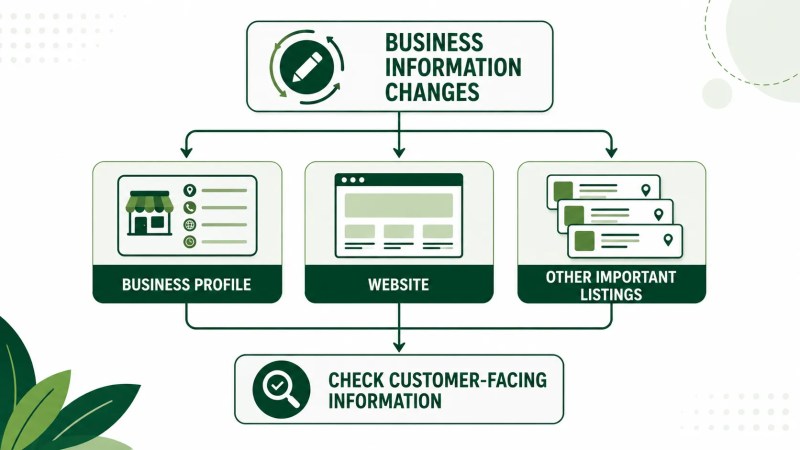
A simple maintenance process can include:
- checking core business information for accuracy
- reviewing operating hours when schedules change
- confirming phone and website destinations still work
- checking whether business categories still represent the company
- reviewing important changes after they are submitted
- updating corresponding customer-facing information elsewhere when necessary
Businesses managing several parts of their local presence may benefit from making these checks part of an ongoing local SEO process rather than waiting until outdated information creates a customer-facing problem.
If the broader objective is attracting more customers through local search, Traffisite also outlines an approach to generating more local leads through an interconnected search strategy.
Frequently Asked Questions
How do I edit my Google Business Profile?
Sign in to the Google Account associated with the Business Profile, locate the business through Google Search or Google Maps, select the available editing option, make your changes, and save them. Check the profile afterward to see how the updated information appears.
Can I change my Google Business Profile information?
Business Profile owners and managers can edit profile information, although their overall access permissions are not identical. Google may also request additional verification after certain business details are changed.
How long does a Google Business Profile edit take to appear?
Processing time can depend on the type of change. Google provides specific timelines for some updates, while certain changes may also require review or additional verification. For example, Google states that approved service-area edits may take up to 48 hours to appear.
Should I edit my Google Business Profile regularly?
You do not need to make changes just for the sake of editing the profile. Instead, review it periodically and update information when business details change or become inaccurate.
Should my Google Business Profile match my website?
Important customer-facing business information should accurately represent the same business. When details such as your name, location, phone number, website, or operating hours change, review the corresponding information on your website and other important listings as well.
Keep Your Business Information Accurate
Editing a Google Business Profile may be a small administrative task, but the information customers find there matters. Focus on the details people depend on, make changes when there is a legitimate business reason, and check important updates after saving them.
When Business Profile maintenance is coordinated with your website and other local search assets, customers are more likely to encounter clear and current information wherever they find the business.