

If your local visibility feels stuck — you’re not showing up in the map pack, calls have slowed down, or you’re simply not sure whether your local SEO is working — a local SEO audit can help you identify possible problems. It’s not a single check; it’s a review of several connected areas that can influence how your business appears when nearby customers search for what you do.
This guide walks through a practical audit process you can run yourself, in order, without needing specialized tools for most of it. If the goal is to actually generate more local leads, the audit below is a useful starting point for deciding what to investigate and fix first.
Quick Answer: A local SEO audit is a structured review of your Google Business Profile, website, citations and business listings, reviews, local rankings, and technical health to identify possible issues affecting your visibility in local search. Starting with your Google Business Profile is practical because it directly controls important business information customers can see in Google Search and Maps, then you can use the rest of the audit findings to prioritize fixes.
What a Local SEO Audit Actually Checks
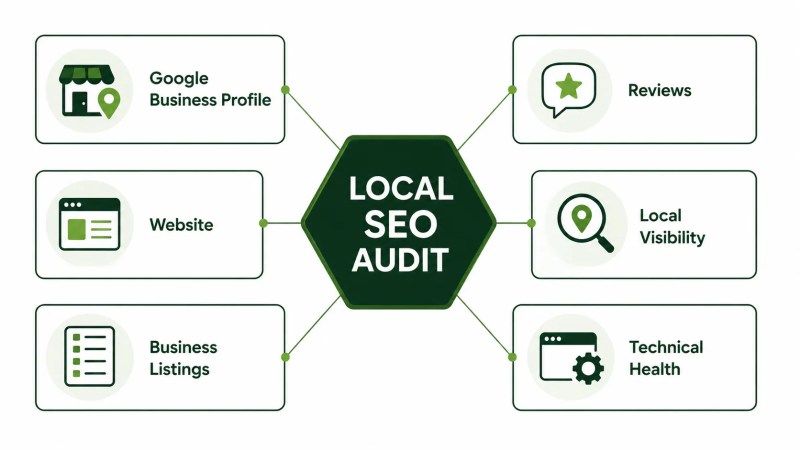
A local SEO audit reviews the main areas that can affect how your business appears in local search results and Google Maps. Rather than treating local SEO as one thing, it breaks the review into distinct areas: your Google Business Profile, your website’s local relevance, citations and business listings across the web, your review profile, your visibility for the searches that matter, and your site’s basic technical health. Our guide to local SEO covers the underlying strategy in more depth; this article focuses on the audit process itself.
For companies that deliver services across specific geographic areas, Traffisite’s SEO for service businesses page provides broader context for connecting service coverage with local search visibility.
Step 1: Audit Your Google Business Profile
Your Google Business Profile (GBP) is a core part of your presence in Google Search and Maps, so it’s a practical place to start. Google recommends keeping Business Profile information accurate, complete, and up to date. Work through these checks:
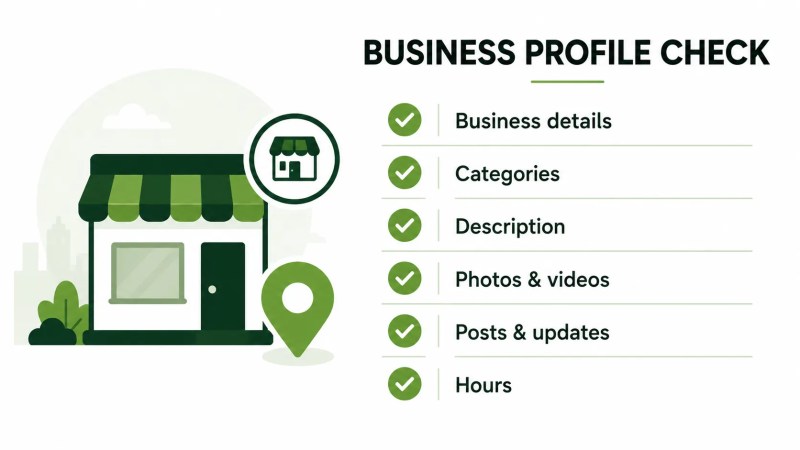
- Confirm that your business name accurately reflects the real-world name your business uses and that your address or service area and phone information are current.
- Check that your primary category accurately represents your core business, and use additional categories only when they genuinely describe what the business offers.
- Review your business description for clarity and make sure it accurately reflects your current services.
- Look at your photos and videos to make sure they are current and useful to prospective customers.
- Review any Business Profile posts or updates you’re using and make sure the information is still current.
- Confirm your regular and special hours are accurate.
For a deeper walkthrough of getting each of these elements right, see our guide on Google Business Profile optimization.
Step 2: Audit Your Website’s Local SEO Signals
Your website should clearly communicate what your business does and where it operates. Google can use publicly available information from a business’s official website as one source of Business Profile information. Check whether:
- Your service area or location pages clearly explain where you operate rather than relying on vague geographic language.
- Your core business details on the website are accurate and consistent with the information you provide through your Google Business Profile.
- Your page titles and headings clearly describe the service and, where useful for the page, the relevant location.
- You have genuinely useful location-specific content when separate location pages are warranted rather than near-duplicate pages with only place names changed.
- Your homepage and important service pages clearly communicate the services and areas they are intended to serve.
When your audit identifies gaps across service pages, location coverage, and business information, Traffisite’s local SEO implementation services can help turn those findings into a coordinated action plan.
Step 3: Audit Your Citations and Business Listings
Google can source business information from your website and other places across the web, so this step focuses on checking whether important third-party listings represent your business accurately. During this step:
- Search your business name and check important directories where your business is listed for accuracy.
- Look for outdated business details, especially old addresses or phone numbers from a previous location.
- Check for duplicate or outdated listings that could give customers conflicting information.
- Note relevant industry or local directories where having an accurate listing would be useful to prospective customers.
For more on why this matters and how to prioritize it, see our article on how business listings support local visibility.
Step 4: Audit Your Reviews
Reviews matter to prospective customers, and Google says review count and positive ratings can also help a business’s local ranking. Check:
- Your overall review count and rating, including how they compare with other businesses appearing prominently for relevant searches.
- How recent your reviews are — a long gap may be worth addressing as part of maintaining an active review profile.
- Whether you’re responding to reviews, particularly when a response would help address a customer’s concern or provide useful context.
- Whether your reviews give prospective customers useful, specific context about their experience with your business.
Step 5: Check Your Local Rankings
Once you’ve reviewed the underlying areas, check how visible the business actually is for searches that matter. Search relevant service terms and locations and note whether the business appears in Google Maps/local results, organic results, both, or neither. Keep in mind that local results can vary based on factors such as relevance and the searcher’s location, so a single manual search should not be treated as a complete ranking measurement. For a closer look at map visibility, see our guide to Google Maps SEO. If you want a more structured way to track search performance over time, our guide on SEO measurement and reporting covers that process.
Step 6: Run a Basic Technical SEO Check
Technical issues can make it harder for search engines or users to access and use important pages. At minimum, check:
- Whether important pages work well and load efficiently on mobile devices.
- Whether your key pages are indexed and not accidentally blocked from search engines.
- Whether your site is served securely over HTTPS and important pages contain no obvious broken links.
- Whether your local business structured data, if present, accurately reflects the business information on the page.
A full technical review goes deeper than what’s practical to do manually — our technical SEO services cover a more comprehensive audit if this step turns up issues you’re not able to diagnose on your own.
Free vs. Paid Local SEO Audit Tools
Much of this audit can be done manually with no cost beyond your time — reviewing your GBP, searching your own listings, and checking your website don’t necessarily require a paid subscription. For a starting point on tools that can speed up specific parts of the process, our free tools page lists no-cost options worth trying first.
Paid tools become more useful when you need to track rankings over time, monitor listings at scale, or compare against multiple competitors without repeating the same manual checks. If you reach that point, our SEO tools resource outlines more advanced options.
How Often Should You Audit Your Local SEO?
As a practical maintenance schedule, consider running a full audit once or twice a year, and sooner if you notice a meaningful drop in calls, rankings, or visibility. Business Profile details and reviews are worth checking more regularly because they can change between full audits. If an audit surfaces more issues than you have time to fix — or you’re not confident interpreting what you find — our SEO audit services can handle a more comprehensive review.
FAQ
What’s the difference between a local SEO audit and a regular SEO audit?
A general SEO audit can examine areas such as technical accessibility, content, links, and search performance. A local SEO audit adds location-specific areas such as your Google Business Profile, business listings, reviews, and visibility in local search. See our comparison of local SEO vs. traditional SEO for a fuller breakdown.
Can I do a local SEO audit myself?
Yes. Many of the checks above can be completed manually. More complex technical problems, structured data errors, large numbers of listings, or location-specific rank tracking may be easier to diagnose with specialized tools or experience.
What’s the most common issue a local SEO audit uncovers?
There isn’t one issue that every local SEO audit uncovers. Common areas worth checking include inaccurate or incomplete Business Profile information, inconsistent business details across important listings, review management, website relevance, and technical problems.
Do I need a paid tool to audit my local SEO?
No. Many core checks — reviewing your Google Business Profile, checking important listings, inspecting your website, and running manual searches — can be completed without a paid SEO tool. Paid tools become useful when you need more scalable tracking, monitoring, or competitive analysis.