

A Google Business Profile lets an eligible business manage how key business information appears across Google Search and Maps. For service-business owners, understanding the profile is useful because it brings important business information and customer-facing features into one place.
This guide explains what a Google Business Profile is, what information it can contain, and the major areas businesses should review after creating or claiming one. It also connects you to more detailed Traffisite guides for optimization, verification, categories, reviews, posts, and suspension issues.
Quick Answer: A Google Business Profile is a business listing that eligible businesses can manage on Google. Depending on the business and available features, a profile can include information such as the business name, category, location or service area, hours, contact details, photos, reviews, and other information that helps people understand and interact with the business. Managing the profile involves keeping information accurate, completing verification when required, choosing appropriate categories, reviewing customer interactions, and following Google’s Business Profile policies.
What Is a Google Business Profile?
A Google Business Profile is a profile that eligible businesses can manage to represent their business on Google. It can surface business information in Google Search and Maps and give potential customers information they may need before contacting or visiting the business.
You may also see the abbreviation GBP used when people discuss Google Business Profile. Older resources may use the previous name Google My Business.
A Business Profile is only one part of a broader local search strategy. Website content, business information, reviews, links and citations, and other local signals may also need attention depending on the business. Traffisite’s local SEO guide explains how these areas fit into a wider local SEO process.
Who Can Use a Google Business Profile?
Google sets eligibility requirements for Business Profiles. Eligibility depends on how the business operates and interacts with customers, so businesses should confirm that they meet Google’s current requirements before creating or managing a profile.
This distinction matters because the way a business operates can affect how its address, service area, and other profile information should be represented.
Before creating or changing a profile, businesses should review Google’s current eligibility and representation requirements rather than assuming every business model qualifies in the same way.
What Information Can a Google Business Profile Include?
Available Business Profile information and features can vary by business category, region, eligibility, and profile circumstances. Depending on what is available for the profile, businesses may be able to manage information such as:
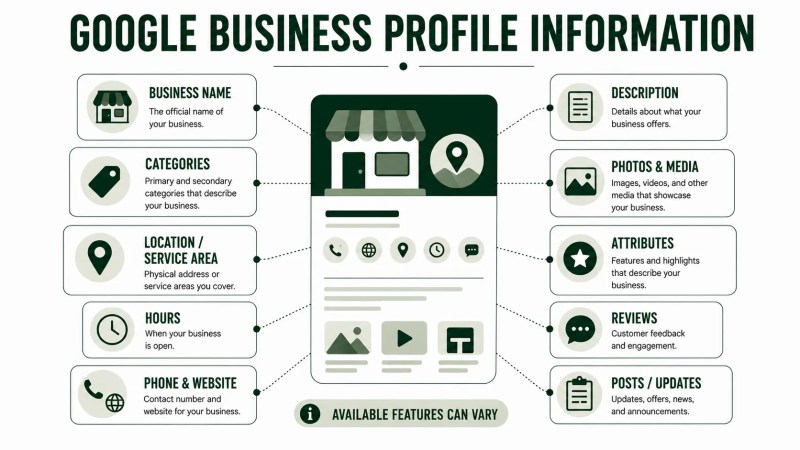
- Business name
- Primary and additional categories
- Address or service area
- Business hours
- Phone number
- Website
- Business description
- Photos and other media
- Attributes
- Customer reviews
- Posts or updates where available
- Other profile-specific information or interaction options
The goal should be accuracy rather than filling fields simply because they exist. The profile should represent the real business and provide useful information to people considering it.
Google Business Profile Verification
Google requires businesses to complete verification in order to manage certain Business Profile information and features. The exact requirements and available verification options should be confirmed against Google’s current Business Profile guidance.
Verification methods can vary, and the options offered to one business may differ from those available to another.
Before beginning verification, review the profile for accurate business information and be prepared to provide the evidence requested through the verification method Google makes available.
Traffisite’s Google Business Profile verification guide explains the process in more detail, including what to review when verification becomes a problem.
Choosing Google Business Profile Categories
Categories describe what a business does. Google Business Profiles use a primary category and can support additional categories where appropriate.
As a practical approach, choose a primary category that accurately reflects the business’s core activity rather than selecting one only because it appears attractive for search visibility. Additional categories should also represent services or activities the business genuinely provides.
Avoid treating categories as a place to add every loosely related service. The objective is to describe the actual business accurately.
For a more focused review, use Traffisite’s Google Business Profile categories guide.
Optimizing Your Google Business Profile
Business Profile optimization starts with accurate, useful business information. Rather than looking for a single setting that will transform visibility, review the profile systematically and focus on information that genuinely represents the business.
A practical review can include:
- Confirming the business name represents the real-world business.
- Reviewing the primary and additional categories.
- Checking the address or service area where applicable.
- Keeping hours current.
- Reviewing the phone number and website.
- Adding useful business information and media where appropriate.
- Reviewing customer-facing profile features available to the business.
- Monitoring the profile for information that needs to be updated.
Profile optimization should not involve adding inaccurate information simply to target additional search terms. Business information should continue to reflect the real business.
Traffisite’s Google Business Profile optimization guide provides a more detailed review process for these elements.
Managing Google Business Profile Reviews
Reviews can give potential customers information about other customers’ experiences with a business. Businesses can also respond to reviews through their Business Profile when the applicable features are available.
A practical review-management process can include asking genuine customers for feedback, monitoring new reviews, responding professionally when appropriate, and avoiding practices that violate Google’s review policies.
Do not treat reviews as something to manufacture. Review activity should reflect genuine customer experiences and follow the platform’s current policies.
Traffisite’s guide to Google Business Profile reviews explains how businesses can approach review management more systematically.
Using Google Business Profile Posts
Eligible profiles may have access to posts or updates that allow businesses to share information directly through the Business Profile.
Depending on the available post features, businesses may use updates to communicate relevant information such as announcements, offers, events, or other timely business information.
Posts are best treated as a customer-communication feature rather than a replacement for the business’s website or broader content strategy.
For practical guidance on planning and using updates, see Traffisite’s Google Business Profile posts guide.
What If Your Google Business Profile Is Suspended?
Google may suspend or disable Business Profiles that don’t follow its guidelines. Because the reason and available next steps can vary, businesses should review the information Google provides about the affected profile before deciding what to change.
If this happens, avoid making random changes or repeatedly submitting actions without understanding the underlying issue. Review the profile information, applicable policies, and the appeal options available for the profile.
The correct next step depends on the specific issue. A business may need to correct profile information, gather supporting evidence, or follow Google’s applicable appeal process.
If you are dealing with this situation, use Traffisite’s Google Business Profile suspension guide for a more focused troubleshooting process.
How to Manage a Google Business Profile Over Time
Creating or verifying a profile is not necessarily the end of the work. Business information can change, customer reviews can arrive, available features can evolve, and businesses may need to update hours, categories, photos, service information, or other profile details.
A simple ongoing review can include:
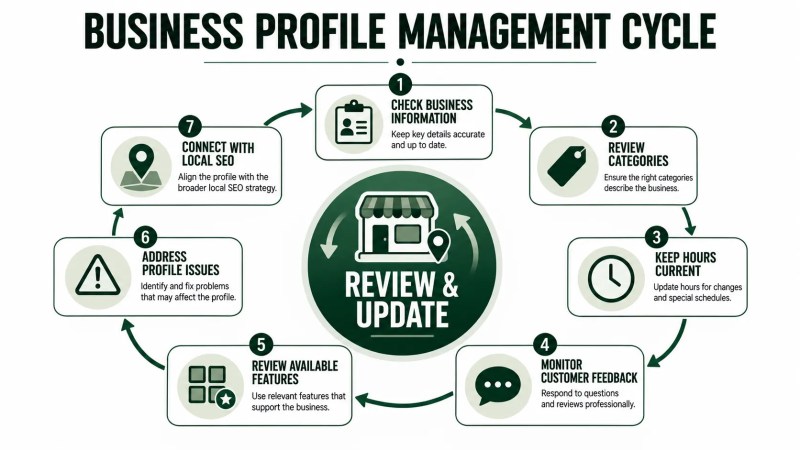
- Check core business information. Make sure important profile details still represent the real business.
- Review categories. Confirm that the selected categories remain appropriate.
- Keep hours current. Update regular or special hours when necessary.
- Review customer feedback. Monitor reviews and respond where appropriate.
- Review available profile features. Use relevant features when they genuinely help communicate with customers.
- Watch for profile issues. Address verification, access, policy, or suspension problems when they arise.
- Connect profile management to broader local SEO. Review the website and other local-search elements rather than treating the Business Profile as an isolated asset.
For businesses that want a broader review beyond the profile itself, Traffisite’s local SEO audit covers additional areas that may need attention.
How Google Business Profile Fits Into Local SEO
A Business Profile can be an important part of local visibility, but it should not be treated as the entire local SEO strategy.
The website still needs to explain the business and its services clearly. Relevant business information should be accurate, and other areas such as citations, content, links, reviews, and local search measurement may also deserve attention depending on the business.
If the goal is broader visibility in Google Maps and local search experiences, Traffisite’s Google Maps SEO guide provides additional context beyond Business Profile management alone.
Google Business Profile FAQ
Is Google Business Profile free?
Google currently provides Business Profile at no charge for eligible businesses. Businesses should still confirm current eligibility, features, and product requirements through Google’s official Business Profile documentation.
Is Google Business Profile the same as Google My Business?
Google Business Profile is the current product name, while Google My Business was a previous name for the product. Older articles and tools may therefore still use Google My Business terminology.
Do I need a physical storefront to have a Google Business Profile?
Not necessarily. Some eligible service-area businesses can use a Business Profile without operating a customer-facing storefront, provided they meet Google’s current eligibility and representation requirements.
Do I need to verify my Google Business Profile?
Verification is required for businesses to manage certain Business Profile information and features. The verification methods available can vary by business.
What should I optimize first on a Google Business Profile?
Start with accuracy. Review whether the business name, category, location or service area, hours, contact details, website, and other important information correctly represent the business. Then review additional features that are relevant and available to the profile.
Can a Google Business Profile be suspended?
Yes. Google may suspend or disable Business Profiles that don’t follow its guidelines. If a profile is affected, review the stated issue, applicable policies, profile information, and available appeal process before deciding what to change.
Use Your Business Profile as Part of a Broader Local SEO Strategy
A Google Business Profile gives eligible businesses a way to manage important business information and customer-facing features across Google Search and Maps.
Start with accurate business information and complete verification when Google requires it to manage the profile. Then review categories, profile optimization, reviews, posts, and ongoing management based on what is relevant and available to the business. If a policy or suspension problem appears, investigate the issue before making unnecessary changes.
Most importantly, treat the profile as one part of the business’s broader local presence. Connect Business Profile management with a useful website, accurate business information, relevant local content, legitimate authority, and ongoing measurement.