

Google Maps can be an important discovery channel for service businesses competing for customers in a specific area. Improving that visibility requires more than editing a few fields in your Google Business Profile. It involves making your business information accurate, strengthening the website and reputation supporting the profile, and measuring whether local search visibility produces meaningful opportunities.
Quick Answer: Google Maps SEO is the process of improving how clearly and consistently your business is represented across Google Business Profile, your website, customer reviews, and other relevant local sources. For service businesses, practical starting points include accurate profile information, clear service and location information, genuine customer reviews, consistent business details, and ongoing measurement of local search performance.
What Is Google Maps SEO?
Google Maps SEO is the process of improving a business’s visibility when potential customers search for nearby services through Google Maps or local Google search results.
For a service business, the goal is not simply to appear when someone searches for the company name. The bigger opportunity is becoming visible when someone needs the service you provide but has not yet decided which business to contact.
A homeowner might search for a plumber, pressure washing company, HVAC contractor, or another nearby provider. A strong local search presence gives the business an opportunity to be discovered during that research and decision-making process.
Google Maps SEO therefore overlaps closely with local SEO services. Your Google Business Profile is part of the picture, alongside your website, reviews, business information, local relevance, and broader online presence.
How Google Maps SEO Works
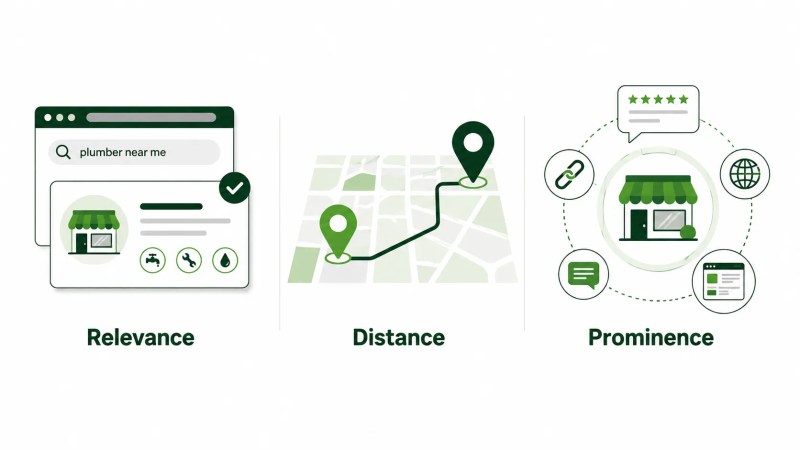
Google says local results are mainly based on relevance, distance, and popularity. In its explanation of these factors, Google describes prominence in terms of how well known a business is. Together, these considerations help Google find appropriate matches for local searches.
Relevance
Relevance describes how well a Business Profile matches what someone is searching for. Google recommends providing complete and detailed business information to help it understand the business and match the profile with relevant searches.
Distance
Distance refers to how far each business is from the customer who is searching. If a customer does not share their location, Google uses the location information available to it.
Because distance depends on the customer’s location, businesses displayed to one searcher may differ from those displayed to someone searching from another location. A Google Maps position therefore should not automatically be treated as one fixed ranking across an entire city or service area.
Prominence
Google describes prominence as how well known a business is. Google says prominence is also based on information such as how many websites link to the business and how many reviews it has.
The practical takeaway is simple: Google Maps business SEO extends beyond editing a profile. Businesses should think about the complete local search presence customers encounter.
Improve Your Google Business Profile
Your Google Business Profile is a logical place to start when reviewing Google Maps visibility. A more detailed Google Business Profile optimization process can help you review the profile systematically rather than treating individual fields as isolated SEO tasks.
Google says businesses with complete and accurate information are more likely to appear in local search results. The objective should therefore be accuracy and usefulness, not inserting keywords wherever possible. Someone viewing the profile should be able to understand what the company does, where it operates, when it is available, and how to contact it.
Complete the Core Business Information
Review the information available on your profile and make sure it accurately represents the business. For service businesses, a profile can include information such as:
- Business name
- Business categories
- Address or service area, as applicable
- Phone number
- Website
- Business hours
- Services offered
- Business description
- Photos
Use information that genuinely represents the business. Google requires businesses to represent themselves accurately, including using the real-world business name and accurate address or service-area information.
Choose Accurate Business Categories
Google says categories help customers find accurate, specific results for services they are interested in. Choose categories that are specific but representative of your core business, and use as few categories as necessary to describe the business accurately.
Do not choose categories solely as keywords or select unrelated categories simply to target additional searches.
Keep the Profile Current
Profile optimization should not end after the initial setup. Business hours change, services evolve, contact information can be updated, and newer photos may better represent the company.
Include profile accuracy in your regular marketing checks so customers are not relying on information that is no longer correct.
Strengthen Your Website for Local Search
Your Business Profile can link to your website, giving potential customers another place to understand what the company does and where its services are available.
If a profile describes a service or service area that is difficult to understand from the website, potential customers may have less supporting information when deciding whether the company fits their needs.
A broader local SEO strategy can connect profile optimization with service content, location information, website structure, and other parts of the business’s local search presence.
Create Useful Service Pages
Important services generally deserve clear website content rather than being buried in a long list on the homepage.
A useful service page should help potential customers understand what the service involves, who it is for, the problem it addresses, where it is available, and what they should do next.
This is where on-page SEO also matters. Page titles, headings, body content, internal links, and related page elements should make the topic understandable without repeating the same keyword unnaturally.
Make Your Real Service Areas Clear
If location matters to the service, make the company’s actual geographic coverage easy for visitors to understand.
For eligible service-area businesses, Google allows the Business Profile to show the areas where the company provides products or services. Businesses that do not serve customers at their business address should remove that address from the profile.
On your website, this does not mean automatically creating a page for every city name you want to target. Location content should have a genuine purpose and provide useful information for customers in that market.
Connect Related Pages
Service pages, location content, guides, and other useful pages should not operate as isolated SEO assets. Connect related information where doing so helps visitors continue their research.
For example, a location page may naturally lead to relevant service pages, while an informational article may help a visitor understand a service before deciding whether to request it.
Traffisite’s guide to internal linking for SEO explains how these page relationships can be structured more deliberately.
Build Relevant Local Authority
A business’s local search presence also extends beyond its own website and Google Business Profile.
Google says the number of websites linking to a business is among the information used when assessing prominence. That makes legitimate mentions and links from relevant sources worth considering as part of a broader local SEO strategy.
Potential opportunities may include industry organizations, professional associations, local organizations, suppliers, partnerships, sponsorships, or useful resources that other websites have a genuine reason to reference.
Businesses developing this area can consider a broader link building and authority strategy instead of treating large-scale directory submissions as the goal.
Strengthen Reviews and Business Information
Build a Sustainable Review Process
Reviews help potential customers evaluate a local business, and Google states that more reviews and positive ratings can help a business’s local ranking.
Instead of chasing a particular number of reviews, create a repeatable process for requesting genuine feedback from real customers.
- Complete the service.
- Ask the customer for an honest review at an appropriate time.
- Make the review process easy to access.
- Respond professionally to feedback.
- Continue requesting feedback consistently rather than relying on occasional review campaigns.
This creates a more sustainable reputation process while giving future customers access to recent feedback about the business.
Keep Important Business Information Consistent
Your business information may also appear on directories, social platforms, industry websites, local organizations, and other third-party sources. These external references are often discussed as local SEO citations and business listings.
Old addresses, outdated phone numbers, duplicate listings, or inconsistent company names can confuse customers and make the company’s online presence more difficult to manage.
Periodically review important sources where the business appears and correct inaccurate information when possible. Prioritize legitimate sources that are actually relevant to the business rather than trying to create a listing on every directory available.
Measure Google Maps SEO Performance
A single manual search does not provide a complete picture of Google Maps SEO performance.
Because distance from the customer is one of the factors Google uses for local results, searches performed from different locations can return different businesses. Checking a keyword from one location should therefore be treated as one observation rather than a complete measurement of local visibility.
Depending on the tools and data available to the business, useful indicators may include:
- Visibility for important local search queries
- Visibility from different points within the target service area
- Organic traffic to important service and location pages
- Leads attributed to local search
- Calls, forms, bookings, or other meaningful conversions
- Changes in review volume and customer feedback
- Performance of pages supporting the local search strategy
The objective is not simply to collect more SEO metrics. It is to determine whether greater search visibility is contributing to more meaningful opportunities for the business.
Traffisite’s guide to SEO measurement and reporting covers the broader process of connecting SEO work with useful performance indicators.
Google Maps SEO Checklist
Use this checklist to identify the most obvious gaps in your current local search presence:
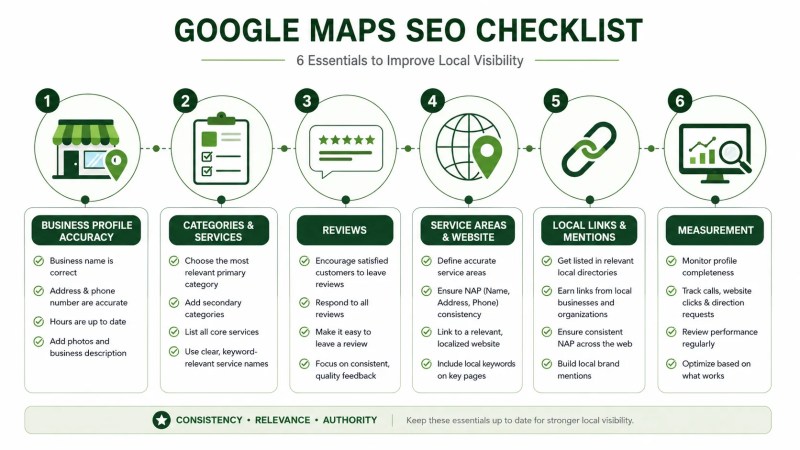
- Confirm that your Google Business Profile information is accurate and complete.
- Review whether your selected business categories accurately represent the company.
- Check business hours, phone numbers, website links, and other important contact information.
- Review the services and service areas represented on the profile.
- Use current photos that accurately represent the business.
- Create a repeatable process for requesting genuine customer reviews.
- Respond professionally to customer feedback.
- Check important business listings for outdated or conflicting information.
- Make sure core services have useful website content.
- Clearly communicate the locations or service areas you actually serve.
- Connect related services, locations, and informational content with useful internal links.
- Look for legitimate opportunities to earn relevant local or industry mentions and links.
- Measure leads and conversions alongside search visibility.
- Review the local search presence regularly rather than treating optimization as a one-time project.
Google Maps SEO FAQ
What is Google Maps SEO?
Google Maps SEO is the process of improving a business’s local search presence so it has a stronger opportunity to be discovered for relevant searches on Google Maps and in local Google results. The work can involve Google Business Profile, the business website, reviews, business information, service areas, and broader local authority.
Is Google Maps SEO the same as local SEO?
Not exactly. Google Maps SEO focuses specifically on visibility within Google’s local and map-based search experience. Local SEO is broader and can also include organic search visibility, service and location pages, website optimization, citations, content, links, and other elements of a company’s local search presence.
How long does Google Maps SEO take?
There is no universal timeline. The amount of work required can vary based on the business’s starting point, market, location, competition, website, profile, reputation, and other circumstances. Be cautious of promises guaranteeing a specific map position within a fixed period.
Can I improve Google Maps visibility without a website?
Yes. A Business Profile can appear on Google Maps and Search and provide customers with business information. A website can provide customers with additional information about the company. Google also says prominence is based in part on information such as how many websites link to the business.
Should I add SEO keywords to my Google Business Profile?
Do not add keywords merely for SEO. Google requires the business name to reflect the real-world name and says categories should represent the core business rather than be used solely as keywords. Profile information should accurately represent the actual business.
Do reviews help Google Maps SEO?
Yes. Google states that more reviews and positive ratings can help a business’s local ranking. Reviews also give potential customers information they can use when comparing businesses.
Should service businesses create a page for every city they serve?
Not automatically. A location page should have a genuine purpose and provide useful information for people in that market. Creating many nearly identical pages simply to target different combinations of services and city names is unlikely to create a strong experience for visitors.
What should I improve first for Google Maps SEO?
Start with accuracy. Review your Google Business Profile, website, core services, contact details, service areas, reviews, and important business listings. Once those foundations are reliable, you can work more systematically on website content, local authority, internal linking, and measurement.
Where to Start
You do not need to change everything at once. Start by checking whether Google and potential customers are seeing accurate, complete information about what your business does and where it operates. Then work outward from that foundation into reviews, website content, authority, and performance measurement.
If you want to place Google Maps visibility within a wider organic search strategy, Traffisite’s SEO for service businesses guide covers the broader framework.