

Looking at Google Business Profile examples can be useful when you know what to evaluate. The goal is not to copy another business’s profile. Instead, examples can help you identify the types of information, content, and customer-facing details that may be relevant to your own profile.
Businesses differ in their categories, locations, services, and customers, and some Business Profile features depend on the business category or feature availability. A profile that works well as a reference for one business may therefore not provide the right model for another.
Quick Answer: When reviewing Google Business Profile examples, look at how clearly and accurately the profile represents the real business. Useful areas to examine may include business information, categories, hours, contact details, services where available, photos, posts, reviews, and other relevant profile features. Use examples to identify useful patterns, not as templates to copy field for field.
What Should You Look for in a Google Business Profile Example?
A Google Business Profile example is most useful when you evaluate individual profile elements rather than judging the profile only by its overall appearance.
Start by asking whether the profile gives a potential customer clear and accurate information about the business. Depending on the business and the features available to its profile, useful areas to review may include:

- business name and core information;
- business category;
- address or service-area information where applicable;
- business hours;
- phone number and website;
- services where available;
- photos and other visual content;
- profile posts;
- customer reviews where available, including business responses when the profile is eligible to reply; and
- other profile information relevant to the business.
A useful profile is not simply one with every possible field filled. The information presented should accurately represent the real business, and relevant features should be used appropriately.
If you are unfamiliar with the platform itself, Traffisite’s guide to Google Business Profile provides a broader introduction before you begin comparing examples.
Pattern #1: Clear and Accurate Business Information
One useful pattern to look for is a profile that makes the business easy to understand. A prospective customer should be able to identify what the business is, where or how it operates, when it is available, and how to contact or learn more about it using the relevant information displayed on the profile.
When reviewing an example, examine whether details such as the business name, hours, phone number, website, address, or service-area information appear consistent with the business being represented.
The lesson is not to copy how another company writes or structures its information. Instead, use the example as a reminder to review whether your own profile accurately reflects your business.
For businesses ready to review their own information, Traffisite’s guide to editing a Google Business Profile explains the profile-editing process in more detail.
Pattern #2: Relevant Categories and Services
Another useful pattern is a profile where the selected business category corresponds with the business being represented.
When comparing profiles, do not assume that another company’s category selection should automatically be copied. Category choices should reflect your own business and the categories Google makes available.
Businesses in certain categories may have the option to display service information on their profiles. Where that feature is available, you can examine how a business presents the services it actually offers. The useful takeaway is whether the information helps clarify the business, not how many services have been added.
Traffisite’s guide to Google Business Profile categories provides more focused guidance for evaluating category selection.
Pattern #3: Useful Photos and Profile Content
Photos can help customers understand aspects of a business before contacting or visiting it. When reviewing examples, consider whether the visual content is relevant to the real business rather than focusing only on the number of images.
Depending on the business, useful photos may represent the location, products, services, team, or other real-world aspects of the company.
Profile posts provide another area to review. Rather than copying another company’s topics or posting frequency, look at whether its posts communicate useful and current information to customers.
If you want to examine that feature separately, Traffisite’s guide to Google Business Profile posts explains how posts fit into profile management.
Pattern #4: Reviews and Business Responses
Where reviews are available, they can provide another useful area to examine when comparing Business Profiles.
Do not evaluate an example solely by its star rating or number of reviews. Instead, consider what the review section can teach you about customer communication. For example, where responses are available, you can examine whether the business replies to reviews and how clearly and professionally those responses address customers.
The purpose is not to imitate individual responses. Businesses should respond based on the actual customer interaction and their own communication standards.
Traffisite’s guide to Google Business Profile reviews provides more context for businesses developing their own review-management process.
How Should You Compare Google Business Profile Examples?
Comparing several relevant profiles can provide a broader reference point than treating one business as the ideal example.
A practical review can use the same questions for each profile:
- Is the business immediately understandable? Look at whether the profile clearly represents what the business does.
- Is the core information clear and useful? Review the relevant contact, location, service-area, and operating information.
- Do the categories make sense for the business? Evaluate relevance rather than assuming another business’s selection should be copied.
- Are services represented where available? Look at whether service information helps clarify the business’s actual offering.
- Are the photos relevant? Consider whether the visual content helps a customer understand the real business.
- Is profile content useful and current? Review posts or other available content in context.
- How does the business handle reviews? Where reviews and responses are available, examine the approach to customer communication rather than focusing only on ratings.
This approach turns examples into a research tool instead of a template. It also helps prevent one competitor’s profile from becoming the standard for decisions that should be based on your own business.
How Do You Apply Lessons From Google Business Profile Examples?
After reviewing several examples, convert your observations into a review of your own profile.
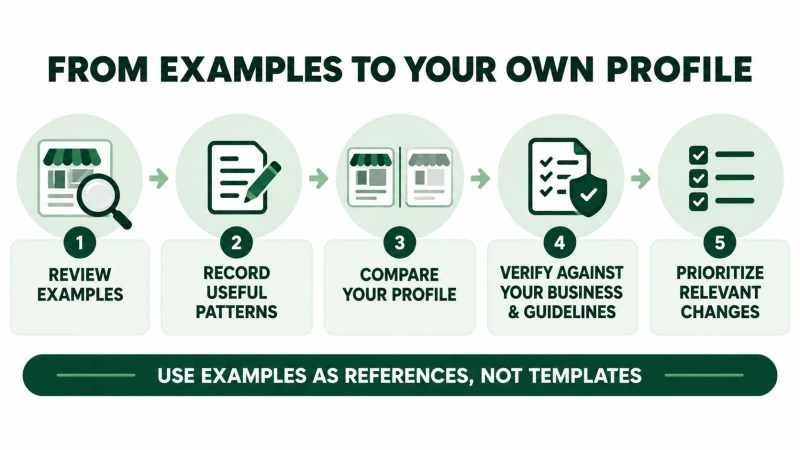
A simple process is:
- Record useful patterns. Note profile elements that consistently help you understand the businesses you reviewed.
- Compare them with your profile. Identify relevant information or features that may need attention.
- Verify everything against your real business. Do not copy categories, services, descriptions, hours, or other details simply because another company uses them.
- Review applicable Google requirements. Make sure proposed changes accurately represent the business and comply with relevant Business Profile guidelines.
- Prioritize relevant changes. Focus on information and features that genuinely help represent your business and serve potential customers.
For a step-by-step review of your own profile, Traffisite’s Google Business Profile optimization guide covers practical optimization areas in more detail.
Businesses should also review the applicable Google Business Profile guidelines before making changes based on what they observe elsewhere.
Frequently Asked Questions
What is a good Google Business Profile example?
A useful example is a profile that helps you understand how relevant business information and available profile features can be presented clearly. It should be used as a reference for evaluation rather than a template to copy.
Should I copy a competitor’s Google Business Profile?
No. Another profile can provide ideas about what to review, but your profile should represent your own real-world business. Categories, services, hours, contact details, locations, content, and other information should be based on your business rather than copied from a competitor.
What should I compare between Google Business Profiles?
Depending on the businesses and available features, you may compare core business information, categories, services, photos, posts, reviews, responses, and other relevant profile details. Focus on whether each element helps accurately and clearly represent the business.
Should every Google Business Profile contain the same information?
No. The information relevant to a profile can differ from business to business, and Google documents category-specific features that may not be available to every profile. Use examples to identify useful patterns while evaluating your own profile independently.
Are more photos, posts, services, or reviews always better?
Not necessarily. Do not judge a profile only by quantity. When reviewing examples, focus on relevance, accuracy, usefulness, and whether the information reflects the real business.
Can Google Business Profile examples help with optimization?
They can provide useful observations for reviewing your own profile. However, changes should be based on your actual business, applicable profile features, and relevant Google Business Profile requirements rather than copying another company’s setup.
Use Examples as References, Not Templates
The most useful Google Business Profile examples are not necessarily the profiles with the most fields, photos, posts, or reviews. More useful references are profiles that help you recognize how relevant information can make a business easier to understand.
Review several businesses, identify useful patterns, and then return to your own profile. Apply only the lessons that accurately fit your business, customers, operations, and available profile features.