

Google Business Profile can help eligible businesses manage how they appear across Google, but businesses should understand the platform’s guidelines before creating or making significant changes to a profile.
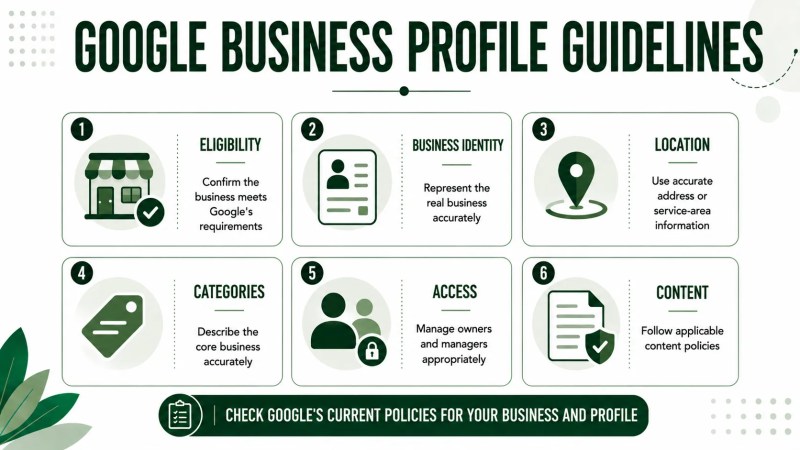
The rules cover more than verification. Businesses should consider eligibility, how the business is represented, names, addresses and service areas, categories, duplicate profiles, access, content, and ongoing profile accuracy. Because Google’s policies and platform features can change, businesses should refer to Google’s current Business Profile documentation when making policy-sensitive decisions.
Quick Answer: Google Business Profile guidelines are intended to help eligible businesses represent themselves accurately. Important areas include business eligibility, business names, locations and service areas, categories, duplicate profiles, ownership and access, profile content, and maintaining accurate information. Always check Google’s current policies for requirements that apply to your specific business and profile.
Why Do Google Business Profile Guidelines Matter?
A Business Profile should represent the actual business rather than being treated as a collection of fields to modify for marketing purposes.
Google publishes guidelines covering business eligibility and how businesses should represent themselves. Following the applicable requirements helps businesses maintain profile information that reflects their real-world operations.
Before changing important profile information, determine whether the change accurately represents the business and whether Google has specific requirements for that field or situation.
If you are still learning how the platform works, Traffisite’s overview of Google Business Profile provides broader context before you work through individual guidelines.
Who Is Eligible for a Google Business Profile?
Not every organization or type of activity is eligible for a Business Profile. Google maintains eligibility requirements that businesses should review before adding or claiming a profile.
To qualify for a Business Profile, a business generally must make in-person contact with customers during its stated hours, although Google lists some exceptions. Businesses should confirm that their business model meets Google’s current requirements rather than assuming that every website, organization, property, or online operation qualifies.
If an eligible business is not already represented, the next step may be adding a Google Business Profile. If an existing unverified profile already represents the business, the appropriate process may instead involve claiming the Google Business Profile.
What Are the Google Business Profile Guidelines for Business Names?
The business name used on a profile should reflect the business’s real-world name rather than being expanded simply to include additional keywords, services, locations, promotional language, or other unnecessary information.
Before changing a profile name, compare it with how the business consistently represents itself on real-world signage, stationery, and other branding. Avoid treating the name field as a place to list every service or search term the business wants to target.
This distinction matters because profile fields should describe the business accurately rather than function as standalone SEO copy.
What Are the Guidelines for Addresses and Service Areas?
The correct location setup depends on how the business operates. Google distinguishes between businesses that serve customers at a location, service-area businesses that travel to customers, and hybrid businesses that do both.
Businesses should use accurate location information and review Google’s current address and service-area requirements before deciding what should be displayed publicly. For example, a service-area business without an eligible storefront should not display its business address to customers.
Do not use an address or service area merely because it targets a desirable location. The profile should accurately represent how and where the business operates under Google’s applicable guidelines.
Location accuracy also affects the broader information businesses manage when editing a Google Business Profile.
How Should You Choose Google Business Profile Categories?
Choose a primary category that best describes the business and use the most specific available category. Additional categories can describe other relevant parts of the business, but Google advises against selecting a category for every individual product or service.
A useful category review starts with the actual business model rather than a list of keywords the company wants to rank for.
Ask:
- What is the business primarily known for?
- Which available category most accurately describes that core business?
- Are additional categories genuinely relevant to what the business does?
- Would each selected category still make sense without considering keyword volume?
For a deeper explanation of this field, see Traffisite’s guide to Google Business Profile categories.
What Should Businesses Know About Duplicate Business Profiles?
Before creating another Business Profile, check whether the business is already represented on Google.
Google’s general guideline is that there should be only one profile per business, although specific situations such as eligible departments or separate locations can have their own requirements.
An existing profile may need to be claimed, verified, accessed through another account, or handled through Google’s ownership-request process. Creating another profile should not be the default response when the real issue is access to an existing profile.
If you can see the correct profile but cannot manage it, first determine whether the issue relates to account access, verification, or ownership.
What Are the Guidelines for Ownership and Profile Access?
Business Profile access should be managed deliberately, particularly when employees, agencies, contractors, or other third parties help maintain the profile.
Google provides owner and manager roles with different permissions. Owners have full control of the profile, including the ability to add or remove users. Managers can perform many profile-management tasks but cannot add or remove users or remove the Business Profile.
As a practical business-control measure, review access periodically and update it when responsibilities change. Former employees, previous providers, or other people who no longer need profile access should not retain permissions simply because nobody has reviewed the user list.
Traffisite’s guide to Google Business Profile access explains owner and manager considerations in more detail.
What Guidelines Apply to Google Business Profile Content?
Businesses can use different Business Profile features to provide information to customers, but content added to a profile must accurately represent the relevant business or location and comply with Google’s applicable policies, including its prohibited and restricted content rules.
When publishing profile content, make sure the information is relevant to the business and appropriate for the specific profile feature being used.
For example, businesses using Google Business Profile posts should review the requirements that apply to post content rather than assuming that any marketing copy is appropriate for the platform.
Reviews also have their own considerations. Traffisite’s guide to Google Business Profile reviews covers review-management considerations separately.
How Should Businesses Manage a Profile Over Time?
Google Business Profile guidelines remain relevant after a profile is created. Businesses should continue reviewing their profile as business information and responsibilities change.
Areas worth reviewing can include profile information and access settings such as:
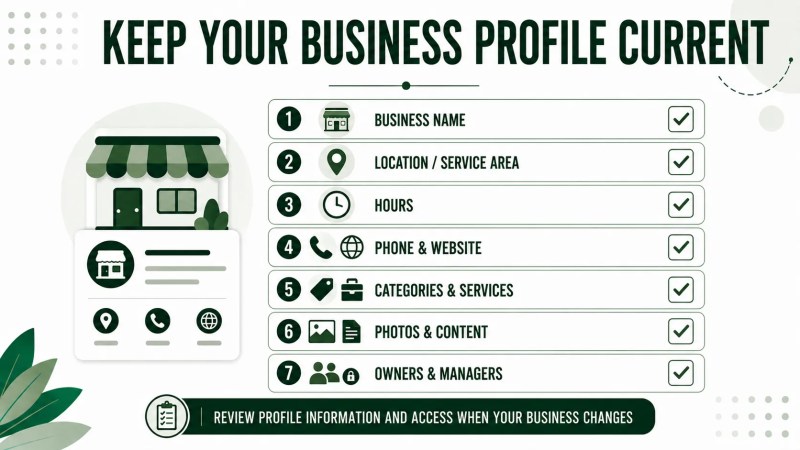
- business name;
- address or service-area information;
- business hours;
- phone number;
- website;
- categories;
- services;
- photos;
- owners and managers; and
- other information relevant to the profile.
When something changes in the business, determine whether the profile should be updated and whether Google’s current guidelines contain specific requirements for that change.
For businesses delegating this work, clearly define who is responsible for profile updates, access, content, monitoring, and approvals. Traffisite’s overview of Google Business Profile management services explains how ongoing responsibilities can be evaluated.
Frequently Asked Questions
What are the main Google Business Profile guidelines?
Major areas include business eligibility, accurate representation, business names, addresses and service areas, categories, duplicate profiles, ownership and access, content, and maintaining accurate profile information. Businesses should check Google’s current documentation for the requirements that apply to their specific situation.
Can I add keywords to my Google Business Profile name?
Your profile name should match how the business is consistently represented and recognized in the real world. Adding services, locations, keywords, promotional wording, or other unnecessary information solely to expand the name can conflict with Google’s business-representation guidelines.
Can an online-only business have a Google Business Profile?
An online-only business that does not have a physical location customers can visit and does not visit customers in person is not eligible for a Business Profile. Google lists some exceptions to its general in-person-contact requirement, so businesses with unusual models should review the current eligibility guidance.
Can I create another Business Profile if I cannot access the existing one?
Do not assume that a new profile is the correct solution. Google generally calls for one profile per business. First determine whether the existing profile needs to be claimed, verified, accessed through another account, or handled through Google’s ownership-request process.
Can an agency manage my Google Business Profile?
Yes. Google Business Profile supports owners and managers, so an authorized third party can help manage a profile. Give each person the access appropriate to their responsibilities while making sure the business retains appropriate ownership and control.
What happens if a Business Profile does not follow Google’s guidelines?
When violations occur, Google may restrict content from displaying or restrict access to the Business Profile or merchant account. Some policy violations can also result in suspension. Review the applicable policy and any information Google provides before attempting to resolve the issue.
Traffisite’s guide to a suspended Google Business Profile covers that situation separately.
Use Google’s Current Guidelines as the Source of Truth
Google Business Profile requirements should guide how a business creates, claims, edits, and manages its profile. Rather than treating every profile field as an SEO opportunity, focus first on whether the information accurately represents the business and follows the requirements that apply to that field.
Because platform policies can change, use Google’s current Business Profile documentation as the source of truth when making policy-sensitive decisions. Traffisite articles can help explain individual processes, but Google’s current requirements should determine what is permitted on the platform.