

If your Google Business Profile has been suspended or otherwise restricted, the next step is not necessarily to create a new profile or immediately submit an appeal. First, understand the issue, review the profile against Google’s requirements, and prepare information that supports the business’s eligibility and profile details.
The Google Business Profile appeals process gives eligible businesses a way to appeal certain profile restrictions and moderation decisions. Preparing before you submit can help you make sure the information you provide accurately represents the real business and addresses the issue being reviewed.
Quick Answer: If your Google Business Profile is eligible for an appeal, review the affected profile and the applicable Google Business Profile guidelines before submitting. Gather supporting business information or documents relevant to the case, and follow the instructions Google provides for the affected profile. Do not create a new Business Profile for the same business while the appeal is under review.
What Is the Google Business Profile Appeals Tool?
The Google Business Profile appeals process can be used to appeal certain profile restrictions and moderation decisions. For an eligible case, the appeals tool can show the restricted profile, the reason for the moderation action, and a link to the relevant policy before you submit the appeal.
The options available can depend on the restriction or moderation decision and what Google displays as eligible for appeal. Follow the instructions shown for the affected profile rather than assuming every case will have the same options.
If you are still trying to understand why the profile became unavailable, our guide to a suspended Google Business Profile provides additional context before you begin the appeal process.
When Might You Need the Google Business Profile Appeals Process?
The appeals process may be relevant when Google has taken an enforcement or moderation action against a Business Profile and the affected business has an available appeal option.
That distinction matters. Not every Google Business Profile problem is necessarily an appeal problem. A profile owner might instead be dealing with verification, editing, ownership, or another account or profile-management issue.
For example, if Google is asking the business to verify the profile rather than showing an enforcement decision, start by understanding the Google Business Profile verification process instead of treating the issue as a suspension appeal.
What Should You Review Before Appealing?
Before submitting an appeal, review the affected profile and the instructions available for the enforcement action. Look for business information or setup choices that may not accurately represent the real business or may conflict with applicable Business Profile requirements.

Business Name
Review the business name shown on the profile and compare it with how the business is consistently represented and recognized in the real world. Google’s guidelines say the profile name should reflect the real-world business name, and unnecessary information should not be added to the name.
Address and Business Location
Review whether the address and location setup accurately represent how the business operates.
This is especially important for businesses that serve customers at their locations and businesses that travel to customers. Google says a service-area business that does not serve customers at its business address should remove that address from the profile.
Business Category
Review the categories associated with the profile and make sure the primary category best describes the business.
If you need more context before making changes, our guide to Google Business Profile categories explains the role categories play in describing a business.
Phone, Website, and Business Information
Review the phone number, website, hours, and other customer-facing information for accuracy and consistency with the business’s actual operations.
The purpose is not to make random changes before appealing. It is to identify information that may be inaccurate, outdated, unsupported, or inconsistent with how the business actually operates and then follow the appropriate instructions for the case.
Recent Profile Changes
Review significant recent changes to the profile so you have a clear record of what information was modified. Do not assume that a recent edit caused the enforcement action unless Google provides information supporting that conclusion.
What Supporting Information Should You Prepare?
Google may give you the option to add supporting evidence after submitting an appeal. If you choose to use the linked evidence form, Google currently requires the evidence to be submitted within 60 minutes of the appeal so it can be attached to the case.
Depending on the case, Google lists examples such as official business registration, a business licence, tax certificates, and business utility bills. Google also advises checking that the business name and address on submitted documents match the profile being appealed.
Do not submit documents simply because they are available. Focus on evidence that is relevant to the issue and consistent with the business information represented in the profile.
Because the appeals process can change, check the instructions presented for your case before preparing the final submission.
How Should You Approach the Google Business Profile Appeal Process?
Use Google’s current instructions for the affected profile and decision. A practical process based on the current appeals workflow is:
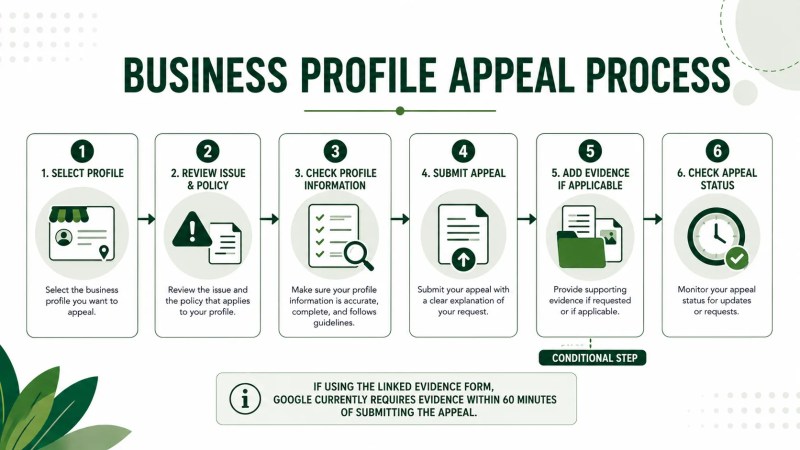
- Sign in to the Google Account associated with the affected Business Profile.
- Select the Business Profile you want to appeal.
- Review the restricted profile, the reason for the moderation action, and the linked policy shown in the appeals tool.
- Review the applicable Business Profile guidelines and make sure the profile accurately represents the business.
- Select the decision you want to appeal and submit the appeal using the option Google provides.
- If you choose to provide supporting evidence, submit it through the linked evidence process within Google’s stated time limit.
- Check the appeals tool for the status of the case.
Following these steps does not guarantee that an appeal will be approved. Google reviews the appeal and provides a decision.
What Should You Avoid When Preparing an Appeal?
Submitting Before Reviewing the Profile
Do not treat the appeal form as the first diagnostic step. Review the affected profile, enforcement information available to you, and applicable guidelines first so you understand what may need attention.
Making Random Changes
Changing the business name, category, address, website, or other details without a clear reason can make it harder to keep track of what information accurately represents the business.
Base any changes on accurate real-world business information and the instructions applicable to the case rather than guessing what might trigger approval.
Creating Another Profile While the Appeal Is Pending
Do not create a new Business Profile for the same business while the appeal is under review. Google specifically instructs businesses not to create another profile for the same business during that period.
Submitting Weak or Unrelated Evidence
More documents do not automatically create a stronger appeal. If supporting evidence is available for the case, prioritize information that directly supports the business details or eligibility being reviewed.
Assuming an Appeal Guarantees Restoration
Submitting an appeal does not guarantee that the profile will be reinstated. Google reviews the appeal and sends a decision.
What Happens After You Submit an Appeal?
Google currently says appeal reviews and decisions can take up to five working days. You can check the status of your case through the Google Business Profile appeals tool.
Do not submit multiple appeals for the same issue while you are waiting for a decision. If an appeal is denied, Google may provide an additional-review process where further evidence can be submitted.
Once the immediate profile issue is resolved, review the broader quality and accuracy of the listing. Our Google Business Profile optimization guide covers ongoing profile improvement, while a broader local SEO audit can help you review the rest of your local search presence.
Frequently Asked Questions
What is the Google Business Profile appeals tool?
It is Google’s process for appealing certain Business Profile restrictions and moderation decisions. For an eligible case, the tool can show the restricted profile, the reason for the moderation action, and a link to the relevant policy.
Can I appeal a suspended Google Business Profile?
If Google provides an appeal option for the suspension or restriction affecting your profile, you can use the available appeals process. Review the affected profile and applicable guidelines before submitting.
What documents do I need for a Google Business Profile appeal?
The appropriate evidence depends on the case. Google lists examples such as official business registration, business licences, tax certificates, and business utility bills. If you choose to provide evidence, follow the instructions shown for your appeal and make sure the submitted business information matches the profile.
Should I create a new Google Business Profile if mine is suspended?
Do not create a new Business Profile for the same business while your appeal is under review. Use the appeal process for the affected profile instead.
How long does a Google Business Profile appeal take?
Google currently says appeal reviews and decisions can take up to five working days. Check the appeals tool for the status of your case rather than submitting another appeal while the decision is pending.
Can I appeal more than once?
Do not submit multiple appeals for the same issue before Google has made a decision. If the original appeal is denied, Google may make an additional-review process available so you can provide further evidence.
Prepare the Profile Before You Appeal
A Google Business Profile appeal should begin with a careful review of the affected profile, not guesswork. Check the business name, location setup, category, contact information, and other relevant details against the business’s real-world operations and Google’s applicable requirements.
Then prepare relevant supporting information and follow the appeal instructions available for the affected profile. The objective is not simply to submit as quickly as possible. It is to submit an accurate, well-prepared request that clearly represents the business and the issue being reviewed.