

Yoast SEO Premium includes internal-linking suggestions designed to help WordPress users identify potential links while working on content. That can make it easier to find relevant pages without manually searching through your site every time you want to add an internal link.
But finding a possible link and deciding which pages should actually connect are different tasks. This guide explains what Yoast’s internal-linking functionality can help with, where human judgment is still needed, and how the tool fits into a broader internal-linking strategy.
Quick Answer: Yoast SEO Premium can surface internal-linking suggestions that help you find existing content you may want to link to. These suggestions can speed up parts of the linking workflow, but you still need to decide whether a suggested destination is useful for the reader and fits the way you want your site’s content to connect.
What Yoast’s Internal Linking Tool Does
Yoast SEO Premium provides internal-linking suggestions in the Yoast SEO sidebar while you’re editing a post or page in WordPress. Instead of relying entirely on memory or manually searching the site for possible destinations, you can review the suggestions and decide whether any of them make sense for the content you’re editing.
Yoast’s documentation says the suggestions can include related posts, pages, tags, or categories. This can be especially useful on a site with a growing content library, where it becomes harder for writers and editors to remember every potentially relevant destination.
Where the Tool Falls Short
A suggested page is still only a candidate for an internal link. You need to consider whether the destination genuinely helps the reader, whether it makes sense in that specific context, and whether another page would be a better next step.
The suggestions also do not replace decisions about how you want the website’s content to be organized and connected. If you’re intentionally building relationships between pillar pages, supporting content, services, or topic clusters, those relationships still need to be planned and reviewed. Our guide to topical authority and topic clusters covers this type of structural planning in more detail.
Tool vs. Strategy: Why the Distinction Matters
The simplest way to think about Yoast’s internal-linking functionality is as assistance with finding potential link opportunities. An internal-linking strategy answers a broader set of questions: which pages should be connected, what destination would be most useful in context, how important sections of the site relate to supporting content, and where links can help people continue navigating through relevant information.
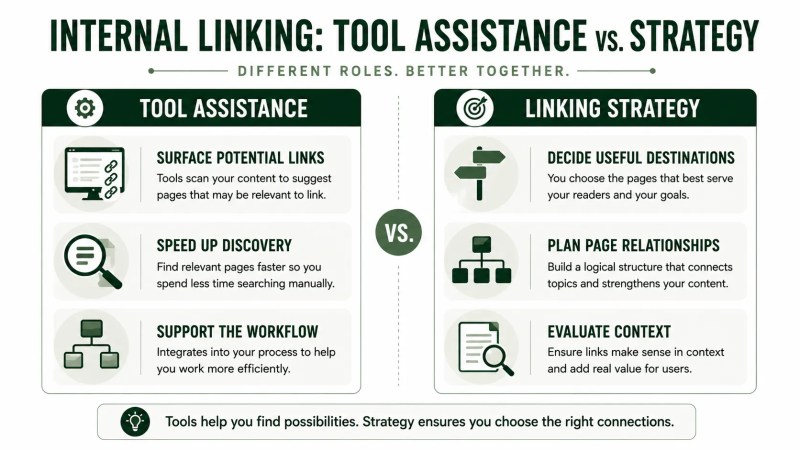
A tool can make parts of that process faster, but the suggestions still need to be evaluated within the site’s broader structure and content goals.
Our guide on internal linking covers how to approach that broader strategy, while our article on internal linking for SEO explains the underlying principles in more detail.
If you’re comparing Yoast with another WordPress SEO plugin, our Rank Math vs. Yoast SEO comparison looks at the two tools more broadly.
Getting the Most Out of the Tool
- Use suggestions as candidates, not automatic decisions. Review whether each suggested destination genuinely helps the reader in that context.
- Prioritize the reader’s next step. A relevant page that answers the reader’s likely next question can be more useful than adding a link simply because a tool suggested it.
- Review older content too. Internal-linking opportunities can appear as your site grows, so periodically revisit existing pages rather than focusing only on newly created content.
- Use a documented linking plan when appropriate. For larger sites or teams, documenting important page relationships can help writers and editors make more consistent linking decisions.
For practical examples of how pages can be connected, our article on internal linking examples walks through several linking patterns.
FAQ
Does Yoast SEO automatically add internal links for me?
No. In the standard internal-linking suggestions workflow, Yoast presents potential destinations for you to review. You choose the relevant suggestion and add the link to your content. Yoast also offers separate internal-linking blocks in Premium, so those should not be confused with the standard suggestions workflow.
Is Yoast’s internal linking tool enough on its own?
It can help you find potential linking opportunities, but the tool does not remove the need to decide whether a link is useful, which destination fits the context, or how important pages and content sections should connect across the site.
Do I need a paid version of Yoast to access internal linking suggestions?
Yes. Yoast currently lists internal-linking suggestions as a feature of Yoast SEO Premium for WordPress.
Using Yoast as Part of an Internal-Linking Process
Yoast can make it easier to discover potential internal links while you’re working on content, but the suggestions are most useful when you evaluate them in context. The goal is not to add every available link; it’s to connect pages where the destination genuinely helps the reader and supports a coherent website structure.
If you need help planning those relationships across a larger site, our SEO website architecture service covers this kind of structural work.