

Most internal linking advice stops at “link your pages together.” It rarely shows what that actually looks like in practice, which is why so many sites end up with links that exist just to exist — a related-posts widget, a footer full of service pages, or an anchor stuffed with an exact keyword instead of a sentence that reads naturally.
The examples below show internal linking done the way it should work: a reader is at a specific point on a specific page, and the link takes them to the next page that’s genuinely useful at that moment. No quota, no forced page types — just relationships that make sense.
Quick Answer: A good internal link connects two pages because the destination is the reader’s logical next step — not because it boosts a link count or targets a keyword. The examples below pair real page types (service, guide, blog, case study, comparison) to show what that looks like in practice.
What Makes an Internal Link Actually Useful
Before looking at examples, it helps to have a quick test. A link is worth adding when you can answer yes to all of these:
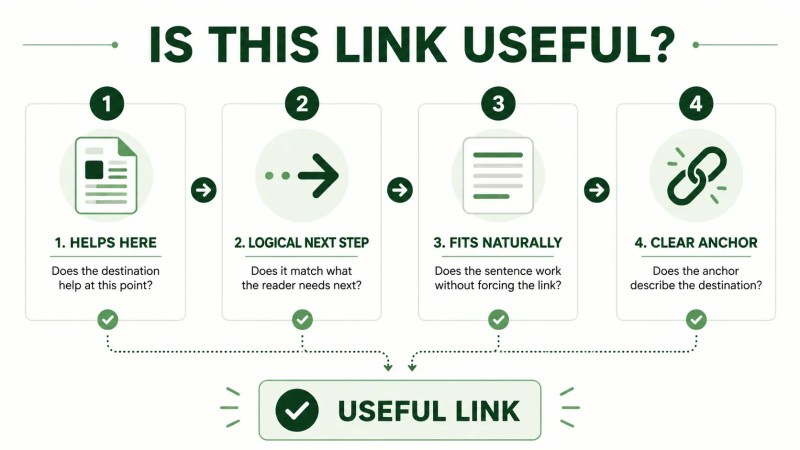
- Does the destination help the reader at this exact point in the page, not just somewhere on the topic?
- Is it the logical next step, given what the paragraph just told them?
- Would the sentence still make sense if you removed the link — or does the link feel bolted on?
- Is the anchor text specific enough that the reader knows what they’ll find before clicking?
If a link fails that test, it’s usually there for the wrong reason — to satisfy a template, reach a link target, or force an exact-match keyword. The examples below all pass it.
Example 1: Service Page → Related Service Page
A visitor reading about technical SEO services and the section on crawl efficiency is thinking about how their site is structured, not just about crawl errors in isolation. That’s the right moment to point them toward SEO website architecture services, because site structure and technical crawlability are closely connected.
This works because the reader’s attention is already on structure — the link doesn’t introduce a new topic, it deepens the one they’re already reading about. A weaker version would jump from technical SEO straight to an unrelated service that has little connection to what the reader just read.
Example 2: Blog Post → Foundational Guide
A blog post like SEO site structure is often written to answer one specific question. Partway through, once the post has established why structure matters, it makes sense to link to the more comprehensive website structure for SEO guide for readers who want the full framework rather than a single-post answer.
This is the blog-to-guide pattern at its best: the blog post handles a narrow question quickly, and the guide is offered as the “go deeper” option for readers who need more than a quick answer. It’s not forced — it only works because the guide genuinely covers more ground than the blog post does.
Example 3: Blog Post → Service Page
Not every blog reader is ready to hire someone, but some are. A post like what do SEO services include naturally reaches a point where the reader is evaluating whether to handle content strategy themselves or bring in outside help. That’s the right place to link to SEO content strategy services — the reader has just been given the context needed to understand what that service actually covers.
The mistake to avoid here is linking to a service page in the first paragraph before the reader has any reason to care. In this example, the link earns its place because it appears after the article has established why the service may be relevant.
Example 4: Industry Page → Case Study
An industry-specific page like SEO for pressure washing companies can discuss what SEO looks like for that type of business. When the page reaches a point where supporting results are relevant, linking to the Media’s Pressure Washing case study gives readers a concrete example to explore.
This is a useful link type that’s easy to skip because it doesn’t fit the usual “blog links to guide” mental model. Reviewing the full site inventory — not just blog and service pages — is what surfaces pairings like this one.
Example 5: Comparison Page → Service Page
A page like service pages vs. blog posts is written for someone trying to decide how to structure their content. Once the comparison reaches a conclusion, it’s a natural point to link to SEO content strategy services for readers who’ve decided they need help planning that structure rather than figuring it out alone.
Comparison pages can create useful internal linking opportunities because readers are already evaluating different approaches. Once that comparison has helped them understand their options, a closely related service can become a logical next step.
Example 6: Guide → Related Guide
The topical authority and topic clusters guide is fundamentally about how groups of related pages support each other — which makes internal linking a core part of that topic, not a tangent. Linking from that guide to the internal linking guide at the point where clustering is discussed keeps the reader inside a genuinely connected topic rather than sending them somewhere loosely related.
This is one way internal linking can support a topic cluster: two guides reference each other because the concepts overlap, not simply because they share a keyword.
Example 7: Solution Page → Supporting Services
A page like improve internal linking describes a problem and desired outcome, but the reader may also want to know which service addresses that problem. Linking from that page to SEO website architecture services connects the problem-focused page to a relevant service.
That relationship makes sense when the service directly supports the outcome discussed on the solution page. The link helps move the reader from understanding the problem to exploring how it can be addressed.
Common Internal Linking Mistakes
Even with good intentions, a few patterns tend to creep in:
- Linking the same anchor to the same page repeatedly across an article, which can become repetitive rather than helpful.
- Stacking multiple links into one sentence, forcing the reader to choose between several destinations at once instead of following one clear path.
- Using generic anchors like “learn more” or “click here,” which tell the reader little about what they’ll find.
- Linking too early, before the surrounding content has given the reader a reason to want that destination.
- Treating link count as a goal, which can lead to inserting links into paragraphs where they don’t genuinely help the reader.
How to Apply This to Your Own Site
To find these pairings on your own site, work paragraph by paragraph rather than page by page:
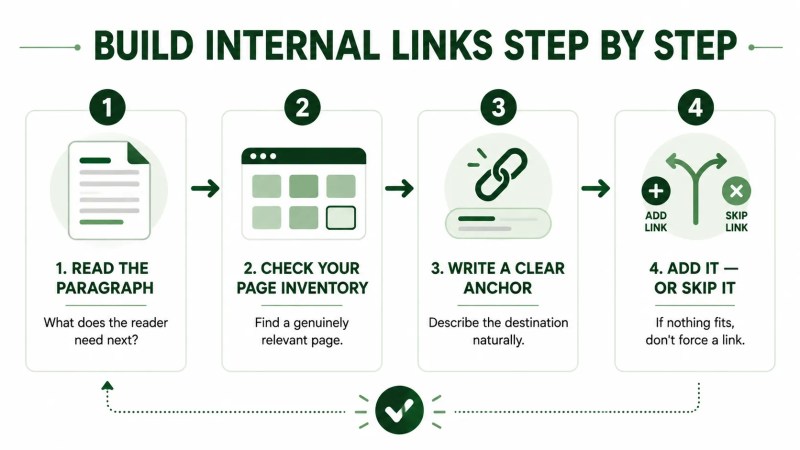
- Read the paragraph and ask what the reader is thinking about at that exact sentence.
- Check your full page inventory — not just blog posts — for a page that answers or expands on that thought.
- Write an anchor that describes the destination rather than forcing the keyword you’re targeting.
- If no page genuinely fits, leave the paragraph without a link rather than forcing one.
This is largely the same process covered in more depth in the internal linking guide, which walks through the underlying strategy behind the examples on this page.
FAQ
How many internal links should a blog post have?
There’s no universal number that fits every article. The useful count depends on how many genuinely relevant destinations exist for that specific piece of content. Adding links simply to reach a target can produce links that don’t help the reader.
Should every internal link point to a service page?
No. Limiting internal links to blog-to-service connections can overlook useful relationships between guides, case studies, comparisons, industry pages, solutions, and other relevant content. The best destination depends on what would help the reader at that point in the page.
What anchor text works best for internal links?
Use anchor text that describes the destination clearly and fits naturally into the sentence. Avoid repeatedly forcing the same exact-match keyword into every link pointing to a page.
Final Thoughts
The pattern across every example above is the same: the link exists because the reader’s next question or need is addressed by that specific page. That’s a higher bar than “this page is somewhat related,” and it’s a useful standard to apply whenever you review internal links on your site.