

Internal and external links both connect one page to another, but they serve different purposes. Internal links point to pages on your own website, while external links point from your website to a different website.
For SEO, the important question isn’t whether one type of link is better. It’s whether the link helps the reader move to a useful next page, supports the structure and context of your content, or provides a relevant outside source when one is genuinely useful.
Quick Answer: Internal links connect pages within the same website and help create clear relationships between your content. External links send readers to a different website, often when an outside source provides useful evidence, documentation, or additional context. A practical SEO strategy can use both: internal links to connect your own relevant pages and external links when another source genuinely helps the reader.
Internal vs. External Links: The Main Difference
The simplest difference is the destination.
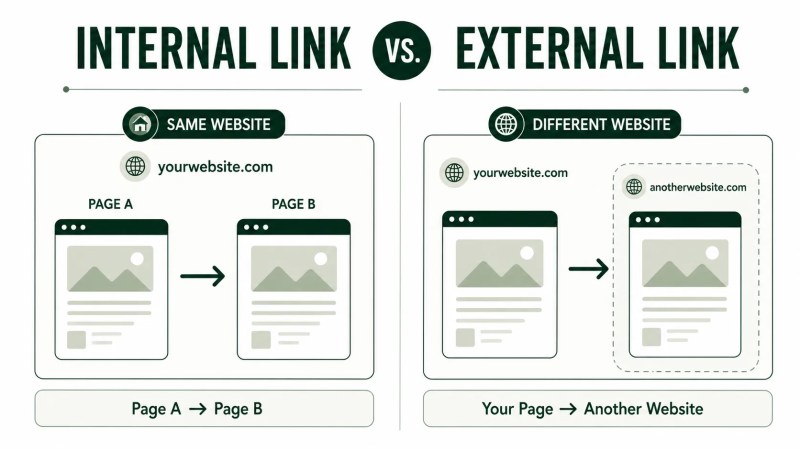
- Internal link: points from one page on your website to another page on the same website.
- External link: points from your website to a page on another website.
For example, if a Traffisite blog post links to the internal linking guide, that’s an internal link because both pages belong to Traffisite. If the same article linked to official documentation hosted on another website, that would be an external link.
The destination is only the beginning of the distinction. Internal links can help organize relationships among your own pages and give readers paths to related content. External links are useful when the best supporting resource exists outside your site.
What Are Internal Links?
An internal link is a hyperlink that points to another page or resource on the same website. It might connect a blog post to another blog, a service page to a supporting guide, a guide to a relevant solution, or one section of a site to another useful destination.
As a website grows, keeping related pages deliberately connected can require more attention. Useful content may otherwise exist without an obvious path from other relevant pages.
For a deeper explanation of the fundamentals, Traffisite’s guide to internal linking for SEO covers how internal links fit into a wider optimization strategy.
What Internal Links Can Do
Useful internal links can:
- Give readers a logical path to related information.
- Connect supporting content to broader topic pages.
- Help establish relationships between related pages.
- Provide paths that readers can follow and that search engines can use to discover other pages on the site.
- Support a more deliberate website structure.
Internal linking is one part of how a website’s pages are connected and organized. A strong linking strategy should reflect how the website’s topics, services, guides, and supporting content relate to one another rather than treating every page as an isolated document.
If the wider organization of the site needs work, the guide to website structure for SEO explains how page hierarchy and navigation fit into the broader picture.
What Are External Links?
An external link points from a page on your website to a page or resource on another website. You might use one when another source contains official documentation, original research, a regulation, a definition, or other information that is more appropriately supported by that source.
For example, an article discussing a Google platform rule may link to Google’s official documentation rather than asking the reader to rely solely on the article’s explanation.
External linking doesn’t mean sending readers away at every opportunity. The destination should add something useful that your page either shouldn’t reproduce or cannot support as directly.
What Makes an External Link Useful?
Before adding an external link, ask:
- Does the destination directly support the point being made?
- Is the source appropriate for the type of claim?
- Will opening the destination give the reader useful additional information?
- Is the link more helpful than simply mentioning the source without linking to it?
For factual claims, the source should match the claim being made. When you’re discussing a platform rule, original study, regulation, or similar factual matter, linking directly to the relevant documentation or original source can give readers access to the underlying information.
When Should You Use Internal Links?
Use an internal link when another page on your website represents a useful next step from the reader’s current point.
That approach helps avoid adding links simply because a keyword happens to match rather than because the destination is genuinely useful.
Link to a Deeper Explanation
If you’re briefly introducing a concept that already has a dedicated page, an internal link can let interested readers explore it without forcing the current article to repeat the entire explanation.
For example, a short discussion of practical link placement can point readers to internal linking examples that show how links can be incorporated into real page contexts.
Connect Related Topics
Internal links can connect articles and pages that contribute to the same broader subject. A website architecture article might connect to internal linking, site structure, crawlability, or topical organization when those subjects genuinely overlap.
This is particularly useful when building groups of related pages around a larger subject. The topical authority and topic clusters guide explains how supporting pages can fit into a broader topic structure.
Guide Readers Toward a Relevant Next Step
Not every useful internal link needs to lead to another educational article. Sometimes a reader has identified a practical website problem and the next useful destination is a page focused on addressing that problem.
For example, if the issue is that related pages exist but aren’t connected effectively, Traffisite’s page on how to improve internal linking is a more specific next step than sending the reader to a generic services page.
When Should You Use External Links?
Use an external link when another website is the most appropriate destination for the information you’re referencing.
Common situations include:
- Citing official documentation for a platform feature or policy.
- Referencing original research or a study.
- Linking to government or regulatory information.
- Providing access to a source that contains evidence supporting a factual claim.
- Directing readers to a tool or resource that is specifically being discussed.
The purpose should be usefulness, not simply adding external links because an SEO checklist says a page should contain them.
An external destination should also be reviewed in context. A source can be authoritative in general while still being the wrong source for a particular claim. The page you link to should directly support or expand the specific point surrounding the link.
How Internal and External Links Work Together
Internal and external linking don’t need to compete with each other. They solve different problems.
Internal links help readers move through your own content and understand how related pages connect. External links can provide access to supporting material that appropriately lives elsewhere.
Consider a service-business article explaining a technical SEO issue. The article could internally link to a relevant Traffisite guide for a deeper explanation, while also externally linking to official documentation when a specific platform requirement needs authoritative support.
The result is a page that participates in the website’s internal structure without pretending that every useful source must exist on the same domain.
A Simple Linking Decision Process
When deciding whether and where to link, use this sequence:
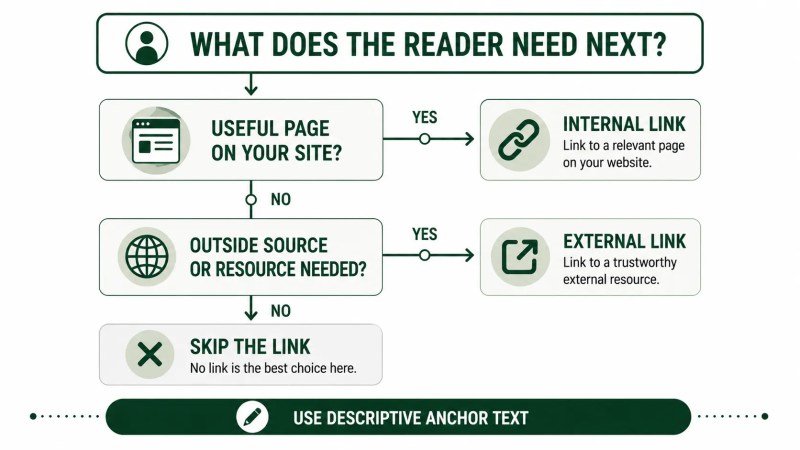
- Identify what the reader may need next. Start with the surrounding sentence or paragraph, not a link quota.
- Check your own site for a relevant destination. If a page directly helps with that next need, consider an internal link.
- Determine whether an outside source is necessary. If the point requires original evidence, official documentation, or another resource that appropriately exists elsewhere, consider an external link.
- Use descriptive anchor text. The linked words should give the reader a reasonable idea of what they’ll find.
- Skip the link when nothing genuinely useful fits. Not every paragraph needs one.
This approach keeps linking focused on usefulness rather than treating internal and external links as boxes to check.
Common Internal and External Linking Mistakes
Adding Links Only for SEO
A link should have a useful destination. Adding unrelated internal pages or weak external sources simply to increase the number of links can make the content less helpful.
Using Vague Anchor Text
Generic phrases such as “click here” tell readers little about the destination. Descriptive anchor text gives readers more information about what they can expect at the destination.
Linking to a Broad Page When a Specific One Exists
If you’re discussing one particular concept, use the most relevant confirmed destination rather than automatically linking to a homepage or broad hub.
Forcing Exact-Match Anchor Text
Anchor text should fit the sentence naturally. You don’t need to force the same keyword phrase every time you link to a page.
Repeating the Same Destination Without a Reason
Repeated links to the same page can become distracting when they don’t provide additional navigational value. Add another link to the same destination only when the context genuinely warrants it.
Using an External Source That Doesn’t Support the Claim
Authority alone isn’t enough. If a source discusses a similar topic but doesn’t actually support the statement you’re making, it isn’t the right citation or external destination for that claim.
FAQ
What is the difference between internal and external linking in SEO?
Internal linking connects pages or resources on the same website. External linking connects a page on your website to a page or resource on another website. Internal links are useful for connecting your own related content, while external links are useful when an outside source or resource provides relevant additional value.
Are internal links or external links more important for SEO?
They serve different purposes, so treating them as direct substitutes isn’t particularly useful. Internal links help connect your own pages and website structure. External links can direct readers to relevant supporting information outside your website. Use each when it serves the page and reader appropriately.
Should every blog post have external links?
Not necessarily. Add an external link when an outside destination genuinely supports, documents, or expands a point in a useful way. Don’t add one solely to satisfy a link-count rule.
How many internal links should a page have?
Google doesn’t specify a magical ideal number of links for a page. Add internal links when they help readers or connect relevant pages, and avoid forcing links simply to reach a predetermined count.
Can I use both internal and external links on the same page?
Yes. A page can use internal links to connect relevant content on its own website and external links when outside sources or resources add useful context. The two types of links can serve different purposes within the same article.
Build Links Around the Reader’s Next Step
The practical difference between internal and external links is straightforward: internal links stay within your website, while external links lead to another website. The more important strategic decision is whether the destination is useful at the exact point where you’re adding the link.
Use internal links to connect related pages and create clearer paths through your own content. Use external links when another website contains the most appropriate supporting source or resource. And when neither option genuinely improves the page, don’t add a link simply because you think SEO requires one.