

If your website has a well-planned hierarchy, clean URLs, and solid internal linking, does the XML sitemap even matter? It does — but not for the reasons many service-business owners assume. A sitemap doesn’t build your site’s structure or fix a weak one. It’s a supporting file that helps search engines discover the pages you’ve already organized.
This article covers what an XML sitemap actually does, the misconceptions that cause the most confusion, and how to structure one for a site with multiple service pages, location pages, and an active blog.
Quick Answer: An XML sitemap is a file that lists URLs you want search engines to know about. It can support URL discovery, but it does not fix weak internal linking or determine which pages Google should prioritize crawling. It’s a discovery aid, not a substitute for the architecture decisions covered in website structure planning.
What an XML Sitemap Actually Tells Search Engines
An XML sitemap is a machine-readable file that lists URLs on your site that you want search engines to know about. Sitemap entries can also contain supported metadata about those URLs, such as when a page was last modified.
It does not describe how those pages relate to each other, which pages matter most to your business, or how a visitor would navigate between them. That relational information comes from your site’s actual structure: your navigation, URL organization, and internal links. For the broader framework on building that structure, see Traffisite’s guide to website structure for SEO — this article assumes that foundation and focuses specifically on the sitemap layer.
Common Misconceptions About XML Sitemaps
Many sitemap-related SEO problems come from treating the sitemap as if it does more than it actually does. Two misconceptions are especially worth clearing up.
A Sitemap Is Not a Substitute for Internal Linking
Listing a page in your sitemap does not create the same relationship as linking to it from relevant content. Internal links help search engines and users understand how pages connect, while a sitemap primarily helps search engines discover URLs. A service page can therefore appear in a sitemap while remaining disconnected from the site’s normal internal navigation and linking structure. If your internal linking needs work, that’s a separate project from sitemap maintenance; Traffisite’s internal linking guide covers how to connect pages in a way that supports a clearer site structure.
Being in the Sitemap Doesn’t Mean Crawl Priority
Some site owners assume that including a page in the sitemap — or placing it near the top of the file — tells Google that it should be crawled first or more often. A sitemap should not be treated as a crawl-priority queue. Sitemap inclusion does not guarantee that a URL will be crawled immediately or indexed. If important pages aren’t getting crawled or indexed as expected, it’s worth investigating the issue as a crawling and indexing problem rather than assuming the sitemap itself is the cause.
How Sitemaps Fit Into Your Website Architecture
Think of your website architecture as the actual structure: how services, locations, and content are organized and connected. The sitemap is a supporting representation of the URLs you want search engines to discover within that structure.
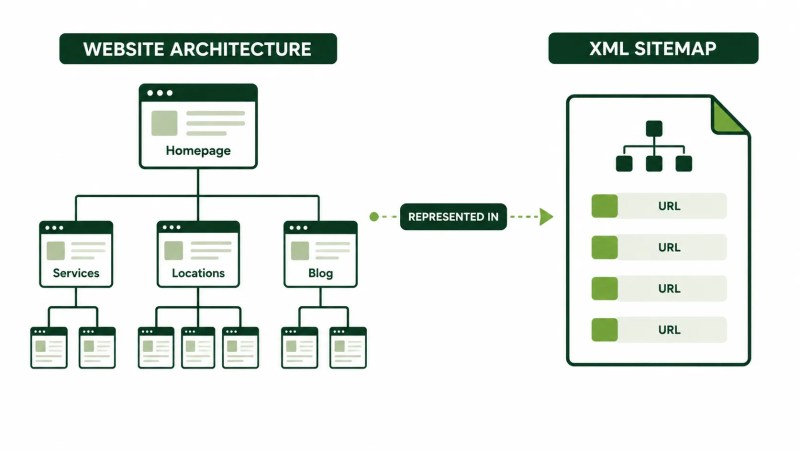
That means the sitemap can’t compensate for architecture problems. A messy URL organization, duplicate or thin location pages, or a blog that isn’t connected to the service pages it supports still needs to be addressed at the site level. Get the architecture right first. If you’re not confident your current structure supports growth as you add services or locations, an SEO website architecture review is a more direct next step than adjusting the sitemap alone.
Structuring a Sitemap for a Multi-Service, Multi-Location Business
Service businesses with several services and multiple service areas tend to run into similar sitemap questions. A few practical guidelines can make the file easier to manage and audit.
Use Separate Sitemap Files Where They Help With Management
WordPress can organize public post types into separate sitemap URL sets, including posts, pages, and eligible custom post types. Separating major content types can make sitemap auditing easier because you can review groups of related URLs independently.
Include Location Pages You Actually Want Indexed
If you serve multiple locations, focus your sitemap on canonical location URLs you want to appear in search results rather than duplicate URL variants. Sitemap inclusion does not make thin or near-duplicate location pages stronger, so those content issues should be addressed directly. If you’re planning location pages across several service areas, it’s worth reviewing them against broader local SEO guidance as part of deciding which URLs should be indexable.
Keep Blog Sitemap Management Clear
Active blogs can accumulate URLs more quickly than relatively stable service or location sections. If your CMS or sitemap tool separates posts from other content types, that organization can make it easier to review blog URL coverage, identify unexpected exclusions, and confirm that newly published posts are appearing in the appropriate sitemap.
Sitemap Best Practices Checklist
- Include the canonical URLs you want search engines to discover and potentially show in search results
- Keep sitemap files updated as important URLs are added, removed, or significantly changed
- Submit your sitemap through the appropriate search-engine tools where useful
- Address thin or near-duplicate location pages rather than expecting sitemap settings to solve their content problems
- Don’t treat sitemap inclusion as a replacement for useful internal links
FAQ
Does adding a page to my sitemap help it rank higher?
A sitemap can help search engines discover URLs, but sitemap inclusion does not increase a page’s Google ranking. The page still needs to be useful, relevant, and properly integrated into the rest of the site.
Should every page on my site be in the sitemap?
Not necessarily. Focus your sitemap on the canonical URLs you want to appear in search results rather than every URL your website can generate.
Can a sitemap fix pages that aren’t being indexed?
A sitemap can help Google discover URLs, but it does not guarantee that they will be crawled or indexed. If a page remains unindexed, review the page itself, its internal linking, crawl accessibility, canonicalization, and other possible indexing issues rather than assuming sitemap inclusion will fix the problem.
Getting the Structure Right First
An XML sitemap is a useful piece of technical SEO, but it works best as support for a site that’s already well organized. If the underlying structure, internal linking, or location-page strategy needs attention, address those issues directly and let the sitemap accurately reflect the URLs you want search engines to discover.